

Alarm on Calendar
JAIME MANUEL SERRANO GONZALEZ Utilities iPhoneiPadiPod touch
Alarm on Calendar is a free Utilities app for iPhone and iPad by JAIME MANUEL SERRANO GONZALEZ. Requires iOS 26.1. Updated September 1, 2026.
- Price
- Free
- on the App Store
- Size
- 1 MB
- Age 4+
- Updated
- Sep 1
- 2026 · v1.1
Screenshots



About Alarm on Calendar
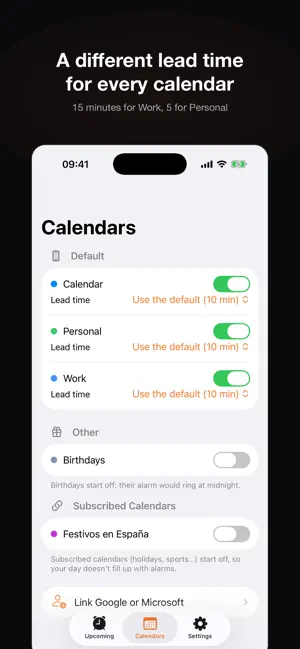
Not another reminder. A real alarm. Calendar alerts are notifications: if your iPhone is on silent or in a Focus mode, you simply don't hear them. And you miss the meeting. Alarm on Calendar schedules a real alarm before each event. The kind that rings like your morning alarm, even on silent, and shows up on the Lock Screen with its own countdown. YOU DECIDE WHEN IT RINGS • Choose the lead time: 5, 10, 30 minutes, an hour… whatever you need. • Two modes: an alarm only on events you accepted, or on all of them, accepted or not. • A different lead time for each calendar: 15 minutes for Work, 5 for Personal. • Snooze, just like your morning alarm. CONTROL EVENT BY EVENT Every event in the list has its own switch. Set an alarm on that meeting you haven't confirmed yet, or drop the one on a birthday you already remember. Your decision overrides every automatic rule. And for a meeting that repeats weekly, you can silence just Thursday's without touching the rest. YOUR THREE CALENDARS, IN ONE PLACE Works with your iCloud calendar, and with Google and Microsoft too (Outlook, Exchange and Microsoft 365). There is no sign-in anywhere: if those accounts are already added in your iPhone's Settings, the app reads what your phone syncs. And if they aren't, the app includes a step-by-step guide that walks you through it. PRIVACY YOU CAN VERIFY The app has no server. It never connects to the internet. It doesn't even link the system networking libraries, so technically it cannot send anything anywhere. Your events are read and processed inside your iPhone and never leave it. No accounts, no sign-up, no ads, no analytics, no tracking, no third-party libraries. You don't have to take our word for it: the source code is public and anyone can audit it. BUILT FOR PEOPLE WHO CAN'T BE LATE • Work meetings that start on the hour. • Doctor's appointments booked months ahead. • Classes, training sessions and shifts. • Video calls when you work from home with your phone on silent. • School pickup. REQUIREMENTS Requires iOS 26.1 or later. The app uses AlarmKit, the alarm technology Apple introduced with iOS 26 and the only thing that lets an app other than Clock ring above silent mode and Focus. The first time you open it, it asks for two permissions: calendar access, to know when your events start, and alarm permission, so it can reach you even with the phone on silent.
What’s new
Version 1.1 · Updated September 1, 2026
Bugs fixed: When moving an event date or time the alarm now updates.
App privacy
The developer, JAIME MANUEL SERRANO GONZALEZ, reported these privacy practices to Apple.
Data Not Collected
The developer does not collect any data from this app.
Alternatives to Alarm on Calendar
Looking for apps like Alarm on Calendar? Here are 6 similar apps on the App Store. The highest rated is Ness iComms (5.0/5), and 5 of the 6 are free to download.


| App | Rating | Price | Last updated | Compare |
|---|---|---|---|---|
| Alarm on Calendar | – | Free | September 1, 2026 | |
| Vurno: Watch Face Scheduler | – | Free | Sep 28, 2026 | Compare |
| Bamboo Tools | – | Free | Oct 29, 2025 | Compare |
| BlockVault | – | Free | Sep 29, 2026 | Compare |
| Ness iComms | 5.0 / 5 (1) | 14.99 USD | Sep 9, 2025 | Compare |
| MotorIA - BOE | – | Free | Sep 9, 2026 | Compare |
| BirdKam | 1.0 / 5 (1) | Free | May 6, 2026 | Compare |
Compare Alarm on Calendar with the top alternatives: ratings, updates, ASO score and keyword gaps →