

Zup: AI Captions & Posts
Sanmukh Sain Karri Social Networking iPhoneiPadiPod touch
Zup: AI Captions & Posts is a free Social Networking app for iPhone and iPad by Sanmukh Sain Karri. Rated 5.0/5 from 3 ratings. Requires iOS 18.0.
- Rating
- 5.0
- 3 ratings
- Price
- Free
- on the App Store
- Size
- 33 MB
- Age 4+
- Updated
- Oct 9
- 2026 · v1.22
Screenshots



About Zup: AI Captions & Posts
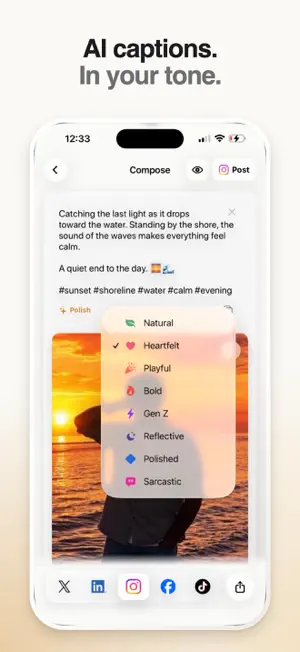
Turn a photo or an idea into a post that sounds like you. Zup helps you write captions, edit photos, preview your post and share when you're ready. • Start with a Moment or a Thought. Choose photos, take a picture or tell Zup what's on your mind. • Find your tone. Generate an AI caption, try a different tone and set your preferences for length, emojis and hashtags. • Make photos your own. Crop, add text, try filters or use optional AI photo editing, with controls to undo changes and restore the original. • Preview and proofread. See your post before sharing. Tap Proofread for a writing score and short suggestions, then Improve caption to revise it. Review the changes before using them. • Share across your socials. Prepare posts for Instagram, TikTok, X, LinkedIn and Facebook. Publish to supported connected accounts or use iPhone's share sheet. • Plan now, post later. Schedule LinkedIn and X posts using suggested times or your own date and time. Manage or cancel scheduled posts in Your voice. You choose what to publish and where it goes. Scheduled posts can publish at the time you confirm, even when the app is closed. Proofread evaluates your writing. Neither its score nor suggested posting times predict reach or engagement. AI generation asks permission before sending content to Zup's server and the configured AI service. Proofread sends your draft text to Zup's server when you request it. Unscheduled drafts stay on your device. Scheduled captions and photos are stored encrypted on Zup's server until cancellation or a final publishing result. Hosted AI and connected social features require an internet connection. Direct publishing depends on account eligibility and service permissions. Instagram requires a supported professional account; Facebook publishing is for Pages. Text-only drafts support X, LinkedIn and Facebook. Apple on-device captioning availability depends on your iPhone, language and settings.
What’s new
Version 1.22 · Updated October 9, 2026
Create posts in a live, editable preview for X, Instagram, LinkedIn and Facebook. Start composing immediately after choosing photos, then tap a photo or its pencil to edit. Enjoy a refreshed photo editor with crop presets, filters, text, AI editing, undo and redo. This update also refines caption spacing and controls, adds expandable LinkedIn captions, and simplifies proofreading results.
App privacy
The developer, Sanmukh Sain Karri, reported these privacy practices to Apple.
Data Linked to You
The following data, which may be collected and linked to your identity, may be used for the following purposes:
- User Content: Photos or Videos, Other User Content
- Contact Info: Name
- Identifiers: User ID, Device ID
- Other Data: Other Data Types
Used for: Product Personalization, App Functionality
Data Not Linked to You
The following data, which may be collected but is not linked to your identity, may be used for the following purposes:
- Identifiers: Device ID
- Usage Data: Product Interaction
Used for: Analytics
Alternatives to Zup: AI Captions & Posts
Looking for apps like Zup: AI Captions & Posts? Here are 6 similar apps on the App Store. The highest rated is fiammo (5.0/5), and all 6 are free to download.
-
 fiammo
5.0
fiammo
5.0
-
 Opinion.
5.0
Opinion.
5.0
-
 Donna - Social Intelligence
5.0
Donna - Social Intelligence
5.0
-
 introapp.com
5.0
introapp.com
5.0
-
 Xuman
4.2
Xuman
4.2
-
 Huddle Social
4.3
Huddle Social
4.3
| App | Rating | Price | Last updated | Compare |
|---|---|---|---|---|
| Zup: AI Captions & Posts | 5.0 / 5 (3 ratings) | Free | October 9, 2026 | |
| fiammo | 5.0 / 5 (2) | Free | Oct 6, 2026 | Compare |
| Opinion. | 5.0 / 5 (11) | Free | May 29, 2026 | Compare |
| Donna - Social Intelligence | 5.0 / 5 (12) | Free | Sep 28, 2026 | Compare |
| introapp.com | 5.0 / 5 (8) | Free | Jun 25, 2026 | Compare |
| Xuman | 4.2 / 5 (10) | Free | Oct 5, 2026 | Compare |
| Huddle Social | 4.3 / 5 (15) | Free | Sep 6, 2026 | Compare |