

BeadCube: 3D Bead Patterns
莹莹 林 Graphics & Design iPhoneiPadiPod touch
BeadCube: 3D Bead Patterns is a free Graphics & Design app for iPhone and iPad by 莹莹 林. Requires iOS 17.0. Updated October 27, 2026.
- Price
- Free
- on the App Store
- Size
- 11 MB
- Age 9+
- Updated
- Oct 27
- 2026 · v1.2.0
Screenshots


About BeadCube: 3D Bead Patterns
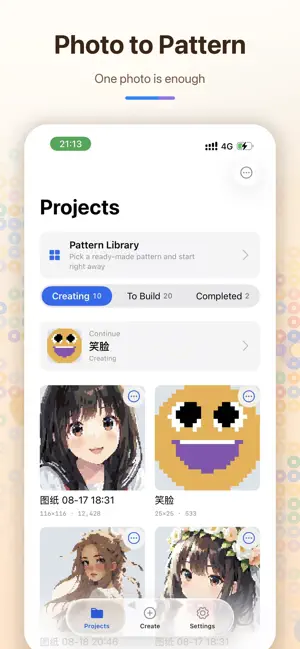
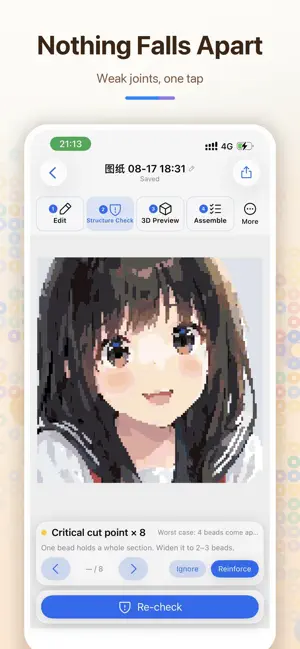
See the finished piece in 3D before placing your first bead. BeadCube is a complete workspace for fuse-bead creators. Turn photos into clear patterns, start from a blank canvas, inspect the finished look in 3D, and find structural weak points before you assemble or iron your work. 3D PREVIEW View your flat pattern as dimensional beads. Drag to inspect it from different angles or jump to preset views, so colors, silhouettes, and assembly relationships are easier to judge before you begin. PHOTO TO PATTERN Choose a photo, crop the subject, and generate a bead pattern automatically. BeadCube suggests a suitable grid and color count, with controls for background removal, color limits, artwork type, and dithering. CREATE AND EDIT Start with a blank canvas or refine a generated pattern cell by cell. Paint, erase, fill, pick colors, select, flip, rotate, undo, and redo. Keep the source image underneath as a reference while correcting details. DESIGNED FOR IPAD Make full use of the larger display with side-by-side previews and controls, an editor that keeps the canvas and inspector visible together, and pattern-plus-3D assembly views. Apple Pencil support enables precise input, while separate finger drawing and panning controls keep longer creative sessions comfortable and efficient. STRUCTURE CHECK Detect isolated beads, detached regions, diagonal-only connections, and critical weak points. Locate each issue, reinforce it, ignore an intentional detail, and run the check again after editing. IMPORT FROM LINKS Paste an external link that contains an image. BeadCube first tries to recognize an existing grid pattern; other images continue through the photo conversion flow. Only import content you have the right to use. ASSEMBLY AND MATERIALS Review bead counts by color, focus on one color while assembling, and export clear patterns, color references, and material lists for printing or sharing. MORE • Curated built-in templates • Designed for iPhone and iPad • Automatic project saving • Pro unlocks more projects, iCloud sync, and professional export MEMBERSHIP OPTIONS • Weekly Experience: auto-renews weekly • Annual Pro: auto-renews yearly • Lifetime Pro: one-time purchase, no renewal Prices are shown in your local currency on the purchase screen. Auto-renewing subscriptions can be managed or canceled in your Apple Account settings. Cancellation takes effect after the current billing period. Lifetime Pro is a non-consumable purchase and does not renew. Privacy Policy: https://finngra.github.io/BeadCube/privacy-en.html Support: https://finngra.github.io/BeadCube/support-en.html Terms of Use: https://finngra.github.io/BeadCube/terms-en.html Terms of Use (EULA): https://www.apple.com/legal/internet-services/itunes/dev/stdeula/
What’s new
Version 1.2.0 · Updated October 27, 2026
Optimize image conversion speed
App privacy
The developer, 莹莹 林, reported these privacy practices to Apple.
Data Not Collected
The developer does not collect any data from this app.
Alternatives to BeadCube: 3D Bead Patterns
Looking for apps like BeadCube: 3D Bead Patterns? Here are 6 similar apps on the App Store. The highest rated is DodoGrid (5.0/5), and all 6 are free to download.
-
 PixelBean - Bead Pattern Maker
-
 桃爸拼豆图纸社
-
 Pixel Beader: Bead Patterns
-
 拼豆设计器
拼豆设计器
-
 DodoGrid
5.0
DodoGrid
5.0
-
 Bead Craft : Fuse Beads Art
| App | Rating | Price | Last updated | Compare |
|---|---|---|---|---|
| BeadCube: 3D Bead Patterns | – | Free | October 27, 2026 | |
| PixelBean - Bead Pattern Maker | – | Free | Sep 22, 2026 | Compare |
| 桃爸拼豆图纸社 | – | Free | Sep 28, 2026 | Compare |
| Pixel Beader: Bead Patterns | – | Free | Oct 12, 2026 | Compare |
| 拼豆设计器 | – | Free | Jul 15, 2026 | Compare |
| DodoGrid | 5.0 / 5 (1) | Free | Aug 14, 2026 | Compare |
| Bead Craft : Fuse Beads Art | – | Free | Jul 13, 2026 | Compare |