

CareLink: Family Phone Help
ITERAON Lifestyle iPhoneiPadiPod touch
CareLink: Family Phone Help is a free Lifestyle app for iPhone and iPad by ITERAON. Requires iOS 15.0. Updated October 16, 2026.
- Price
- Free
- on the App Store
- Size
- 130 MB
- Age 4+
- Updated
- Oct 16
- 2026 · v1.1.9
Screenshots
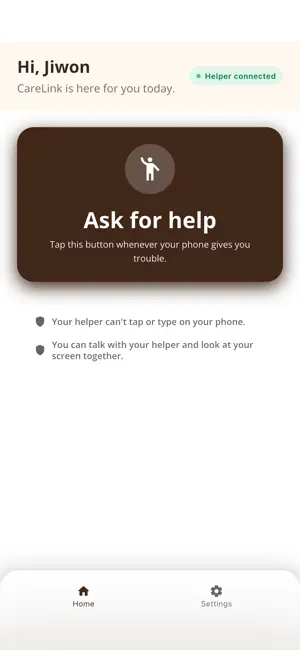
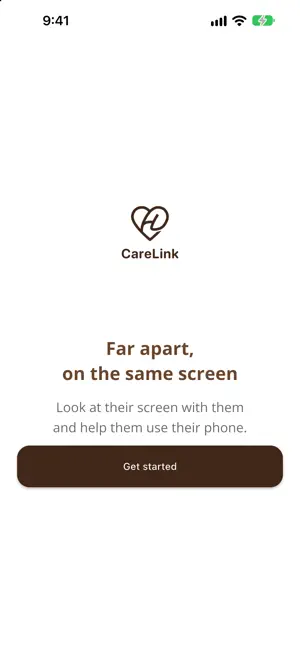


About CareLink: Family Phone Help
Help your parents use their phone, even when you live far away. They tap one button. Your phone rings like a phone call. You answer, see their screen, and show them what to do. CareLink is made for older parents and the adult children who help them. How it works 1. Connect once with a 6-digit family code. 2. When they get stuck, they tap "Ask for help" on the home screen. 3. Your phone rings, even if CareLink is closed. 4. Answer, and you can talk and look at their screen together. What you can do - Talk by voice while you help - See their screen live, so you know exactly what they are looking at - Draw on their screen to point things out, then undo or erase it (drawing depends on the phone the person you help uses) - Connect with up to two people you help Privacy and safety come first - You can only look at their screen. You cannot tap or type on their phone. - Screen sharing starts only after they say yes, and they are asked every time. - They can stop sharing at any time. - Nothing is recorded or stored. The call and the screen are sent live and never saved on our servers. - Password screens are hidden while they share. Made for older parents - Large buttons and simple screens - One button to ask for help, and nothing else to learn - Works on Wi-Fi or mobile data - Available in English and Korean Points Calls with screen sharing use points. - 2,000 points free when you sign up as a helper, which covers four 10-minute calls - 500 points for the first 10 minutes of a call - 150 points for each minute after that - Only the helper buys and uses points. The person you help never pays. - During a call you can see your points and the time you have left. Questions? Open Settings and tap Contact us. We read every message and reply. Requires iOS 15 or later.
What’s new
Version 1.1.9 · Updated October 16, 2026
• When a family link is removed, it now shows correctly on the parent's screen
App privacy
The developer, ITERAON, reported these privacy practices to Apple.
Data Used to Track You
The following data may be used to track you across apps and websites owned by other companies:
- Identifiers: Device ID
Data Linked to You
The following data, which may be collected and linked to your identity, may be used for the following purposes:
- Purchases: Purchase History
- Contact Info: Name, Phone Number
- User Content: Photos or Videos, Audio Data, Customer Support
- Identifiers: User ID
- Usage Data: Product Interaction
Used for: App Functionality
Data Not Linked to You
The following data, which may be collected but is not linked to your identity, may be used for the following purposes:
- Identifiers: Device ID
Used for: Third-Party Advertising
Alternatives to CareLink: Family Phone Help
Looking for apps like CareLink: Family Phone Help? Here are 6 similar apps on the App Store. The highest rated is Echo: Stream your mind (5.0/5), and all 6 are free to download.
-
 livioTouch
-
 살게요 - 기부와 구매방식을 새롭게
-
 Text to Speech for Seniors
-
 Echo: Stream your mind
5.0
Echo: Stream your mind
5.0
-
 Dustler: Cleaning Butler
-
 Cercano
| App | Rating | Price | Last updated | Compare |
|---|---|---|---|---|
| CareLink: Family Phone Help | – | Free | October 16, 2026 | |
| livioTouch | – | Free | Mar 29, 2026 | Compare |
| 살게요 - 기부와 구매방식을 새롭게 | – | Free | May 7, 2024 | Compare |
| Text to Speech for Seniors | – | Free | Apr 16, 2026 | Compare |
| Echo: Stream your mind | 5.0 / 5 (1) | Free | Sep 19, 2026 | Compare |
| Dustler: Cleaning Butler | – | Free | Oct 15, 2026 | Compare |
| Cercano | – | Free | Sep 29, 2026 | Compare |