

Kihya Memo: Notes & Markdown
Kihya Productivity iPhoneiPadiPod touchMac
Kihya Memo: Notes & Markdown is a free Productivity app for iPhone and iPad by Kihya. Requires iOS 16.0. Updated August 20, 2026.
- Price
- Free
- on the App Store
- Size
- 33 MB
- Age 4+
- Updated
- Aug 20
- 2026 · v1.1.0
Screenshots
About Kihya Memo: Notes & Markdown
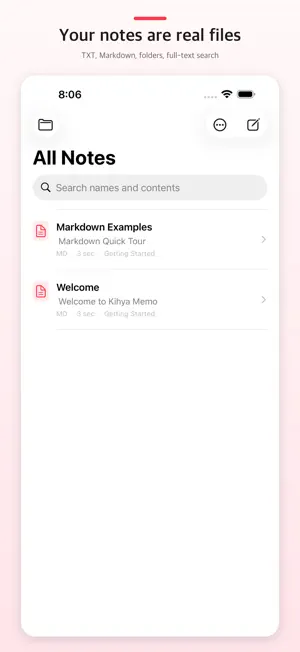
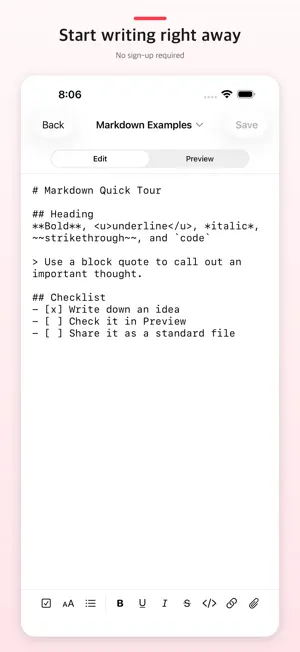
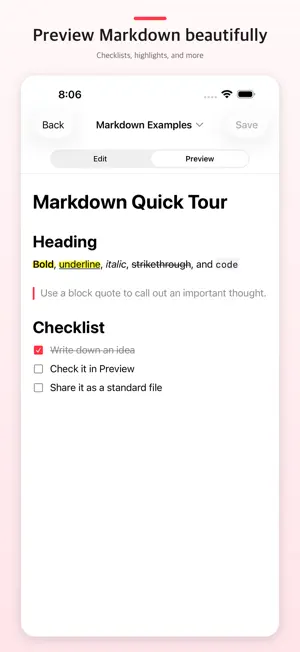
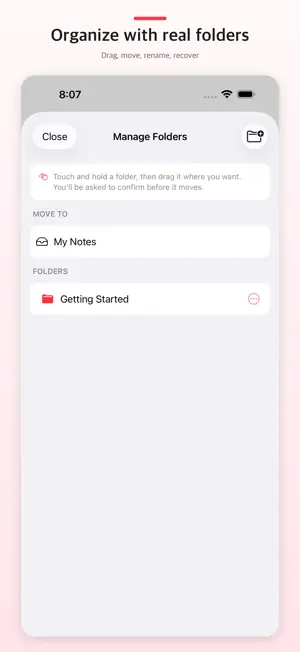
Kihya Memo is a lightweight, offline-first Markdown notepad. Write the source directly, use focused formatting tools, and switch to a beautiful native preview while every note remains a file you can keep. Markdown is the heart of the app. When needed, the same plain-text editor also opens safe UTF-8 text and source documents without converting them to a proprietary database. There is no Kihya account to create and no required Kihya memo server. Google Drive sync and remote server folders are optional. KEY FEATURES • Switch instantly between Markdown source and native preview • Toggle task checkboxes directly in preview • Use focused Markdown tools for headings, lists, bold, italic, strike, code, links, attachments, and underline • Convert pasted rich text into clean Markdown • Create, edit, rename, move, and share HTML, JSON, XML, CSV, PHP, ASP, JavaScript, SQL, and other UTF-8 text or source files when needed • Live syntax colors and line numbers without adding formatting to the file • Static HTML/SVG, pretty JSON/XML, table, calendar, contact, and color-source previews • Plain-text copy and paste for code; rich-text conversion only inside Markdown • Import photos, PDFs, archives, and other files from Photos or Files • Drag, rename, move, and safely remove nested folders in a dedicated manager • Search file names and full note contents • Find, Replace, and Replace All from the title menu, with case options, regex, and capture groups • Choose Save, Discard Changes, or Keep Editing when leaving an unsaved note • Move, rename, trash, or open past versions from the title menu • Open Recently Deleted from the folder list to restore items to their original location or delete them permanently • Optionally protect Recently Deleted with Face ID, Touch ID, or the device passcode • Keep pre-save versions locally and load one into the editor without saving it immediately • Recover the latest local edit draft after an unexpected app termination • Optional marker-texture highlighting for bold and underlined preview text • Preview local images and open clearly marked local-file links • Open and share editable text, source documents, and stored files through the system Files app • Optionally sync original files through a visible app folder in your own Google Drive • Add SFTP, plain FTP, explicit FTPS, or implicit FTPS servers as remote folders, with local recovery drafts, history, conflict detection, and verified saves • Export the visible folder tree as a ZIP without trash or private history • Start writing instantly from a resizable Quick Note Home Screen widget • See a sourced daily thought matched to morning, afternoon, evening, or night • Continue writing beneath a thought and share it as a 4:5 image card • Open a favorite document in full-screen reading mode from the Home Screen • Five bundled Korean typefaces in addition to the system font • Native phone navigation and an iPad three-pane or full-screen editor PRIVACY BY DESIGN • No Kihya sign-up or required login • No ads or cross-app tracking • Google Drive connects only when you choose it; notes are never sent to a Kihya server • Remote connections go directly from your device to the server you enter; credentials use device-only protected storage and remote contents, hosts, paths, and user names are excluded from analytics • SFTP and FTPS are encrypted. Plain FTP is visibly marked and requires a separate warning because its credentials, file names, and contents are not encrypted • Firebase usage events never include note text, file names, searches, or Google account details • Access is limited to local files and files the user explicitly selects • Normal history and recovery drafts stay on device; pre-overwrite sync text is also protected in hidden app data in your Drive
What’s new
Version 1.1.0 · Updated August 20, 2026
Kihya Memo got its server-room badge. • Edit supported UTF-8 text/source files in SFTP, FTP, and FTPS remote folders. • Verified saves, conflict detection, recovery drafts, and local history help protect remote work. • More formats now get syntax colors, line numbers, and regex Find & Replace. • Smoother Drive sync, stability fixes, and a fresh icon.
App privacy
The developer, Kihya, reported these privacy practices to Apple.
Data Linked to You
The following data, which may be collected and linked to your identity, may be used for the following purposes:
- Location: Coarse Location
- Identifiers: User ID, Device ID
- Usage Data: Other Usage Data
- Contact Info: Email Address, Name, Phone Number
- User Content: Photos or Videos, Audio Data, Other User Content
Used for: Analytics, App Functionality
Data Not Linked to You
The following data, which may be collected but is not linked to your identity, may be used for the following purposes:
- Usage Data: Product Interaction
- Diagnostics: Other Diagnostic Data
Used for: Analytics
Alternatives to Kihya Memo: Notes & Markdown
Looking for apps like Kihya Memo: Notes & Markdown? Here are 6 similar apps on the App Store. The highest rated is ClipVault Snippet Box (5.0/5), and all 6 are free to download.



| App | Rating | Price | Last updated | Compare |
|---|---|---|---|---|
| Kihya Memo: Notes & Markdown | – | Free | August 20, 2026 | |
| AppendX | – | Free | Aug 29, 2026 | Compare |
| ClipVault Snippet Box | 5.0 / 5 (1) | Free | Sep 11, 2026 | Compare |
| Clippper - リンク保存・整理・ブックマーク | – | Free | Sep 30, 2026 | Compare |
| Trove Bookmarks | – | Free | May 21, 2026 | Compare |
| ShineNotes | 5.0 / 5 (1) | Free | Sep 29, 2026 | Compare |
| relnote | – | Free | Aug 29, 2026 | Compare |