

Printer App: HP Epson Brother
Amenti Labs LLC Utilities iPhoneiPadiPod touch
Printer App: HP Epson Brother is a free Utilities app for iPhone and iPad by Amenti Labs LLC. Requires iOS 18.0. Updated October 7, 2026.
- Price
- Free
- on the App Store
- Size
- 30 MB
- Age 4+
- Updated
- Oct 7
- 2026 · v1.0.3
Screenshots

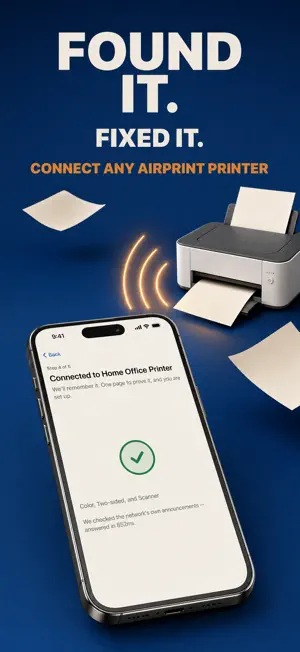


About Printer App: HP Epson Brother
Print, scan and make PDFs with Platen. During first setup, choose printer setup or PDF and photo tools. Convert PNG, JPG and photos to PDF, combine PDF files, and preview pages before saving or printing. PDF export is free and works without a printer. Connect a compatible Wi-Fi printer when you want a paper copy. FREE, ALWAYS — NOT A TRIAL - Finding your printer - Diagnosing why it will not connect - Adding a printer by IP address when discovery is blocked - Your first real print, on real paper You never have to pay to find out whether Platen works with your printer. NO ACCOUNT. EVER. No sign-up, no email, no password. There is nothing to log into. Your documents go from your iPhone to your printer over your own Wi-Fi. PRINT - PDFs from Files and iCloud Drive - Photos, with layouts the system print sheet cannot express - Web pages, and whatever you last copied to the clipboard - Text labels for Avery sheets, with a starting position for partly used sheets - Live printer status and ink levels, read from the printer itself - Scan a page and print it straight back out — a copier, made from your phone - Print at actual size, so a shipping label comes out the size the carrier made it — never shrunk to fit - Pro: page ranges, odd and even pages, two-sided printing, 2-up and 4-up, booklet layouts, custom and folio paper sizes, and a print queue SCAN - Pro: scan from the flatbed or document feeder of compatible eSCL/AirScan printers and scanners. No account required. - Or scan with the camera: automatic edge detection and perspective correction - Pro: text recognition and searchable PDF export WORKS WITH YOUR PRINTER Platen prints over Wi-Fi to compatible AirPrint and IPP printers, including supported models from HP, Canon, Epson, Brother, Pantum, Lexmark, Xerox, Ricoh, Kyocera and Samsung. Features depend on your printer. If it does not appear automatically, add it by its IP address. PLATEN PRO - A weekly plan with a 3-day free trial, or an annual plan - Manage or cancel through your Apple Account. After a free trial, the selected weekly plan renews automatically unless you cancel. - Prices are shown in your own currency before you buy - Payment is charged to your Apple Account at confirmation of purchase. A subscription renews automatically unless it is canceled at least 24 hours before the end of the current period. Manage or cancel it in the app, or in your App Store account settings. PRIVACY - No account, no ads, no tracking, no precise location - Local Network permission is used to find and connect to compatible printers and scanners, and to print and scan. - Platen records whether a print succeeded and why one failed, so connection problems get fixed. It is never tied to your name and never includes what you printed. Privacy Policy: https://platen-app.pages.dev/privacy/ Terms of Use (EULA): https://www.apple.com/legal/internet-services/itunes/dev/stdeula/ Platen is an independent app. It is not affiliated with, endorsed by, or sponsored by HP, Canon, Epson, Brother, Lexmark, Xerox, Ricoh, Kyocera, Pantum, Samsung or Apple. All trademarks are the property of their respective owners.
What’s new
Version 1.0.3 · Updated October 7, 2026
Choose printer setup or PDF and photo tools during first setup. New shortcuts for PNG/JPG to PDF, Photos to PDF and Combine PDFs make saving a PDF easier, without a printer.
App privacy
The developer, Amenti Labs LLC, reported these privacy practices to Apple.
Data Not Linked to You
The following data, which may be collected but is not linked to your identity, may be used for the following purposes:
- Identifiers: Device ID
- Usage Data: Product Interaction
Used for: Analytics, App Functionality
Alternatives to Printer App: HP Epson Brother
Looking for apps like Printer App: HP Epson Brother? Here are 6 similar apps on the App Store.
-
 QPrint - Print & Scan
-
 HA Remote - Smart Home Client
-
 Universal Printer & Scanner
-
 IoTize Tap Manager
-
 Dataly - Data Usage Monitor
-
 Up Conect
| App | Rating | Price | Last updated | Compare |
|---|---|---|---|---|
| Printer App: HP Epson Brother | – | Free | October 7, 2026 | |
| QPrint - Print & Scan | – | Free | Feb 24, 2026 | Compare |
| HA Remote - Smart Home Client | – | Free | Jul 20, 2026 | Compare |
| Universal Printer & Scanner | – | Free | Sep 23, 2026 | Compare |
| IoTize Tap Manager | – | Free | May 20, 2026 | Compare |
| Dataly - Data Usage Monitor | – | Free | Oct 18, 2026 | Compare |
| Up Conect | – | Free | Oct 20, 2026 | Compare |