

CLIPDAY
Hidekazu Masuda Photo & Video iPhoneiPadiPod touch
CLIPDAY is a free Photo & Video app for iPhone and iPad by Hidekazu Masuda. Requires iOS 26.0. Updated September 19, 2026.
- Price
- Free
- on the App Store
- Size
- 59 MB
- Age 4+
- Updated
- Sep 19
- 2026 · v3.2
Screenshots


About CLIPDAY
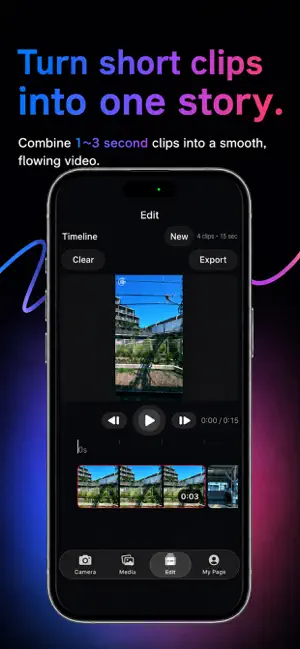
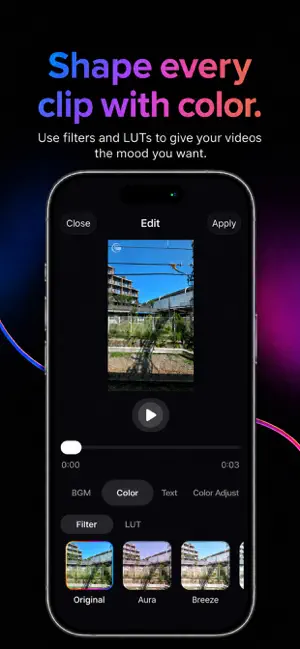
ClipDay is a video app for capturing, organizing, editing, and turning short clips into one finished video. It supports both 9:16 vertical video and 16:9 horizontal video, and lets you organize your recorded clips by date. Choose the clips you want, add them to the timeline, rearrange them, preview them, and combine them into a single video with a simple workflow. You can also import videos from your photo library and trim only the parts you want to use. For color editing, ClipDay includes Filters and LUT presets that make it easy to change the look and mood of your videos. With ClipDay Pro, you can create and save your own custom looks with My Filter. Adjust brightness, contrast, saturation, temperature, tint, highlights, shadows, and fade, and save up to 3 My Filters. Saved My Filters can be reused anytime to give your everyday clips a consistent look. You can also add text and text animations to give your short videos a more personal style. The camera includes recording-duration presets, zoom switching, and stabilization. When recording in 16:9, you can also use the volume button as a shutter. Main Features • 9:16 / 16:9 video recording • 1 sec / 2 sec / 3 sec recording presets • Video stabilization • Zoom switching • Volume button recording (16:9) • Organize videos by date • Import videos from your photo library • Video trimming • Timeline editing • Add and rearrange multiple clips • Video export • Color adjustment with Filters / LUTs • Create and save My Filters (Pro) • Add text • Text animations Capture a moment, choose it, connect it, and finish it. ClipDay is a simple video tool for keeping short everyday moments. ClipDay Pro ClipDay Pro includes all Filters, all LUTs, My Filter, text animations, 4–6 second recording, watermark-free exports, and other Pro features. You can create and save up to 3 My Filters. ClipDay Pro is available as a monthly or annual subscription. Eligible users can try ClipDay Pro free for 1 week. After the free trial, the subscription automatically renews at the price of the selected plan. Subscriptions can be managed or canceled anytime from your Apple Account settings. Privacy Policy https://clipday-support.netlify.app/privacy Terms of Use https://www.apple.com/legal/internet-services/itunes/dev/stdeula/
What’s new
Version 3.2 · Updated September 19, 2026
• Optimized the camera preview during recording for smoother performance • Improved recording startup performance for a more responsive experience • Other stability improvements
App privacy
The developer, Hidekazu Masuda, reported these privacy practices to Apple.
Data Not Collected
The developer does not collect any data from this app.
Alternatives to CLIPDAY
Looking for apps like CLIPDAY? Here are 6 similar apps on the App Store.
-
 TinyVlog
-
 Tape, it Black|Mask with Tape
-
 Edit LOGLOG|Simple Vlog Editor
-
 FRAMEY – Style Vertical Videos
-
 CapLog – Cap it, Stick it!
-
 Agavedex
| App | Rating | Price | Last updated | Compare |
|---|---|---|---|---|
| CLIPDAY | – | Free | September 19, 2026 | |
| TinyVlog | – | Free | Jul 24, 2026 | Compare |
| Tape, it Black|Mask with Tape | – | Free | Sep 27, 2026 | Compare |
| Edit LOGLOG|Simple Vlog Editor | – | Free | Oct 20, 2026 | Compare |
| FRAMEY – Style Vertical Videos | – | Free | Mar 11, 2026 | Compare |
| CapLog – Cap it, Stick it! | – | Free | Sep 28, 2026 | Compare |
| Agavedex | – | Free | Aug 18, 2026 | Compare |
Compare CLIPDAY with the top alternatives: ratings, updates, ASO score and keyword gaps →