

Beat Maker: Music & Drum Pad
Tetiana Kryvoshei Music iPhoneiPadiPod touch
Beat Maker: Music & Drum Pad is a free Music app for iPhone and iPad by Tetiana Kryvoshei. Rated 4.0/5 from 1 ratings. Requires iOS 18.0.
- Rating
- 4.0
- 1 ratings
- Price
- Free
- on the App Store
- Size
- 457 MB
- Age 4+
- Updated
- Sep 28
- 2026 · v1.0
Screenshots



About Beat Maker: Music & Drum Pad
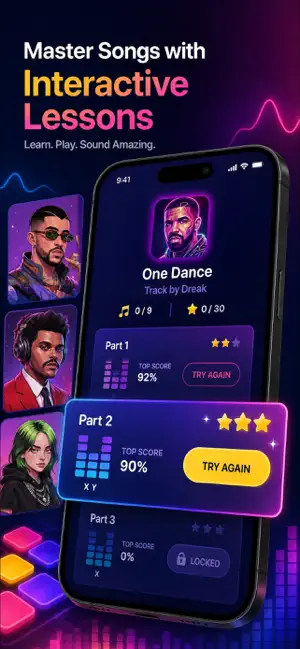
Get polished beat sketches and drum patterns in Beat Maker: Music & Drum Pad in a couple of taps. Build rhythm, learn sound packs and shape tracks without a heavy studio setup. · Choose a sound pack before you play · Tap pads for drums, piano and FX · Follow 1000+ guided Beat School lessons · Practise EDM, Trap, House and Pop · Explore Hip-Hop, Drum & Bass and Dubstep · Learn tips from experienced beatmakers · Adjust tempo for cleaner sequencing · Shape tone with EQ studio tools · Try 808 hits and layered percussion · Create ideas with headphones anywhere · Move through Career Mode challenges · Share finished loops and music sketches Beat Maker: Music & Drum Pad is built for quick practice and structured beat creation. Open a pack, listen to the sound, tap the pads and turn a short rhythm into a fuller loop. The workflow is simple enough for first sessions, but it still gives room to practise timing, arrangement and finger drumming as your control improves. Use it when you want to go from an idea to a playable pattern without setting up a large machine or connecting extra gear. Start with drums, add piano phrases, place FX, then regulate tempo and EQ to make the beat feel tighter. If you are learning, Beat School gives a clear path through each pack. If you already make music, the same tools work as a compact simulator for sketching grooves before a longer studio session. CREATE, PRACTISE AND REFINE Beat Maker: Music & Drum Pad combines lessons, pads and studio-style controls in one focused workspace. Each pack is made for a particular mood or genre, so you can move from a Trap bounce to House rhythm, from Pop hooks to Electro textures, or from Drum & Bass speed to Dubstep weight without rebuilding the whole setup. The pad layout keeps the first step direct. Touch a pad, hear the sound and learn how it sits with the rest of the kit. Drums help you form the groove. Piano parts add melody. FX bring transitions, drops and extra movement. A synthesizer-style feel is available through selected electronic sounds, while 808 elements help with low-end patterns in modern genres. Lessons are tied to the packs, which makes practice more practical. You are not only watching instructions. You play through patterns, copy useful moves and learn where to improvise. Short tips explain how experienced beatmakers think about timing, layers, energy and variation. Over time, the app helps you connect simple taps into stronger sequences. Career Mode gives your practice a clearer direction. Complete tasks, test your timing and build confidence across different styles. It is useful for daily training, short breaks or longer sessions with headphones. You can fly through a quick exercise when you have a few minutes, or spend more time polishing one loop until it feels ready to share. Beat Maker: Music & Drum Pad is also useful as a portable music notebook. Capture a rhythm when it appears, test a genre you do not usually play, or prepare a small demo before moving into a larger pro setup. The app does not force one route. You can learn step by step, improvise freely, or simply open a pack and start tapping. A paid subscription unlocks access to the extended content available in the app, including additional lessons, sound packs and advanced practice material. You can manage or cancel your subscription through your Apple account settings, and any active access remains available until the current paid period ends. Information about service rules and the way personal data is processed is provided in the app’s Terms of Use and Privacy Policy. Terms of Use: https://docs.google.com/document/d/1OWOZ8LjNdw8CNwh8gFIEaOGlbdXW6TolnweII2ZBsAo/edit?usp=sharing Privacy Policy: https://docs.google.com/document/d/1bQWSHOpVxMTUxMLBUTN4xPeR_nwW_r8VPkg8ttoQtEQ/edit?usp=sharing
App privacy
The developer, Tetiana Kryvoshei, reported these privacy practices to Apple.
Data Used to Track You
The following data may be used to track you across apps and websites owned by other companies:
- Identifiers: User ID
Data Not Linked to You
The following data, which may be collected but is not linked to your identity, may be used for the following purposes:
- Identifiers: User ID, Device ID
- Usage Data: Product Interaction
Used for: Analytics
Alternatives to Beat Maker: Music & Drum Pad
Looking for apps like Beat Maker: Music & Drum Pad? Here are 6 similar apps on the App Store. The highest rated is Magic Keyora Music Tune Tile (4.3/5), and all 6 are free to download.
-
 Magic Keyora Music Tune Tile
4.3
Magic Keyora Music Tune Tile
4.3
-
 Beat Maker – Drum Pad Music
2.6
Beat Maker – Drum Pad Music
2.6
-
 Piano Spirits: Learn Piano
3.7
Piano Spirits: Learn Piano
3.7
-
 Magic Pad - Beat Maker DJ
4.0
Magic Pad - Beat Maker DJ
4.0
-
 Real Piano – Learn & Play
4.0
Real Piano – Learn & Play
4.0
-
 Beat Maker - Music Drum Pad
3.3
Beat Maker - Music Drum Pad
3.3
| App | Rating | Price | Last updated | Compare |
|---|---|---|---|---|
| Beat Maker: Music & Drum Pad | 4.0 / 5 (1 rating) | Free | September 28, 2026 | |
| Magic Keyora Music Tune Tile | 4.3 / 5 (3) | Free | Sep 30, 2026 | Compare |
| Beat Maker – Drum Pad Music | 2.6 / 5 (8) | Free | Oct 7, 2026 | Compare |
| Piano Spirits: Learn Piano | 3.7 / 5 (3) | Free | Oct 9, 2026 | Compare |
| Magic Pad - Beat Maker DJ | 4.0 / 5 (11) | Free | Sep 30, 2026 | Compare |
| Real Piano – Learn & Play | 4.0 / 5 (25) | Free | Jul 20, 2026 | Compare |
| Beat Maker - Music Drum Pad | 3.3 / 5 (10) | Free | Apr 27, 2026 | Compare |