

Cool Wallpapers・Live 4K Themes
Daryl Dixon Graphics & Design iPhoneiPadiPod touch
Cool Wallpapers・Live 4K Themes is a free Graphics & Design app for iPhone and iPad by Daryl Dixon. Requires iOS 17.4. Updated October 10, 2026.
- Price
- Free
- on the App Store
- Size
- 56 MB
- Age 4+
- Updated
- Oct 10
- 2026 · v1.0.2
Screenshots


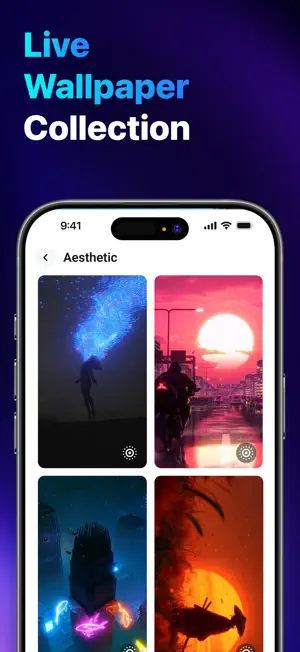
About Cool Wallpapers・Live 4K Themes
Discover Stunning Wallpapers, Curated Just for Your Screen Tired of scrolling endless wallpaper grids full of clutter and ads? Cool Wallpapers gets out of the way. 659 wallpapers, hand sorted into 16 collections, cut for your iPhone screen. No account, no feed, no clutter, open the app, find one you like, keep it. KEY FEATURES • 659 Wallpapers, 16 Collections: Car, anime, dark, aesthetic, nature, animal, cute, fluffy, art, basic, color, couple, flower, glass, 3D, and eye, every style hand picked for a phone screen. • Live Wallpapers: Bring your Lock Screen to life with dynamic, moving wallpapers. • Full Screen Preview: See exactly how a wallpaper will look before you save it. • Hand Arranged Feed: A curated scroll of collections and editorial rows, not an endless grid. • One Tap Save: Download any wallpaper straight to Photos in a single tap. • Garage: All your saved and downloaded wallpapers, organized in one place. • Instant Set: Set any download as your Lock Screen, Home Screen, or both. WHY YOU'LL LOVE IT Cool Wallpapers is built small on purpose. No sign up, no profile, no social feed, no ads between wallpapers. It doesn't ask for your contacts or your location, the only permission it ever requests is adding a wallpaper to your photo library when you download one. From matte black minimalism to neon 3D, from kawaii pastels to macro flowers, every image is picked to actually look right on your screen, not just in a thumbnail. HOW TO SET A WALLPAPER Download a wallpaper, open Photos, pick it, tap share and choose "Use as Wallpaper." iOS puts it on the Lock Screen, the Home Screen, or both. Your screen sees you every single time you pick up your phone. Stop settling for the default. Download Cool Wallpapers now and give your Home Screen and Lock Screen the wallpaper they actually deserve, today. LEGAL INFORMATION: Privacy Policy: https://mobocovietnam.com/Privacy-policy.html Terms of Use: https://mobocovietnam.com/Term-of-Use.html Apple Standard EULA: https://www.apple.com/legal/internet-services/itunes/dev/stdeula/
What’s new
Version 1.0.2 · Updated October 10, 2026
New in this update: • Live wallpapers preview more smoothly, with no blank flash before playback • Faster, lighter scrolling through live wallpaper collections • A cleaner wallpaper preview layout on every screen size
App privacy
The developer, Daryl Dixon, reported these privacy practices to Apple.
Data Used to Track You
The following data may be used to track you across apps and websites owned by other companies:
- Usage Data: Advertising Data
- Diagnostics: Crash Data
Data Linked to You
The following data, which may be collected and linked to your identity, may be used for the following purposes:
- Usage Data: Advertising Data
Used for: Third-Party Advertising
Data Not Linked to You
The following data, which may be collected but is not linked to your identity, may be used for the following purposes:
- Diagnostics: Crash Data
Used for: Analytics
Alternatives to Cool Wallpapers・Live 4K Themes
Looking for apps like Cool Wallpapers・Live 4K Themes? Here are 6 similar apps on the App Store. The highest rated is Name Wallpaper Maker: Neon (5.0/5), and all 6 are free to download.
-
 ScreenLux: Live Wallpapers 4K
-
 Wall Labs - Wallpapers
-
 Name Wallpaper Maker: Neon
5.0
-
 WallPack: 4K Live Wallpaper
-
 Creo AI: Wallpaper Generator
4.5
-
 Wallpapers Creator
| App | Rating | Price | Last updated | Compare |
|---|---|---|---|---|
| Cool Wallpapers・Live 4K Themes | – | Free | October 10, 2026 | |
| ScreenLux: Live Wallpapers 4K | – | Free | Sep 22, 2026 | Compare |
| Wall Labs - Wallpapers | – | Free | Jun 10, 2026 | Compare |
| Name Wallpaper Maker: Neon | 5.0 / 5 (1) | Free | Aug 18, 2026 | Compare |
| WallPack: 4K Live Wallpaper | – | Free | Sep 15, 2026 | Compare |
| Creo AI: Wallpaper Generator | 4.5 / 5 (2) | Free | Oct 21, 2026 | Compare |
| Wallpapers Creator | – | Free | Oct 20, 2026 | Compare |