

Pocket EA
Jalal Kakar Productivity iPhoneiPadiPod touch
Pocket EA is a free Productivity app for iPhone and iPad by Jalal Kakar. Rated 5.0/5 from 3 ratings. Requires iOS 16.4. Updated October 17, 2026.
- Rating
- 5.0
- 3 ratings
- Price
- Free
- on the App Store
- Size
- 69 MB
- Age 17+
- Updated
- Oct 17
- 2026 · v2.4
Screenshots


About Pocket EA
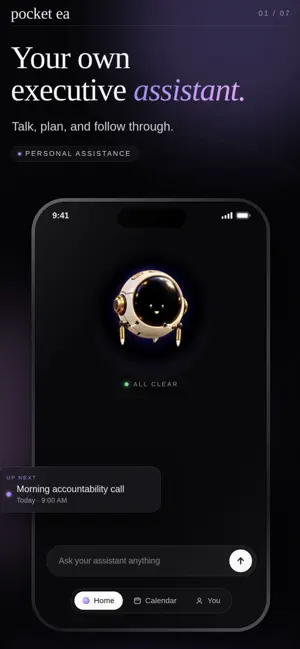
Most productivity apps wait for you to manage them. Pocket EA works differently. Pocket EA is a personal AI assistant that remembers what matters, anticipates what needs attention, and helps move it forward—so fewer important things depend on you remembering everything. FROM THOUGHT TO FOLLOW-THROUGH Talk or type naturally. Pocket EA turns conversations into real next steps: tasks, commitments, scheduled check-ins, calendar updates, and plans you can act on. AN ASSISTANT THAT TAKES INITIATIVE Pocket EA helps surface what needs your attention, follows up on unfinished commitments, and presents a clear next action—reducing the decisions and friction between you and what needs to get done. ACCOUNTABILITY THAT ACTUALLY CALLS Schedule a check-in and Pocket EA can ring your device like a real call, including from your lock screen. It helps you revisit what you committed to and decide what happens next. MEMORY THAT WORKS FOR YOU Pocket EA builds useful context across conversations, priorities, people, and preferences, so you do not have to keep repeating yourself. You can review, correct, or delete what it learns at any time. ONE PLACE FOR YOUR DAY View tasks, commitments, check-ins, and scheduled work together. Pocket EA helps you understand what matters now without making you sort through unnecessary information. CLEAR YOUR HEAD Use Clear My Head for a temporary conversation when you need space to think, untangle an idea, or work through something without adding it to your permanent assistant memory. TALK WHEN TYPING ISN’T ENOUGH Have natural voice conversations with Pocket EA, receive spoken guidance, and move through the app while your assistant helps you understand what to do next. MAKE POCKET YOURS Choose animated Pocket characters and unlock new Pocket Forms as you reach goals and milestones. Customize how your assistant looks today, with more personalization options coming over time. Pocket EA includes: • Continuous text and voice conversation • Personal memory with user controls • Proactive attention and follow-through • Task and commitment management • Accountability check-ins and calls • Day, week, and month calendar views • Clear My Head temporary conversations • Animated Pocket characters and unlockable forms • Privacy, memory, and account controls Pocket EA is for people who do not need another place to organize their lives. They need an assistant that helps carry things forward. A free trial is available. Subscription options and pricing are shown before purchase. Subscriptions renew automatically unless canceled at least 24 hours before the end of the current billing period. You can manage or cancel your subscription through your App Store account settings. Terms of Use: https://pocket-ea.app/terms Privacy Policy: https://pocket-ea.app/privacy
What’s new
Version 2.4 · Updated October 17, 2026
Pocket EA 2.4 brings clearer answers, smoother conversations, and less friction throughout your day. • Improved voice responsiveness and connection recovery. • Better understanding of your requests, remembered context, and scheduling conflicts. • Web research with tappable source links. • Review, edit, and approve email drafts directly in chat, including multiple drafts at once. • Attach up to five photos or documents to a message. • Schedule multiple one-time accountability calls and manage each separately. • Updated Pocket City visuals, a changing day-and-night sky, and livelier characters. • Reliability improvements for uploads, reminders, and connected Gmail accounts. Less to juggle. More follow-through.
App privacy
The developer, Jalal Kakar, reported these privacy practices to Apple.
Data Linked to You
The following data, which may be collected and linked to your identity, may be used for the following purposes:
- Contact Info: Name, Email Address
- Purchases: Purchase History
- Identifiers: User ID, Device ID
- Usage Data: Product Interaction
- Diagnostics: Other Diagnostic Data, Crash Data, Performance Data
- User Content: Other User Content, Emails or Text Messages, Photos or Videos, Audio Data, Gameplay Content, Customer Support
- Sensitive Info: Sensitive Info
- Health & Fitness: Health
- Location: Coarse Location
- Contacts: Contacts
Used for: Third-Party Advertising, Developer’s Advertising or Marketing, Analytics, Product Personalization, App Functionality
Alternatives to Pocket EA
Looking for apps like Pocket EA? Here are 6 similar apps on the App Store. The highest rated is MyScanner: Scan PDF & QR Code (5.0/5), and all 6 are free to download.
-
 MyScanner: Scan PDF & QR Code
5.0
-
 Kairos - Mind Management
5.0
-
 Slotmark: Reminder & To Do
5.0
-
 PodSized: AI Podcast App
5.0
-
 Kronus - Discipline Tracker
5.0
-
 Hypermonkey: ADHD Productivity
4.5
| App | Rating | Price | Last updated | Compare |
|---|---|---|---|---|
| Pocket EA | 5.0 / 5 (3 ratings) | Free | October 17, 2026 | |
| MyScanner: Scan PDF & QR Code | 5.0 / 5 (6) | Free | Oct 19, 2026 | Compare |
| Kairos - Mind Management | 5.0 / 5 (3) | Free | May 12, 2026 | Compare |
| Slotmark: Reminder & To Do | 5.0 / 5 (18) | Free | Sep 3, 2026 | Compare |
| PodSized: AI Podcast App | 5.0 / 5 (9) | Free | Oct 5, 2026 | Compare |
| Kronus - Discipline Tracker | 5.0 / 5 (2) | Free | Oct 20, 2026 | Compare |
| Hypermonkey: ADHD Productivity | 4.5 / 5 (19) | Free | Sep 5, 2026 | Compare |
Compare Pocket EA with the top alternatives: ratings, updates, ASO score and keyword gaps →