

xMosaique - Preset Camera
Xudong Qin Photo & Video iPhoneiPadiPod touch
xMosaique - Preset Camera is a free Photo & Video app for iPhone and iPad by Xudong Qin. Rated 4.0/5 from 1 ratings. Requires iOS 18.0.
- Rating
- 4.0
- 1 ratings
- Price
- Free
- on the App Store
- Size
- 6 MB
- Age 4+
- Updated
- Sep 24
- 2026 · v1.5.3
Screenshots



About xMosaique - Preset Camera
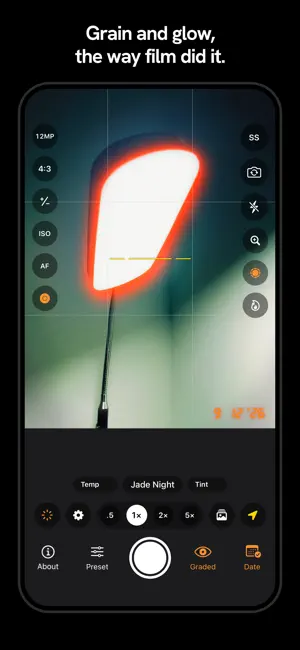
Most camera apps ask you to shoot first and hope the edit works out later. xMosaique turns that around. Choose a look, and the viewfinder shows it — the colour, the contrast, the grain, all of it, live. Underneath sits a real camera: manual shutter and ISO, RAW, and every lens on your iPhone. SEE IT BEFORE YOU SHOOT Thirteen looks are built in and ready the moment you open the app: warm everyday colour, golden afternoon light, tungsten nights, punchy daylight, cool slide film, and a handful drawn from the palettes of classic cinema. Swipe across the viewfinder to move between them and watch the whole scene change — front camera included. MANUAL WHEN YOU WANT IT, AUTO WHEN YOU DON'T • Shutter speed from a full second to 1/8000 — or leave it on auto • Manual ISO, white balance, and exposure compensation whenever you reach for them • A live histogram, with the shutter speed and ISO the shot will use, in Luminance or RGB • Manual focus on a Near-to-infinity dial, with focus peaking marking sharp edges in red as you turn it • Five shooting formats — 4:3, 3:2, 1:1, 5:4, and a 65:24 XPan panorama — with the crop greyed out live in the viewfinder • Long exposure up to 20 seconds for light trails, waterfalls, and night skies • Exposure bracketing for scenes with bright windows and dark corners • RAW capture, every lens on your iPhone, and a one-tap selfie framing switch • Grid, level, and face-detect focus — on when you want them, gone when you don't • Shoot from the Lock Screen, the Camera Control button, or the volume keys BRING YOUR OWN PRESETS Already have a preset collection? xMosaique reads the same .xmp preset files desktop photo editors use — the ones you bought, traded, or were sent by a friend. Import them from Files, iCloud Drive, Google Drive, or OneDrive, a whole folder at a time if you like, and send any of them back out to share. MAKE IT YOURS A single slider takes any look from barely-there to twice its strength. Add 35mm film grain in three textures, the soft red bloom real film gives to bright lights, or a retro date stamp in the corner. Or drop the whole frame to black and white. STEADY BY DEFAULT Handheld shots get quiet help. The app grabs a quick burst and keeps the sharpest frame, so an unsteady hand in low light doesn't cost you the picture. YOUR ORIGINAL IS NEVER LOST Every graded shot can be saved alongside an untouched original, so you never have to choose between the look and the negative. Want the negative too? Switch it on in Settings > Saving. LEARNED IN ABOUT A MINUTE Every control is a circle in a corner. Tap it to switch it, hold it to open everything it can do. That's the whole rule — and the About page has the tips and the colour legend whenever you want them. FINISHED THE WAY YOU WANT IT Save as JPEG or HEIF for sharing, or step up to higher-precision files when a photo is headed for a big print or further editing. THIRTEEN LANGUAGES English, Spanish (Spain and Latin America), Portuguese (Brazil), French, German, Italian, Japanese, Korean, Chinese (Simplified and Traditional), Hindi, and Indonesian. Photos stay on your device and in your photo library. No account is needed to shoot — sign in only if you want to pull presets from Google Drive or OneDrive, and xMosaique asks for read-only access when you do.
What’s new
Version 1.5.3 · Updated September 24, 2026
A live histogram with the shutter speed and ISO your shot will use, and optional GPU Rendering that makes saving much faster. EXPOSURE READOUT AND HISTOGRAM • Switch it on in Settings > Live View > Exposure Readout — it ships off • The shutter speed and ISO the photo will be taken at, across the top of the frame: yellow where you have locked a value by hand, white where the camera is metering • A live histogram beside them, drawn from the frame as you see it — through the look with Graded on, of the original with it off • Tap the histogram to switch between Luminance and RGB • Yellow marks at either end when the picture is clipping, so blown highlights and crushed shadows show up before the shutter, not after GPU RENDERING • Settings > Saving > GPU Rendering, also off until you ask for it • On, the photo is rendered by the same graph the viewfinder draws, so the file follows the frame you were looking at — and it is much faster than the processing xMosaique has used until now • A capture the GPU cannot take falls back to the usual processing on its own; nothing is lost, that shot is just saved the old way • Photos saved this way can differ slightly from the same shot saved without it IN THE VIEWFINDER • The date stamp's glow now fades out in the live view instead of sitting on a faint hard-edged rectangle behind the digits. Saved photos are unchanged • The corner controls hang from the live view and scale with it, so they stay in proportion on every iPhone size A DEFAULT HAS MOVED, FOR NEW INSTALLS ONLY • In a fresh install, Keep Unprocessed Original is now off: one shutter press saves one photo. Switch it on in Settings > Saving if you want the untouched original kept beside the graded one • If you already have xMosaique, your setting is exactly where you left it — this update does not change it Thank you for shooting with us. Tell us what you'd like to see next.
App privacy
The developer, Xudong Qin, reported these privacy practices to Apple.
Data Not Collected
The developer does not collect any data from this app.
Alternatives to xMosaique - Preset Camera
Looking for apps like xMosaique - Preset Camera? Here are 6 similar apps on the App Store. The highest rated is SHC3 (5.0/5), and all 6 are free to download.
-
 Espresso - True Color Film Cam
-
 光迹ColorMap
-
 OrthoCam
-
 SHC3
5.0
SHC3
5.0
-
 Eclat Camera
5.0
Eclat Camera
5.0
-
 Halo Camera – AI Photography
| App | Rating | Price | Last updated | Compare |
|---|---|---|---|---|
| xMosaique - Preset Camera | 4.0 / 5 (1 rating) | Free | September 24, 2026 | |
| Espresso - True Color Film Cam | – | Free | Sep 30, 2026 | Compare |
| 光迹ColorMap | – | Free | Sep 25, 2026 | Compare |
| OrthoCam | – | Free | Sep 24, 2026 | Compare |
| SHC3 | 5.0 / 5 (1) | Free | Sep 24, 2026 | Compare |
| Eclat Camera | 5.0 / 5 (1) | Free | Mar 30, 2026 | Compare |
| Halo Camera – AI Photography | – | Free | Oct 6, 2026 | Compare |