

Clearly - Magnifier
KANGHYEON LEE Utilities iPhoneiPadiPod touch
Clearly - Magnifier is a free Utilities app for iPhone and iPad by KANGHYEON LEE. Requires iOS 16.4. Updated September 5, 2026.
- Price
- Free
- on the App Store
- Size
- 65 MB
- Age 4+
- Updated
- Sep 5
- 2026 · v1.0.1
Screenshots
About Clearly - Magnifier
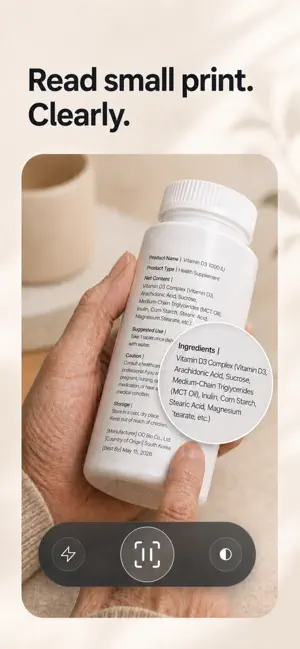
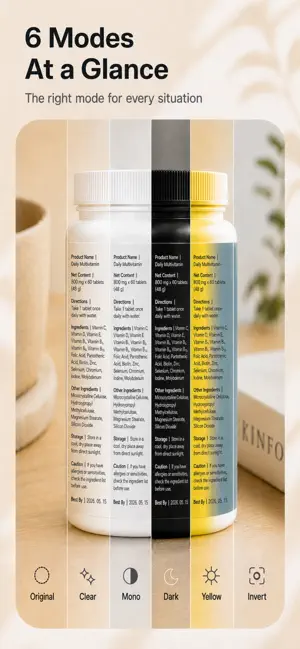
Small text, made easier to read. Clearly turns your rear camera into a simple, gesture-first magnifying glass for menus, labels, instructions, serial numbers, receipts, books, and everyday details. Open the app and start magnifying—no account or complicated setup. READ SMALL TEXT MORE COMFORTABLY Use Clearly as a live digital magnifier whenever fine print or a small detail is difficult to see. • Pinch or swipe vertically to zoom • Turn on the flashlight in dim places • Tap to capture a frame and inspect it without holding the same position • Magnify captured views up to 16× • Move around a captured view to check every detail • Save an image only when you choose CHOOSE THE VIEW THAT WORKS FOR YOU Swipe horizontally or use the viewing-style control to move between five modes: • Original • Balanced clarity • Document black and white • Color negative • Inverted document You can also fine-tune brightness and contrast for different text, surfaces, and lighting conditions. MADE FOR EVERYDAY DETAILS Clearly is useful for reading restaurant menus, product labels, medicine-bottle print, appliance serial numbers, receipts, manuals, maps, books, craft details, electronics, and more. DESIGNED FOR SIMPLE, ACCESSIBLE CONTROL Large controls, clear labels, VoiceOver support, reduced-motion behavior, and an interface that fades out of the way help keep the content front and center. PRIVATE IMAGE HANDLING Magnified images are processed on your device and are not uploaded by Clearly. Nothing is added to Photos unless you tap Save. Clearly requests add-only photo access when saving and does not attach location or EXIF metadata to saved images. Clearly may display ads. Available advertising privacy choices can be reviewed from the app settings. Live camera zoom and image quality vary by device. Clearly is a general-purpose visual assistance tool and does not diagnose or treat vision conditions. Open. Zoom. Read. Clearly — see the details that matter. Privacy Policy: https://clearly-privacy.cliearly.workers.dev/
What’s new
Version 1.0.1 · Updated September 5, 2026
Bug fixes and performance improvements.
App privacy
The developer, KANGHYEON LEE, reported these privacy practices to Apple.
Data Linked to You
The following data, which may be collected and linked to your identity, may be used for the following purposes:
- Location: Coarse Location
- Identifiers: Device ID
- Usage Data: Product Interaction, Advertising Data
- Diagnostics: Performance Data
Used for: Third-Party Advertising, Analytics, App Functionality
Data Not Linked to You
The following data, which may be collected but is not linked to your identity, may be used for the following purposes:
- Diagnostics: Crash Data
Used for: Third-Party Advertising, Analytics, App Functionality
Alternatives to Clearly - Magnifier
Looking for apps like Clearly - Magnifier? Here are 6 similar apps on the App Store. The highest rated is Tencent Hy Translate (5.0/5), and all 6 are free to download.
-
 Lenzap - Magnifier
-
 Tencent Hy Translate
5.0
Tencent Hy Translate
5.0
-
 Oneclick Scanner
-
 Gold Tester & Identifier
4.4
Gold Tester & Identifier
4.4
-
 Heart Nest: Wellness Monitor
4.0
Heart Nest: Wellness Monitor
4.0
-
 AhnLab Security Manager
| App | Rating | Price | Last updated | Compare |
|---|---|---|---|---|
| Clearly - Magnifier | – | Free | September 5, 2026 | |
| Lenzap - Magnifier | – | Free | Feb 28, 2026 | Compare |
| Tencent Hy Translate | 5.0 / 5 (3) | Free | Sep 8, 2026 | Compare |
| Oneclick Scanner | – | Free | Jun 15, 2025 | Compare |
| Gold Tester & Identifier | 4.4 / 5 (19) | Free | Aug 27, 2026 | Compare |
| Heart Nest: Wellness Monitor | 4.0 / 5 (23) | Free | Aug 21, 2026 | Compare |
| AhnLab Security Manager | – | Free | Nov 12, 2024 | Compare |