

Voices in View
Alex WATSON Utilities iPhoneiPadiPod touch
Voices in View is a free Utilities app for iPhone and iPad by Alex WATSON. Requires iOS 26.0. Updated August 19, 2026.
- Price
- Free
- on the App Store
- Size
- 2 MB
- Age 4+
- Updated
- Aug 19
- 2026 · v1.1
Screenshots

About Voices in View
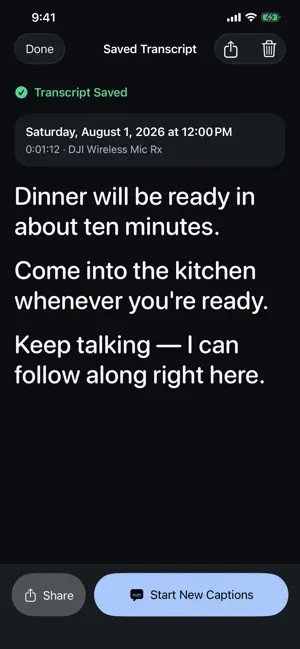
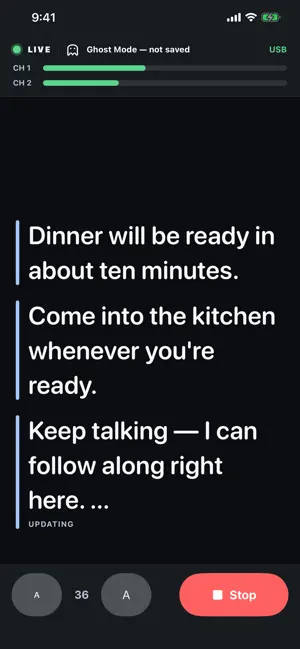
Voices in View helps people who are hard of hearing follow in-person conversations with large, real-time captions on iPhone. Choose the microphone that fits the conversation: the nearby iPhone, DJI Mic Mini 2.0 or another compatible USB microphone, or supported AirPods worn by the person reading captions. Use Ghost when captions should disappear after the conversation, or choose Save to keep finalized transcript text on this iPhone for later reading, sharing, or deletion. Features: • On-device English transcription using Apple’s Speech framework • Large, high-contrast captions with live size controls • Ghost mode that does not save transcript text • Optional local transcript history • Share saved transcripts through the iOS share sheet • A microphone test before starting captions • Built-in iPhone microphone support with no extra hardware • Tested support for DJI Mic Mini 2.0 and compatible USB audio • Two-channel USB input mixed into one easy-to-follow conversation feed • AirPods Far Field for hands-free, head-directed microphone capture • Live scrolling that keeps recent context available • No accounts, ads, analytics, cloud transcription, or audio recordings AirPods feature availability depends on the AirPods model and iOS version. Hearing Aid, Transparency, Conversation Boost, and other listening settings remain under the user’s control in iPhone settings; Voices in View does not change them. Live transcription availability depends on Apple’s on-device speech support for your iPhone. Voices in View currently supports US English and requires iOS 26 or later.
What’s new
Version 1.1 · Updated August 19, 2026
What’s New in 1.1.0 • Choose between iPhone, DJI Mic Mini 2.0 or other USB microphones, and supported AirPods • Use AirPods Far Field for hands-free, head-directed microphone capture • Test microphone levels before starting captions • Scroll back through recent captions without losing your place, then jump back to live • Enjoy simpler Input and Caption Mode controls
App privacy
The developer, Alex WATSON, reported these privacy practices to Apple.
Data Not Collected
The developer does not collect any data from this app.
Alternatives to Voices in View
Looking for apps like Voices in View? Here are 6 similar apps on the App Store. The highest rated is Speak to Read (5.0/5), and all 6 are free to download.
-
 Speak to Read
5.0
Speak to Read
5.0
-
 Live Transcribe Voice Notes
3.0
Live Transcribe Voice Notes
3.0
-
 Timers Everywhere
5.0
Timers Everywhere
5.0
-
 ANCEL Battery Monitor
3.4
ANCEL Battery Monitor
3.4
-
 Dialer
4.2
Dialer
4.2
-
 ClearCaptions Mobile
4.4
ClearCaptions Mobile
4.4
| App | Rating | Price | Last updated | Compare |
|---|---|---|---|---|
| Voices in View | – | Free | August 19, 2026 | |
| Speak to Read | 5.0 / 5 (1) | Free | Feb 4, 2026 | Compare |
| Live Transcribe Voice Notes | 3.0 / 5 (2) | Free | May 2, 2024 | Compare |
| Timers Everywhere | 5.0 / 5 (8) | Free | Jan 20, 2024 | Compare |
| ANCEL Battery Monitor | 3.4 / 5 (25) | Free | Sep 4, 2025 | Compare |
| Dialer | 4.2 / 5 (37) | Free | Aug 25, 2025 | Compare |
| ClearCaptions Mobile | 4.4 / 5 (2,095) | Free | Oct 22, 2026 | Compare |
Compare Voices in View with the top alternatives: ratings, updates, ASO score and keyword gaps →