

Wise Timetable Companion
Wise Technologies Education iPhoneiPadiPod touch
Wise Timetable Companion is a free Education app for iPhone and iPad by Wise Technologies. Requires iOS 15.6. Updated September 6, 2026.
- Price
- Free
- on the App Store
- Size
- 20 MB
- Age 4+
- Updated
- Sep 6
- 2026 · v1.2.1
Screenshots


About Wise Timetable Companion
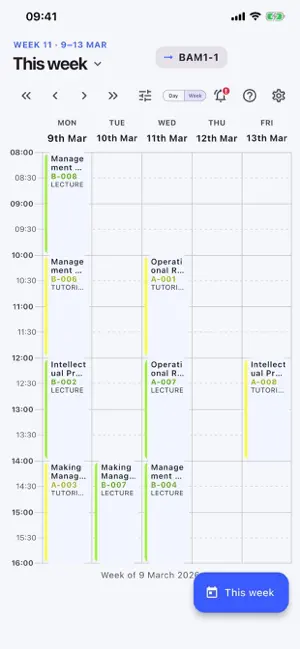
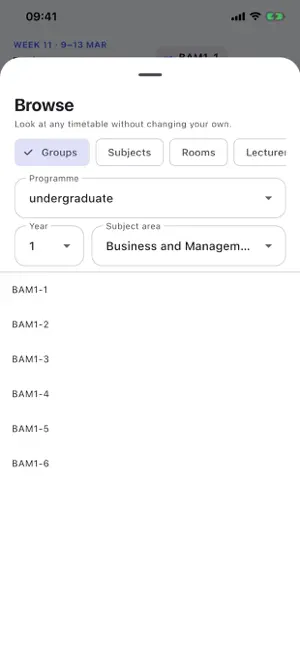
Wise Timetable Companion shows your own timetable on your phone — and tells you the moment it changes. Your school or university already publishes its timetable with Wise Timetable. Enter the short school code once, pick the groups or the lecturer you want to follow, and the app keeps it from then on. There is no account, no registration and no password. WHY A NOTIFICATION MATTERS A calendar subscription or a web page can only be asked. Neither can tell you anything. A room changes overnight, the feed updates silently, and you walk to the old room in the morning. Wise Timetable Companion pushes. When your school posts a notice for your group, your course or your lecturer, your phone shows it within seconds — on the lock screen, with the app closed. Only for what you follow, never a broadcast to the whole faculty. WHAT YOU GET • Your day and your week, laid out on a real time grid • Every lesson with its room, its lecturer and its type • Tap any lesson for the full detail: date, time, duration, room, lecturers and which groups are in it • Browse any other group, subject, room or lecturer without changing what you follow — useful before you decide, and useful when you need to find a colleague or a free room • See subject, room and programme names in your school's second language, where your school publishes one • Notices from your school, kept in the app so you can read them again • Follow several groups at once, from different programmes and years • Lecturers can follow their own schedule instead of a group BUILT FOR HOW A SCHOOL ACTUALLY WORKS Thirteen interface languages. Light and dark appearance, following your device. Works on iPhone and iPad. Your timetable comes from your own institution's Wise Timetable server, so what you see is what the timetabling office published — not a copy that went stale. NO ACCOUNT, NO TRACKING The app asks for nothing about you. No sign-up, no email address, no name. Your school code and your selection stay on your device. There is no advertising and nothing about you is profiled. Wise Timetable Companion is made by Wise Technologies Ltd., which has built academic timetabling software since 2003. It is used by universities and colleges worldwide, including the University of Oxford. Does your school not use Wise Timetable yet? Type "demo" as the school code to look around, and tell them about us: wise-tt.com
What’s new
Version 1.2.1 · Updated September 6, 2026
See your own subgroup's timetable. If your group is split into subgroups, they now appear in the group list, indented under the group they belong to. Pick your own subgroup and you get exactly its lessons, rooms and lecturers — it no longer shows the whole group's week instead. Fixes a report from a student who lost this when moving to the new app.
App privacy
The developer, Wise Technologies, reported these privacy practices to Apple.
Data Not Linked to You
The following data, which may be collected but is not linked to your identity, may be used for the following purposes:
- Identifiers: Device ID
Used for: App Functionality
Alternatives to Wise Timetable Companion
Looking for apps like Wise Timetable Companion? Here are 6 similar apps on the App Store. The highest rated is Studo - University Student App (4.6/5), and all 6 are free to download.
-
 CŠOD MISIJA
-
 moj eAsistent
4.5
moj eAsistent
4.5
-
 Learn Slovenian
4.0
Learn Slovenian
4.0
-
 Taleb: AI Study Companion
-
 Studo - University Student App
4.6
Studo - University Student App
4.6
-
 Besedan: Izboljšaj svoj govor
| App | Rating | Price | Last updated | Compare |
|---|---|---|---|---|
| Wise Timetable Companion | – | Free | September 6, 2026 | |
| CŠOD MISIJA | – | Free | Sep 25, 2025 | Compare |
| moj eAsistent | 4.5 / 5 (6) | Free | Oct 1, 2026 | Compare |
| Learn Slovenian | 4.0 / 5 (33) | Free | Sep 7, 2026 | Compare |
| Taleb: AI Study Companion | – | Free | Sep 25, 2026 | Compare |
| Studo - University Student App | 4.6 / 5 (14) | Free | Sep 28, 2026 | Compare |
| Besedan: Izboljšaj svoj govor | – | Free | Nov 5, 2025 | Compare |