

Writely - Text to Handwriting
Alluson UG (haftungsbeschränkt) Productivity iPhoneiPadiPod touch
Writely - Text to Handwriting is a free Productivity app for iPhone and iPad by Alluson UG (haftungsbeschränkt). Requires iOS 26.0. Updated October 26, 2026.
- Price
- Free
- on the App Store
- Size
- 15 MB
- Age 4+
- Updated
- Oct 26
- 2026 · v2.0.0
Screenshots


About Writely - Text to Handwriting
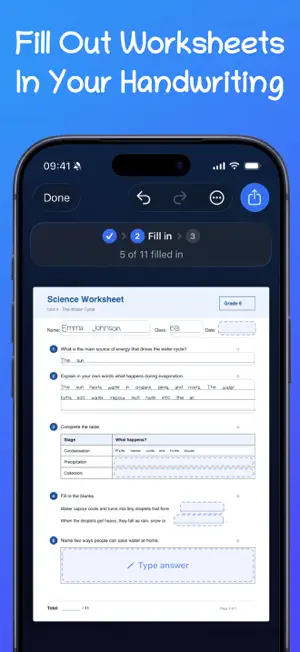
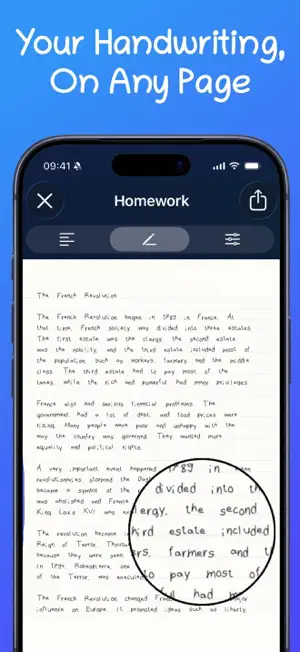
Typing is fast. Handwriting is personal. With Writely, you get both. Draw your letters, numbers and symbols once – with your finger or the Apple Pencil. From then on, Writely turns anything you type or paste into your handwriting: line by line, page by page. Not a stock font, but your own strokes. HOW IT WORKS 1. Create your handwriting. Trace each character once; guides keep everything level. 2. Enter your text. Type or paste it: lecture notes, an essay, a letter, a draft. 3. Finish your page. Save it as an image or PDF, share it or keep working on it. FILL OUT WORKSHEETS Import a PDF worksheet and Writely finds the answer fields – lines, boxes and tables – right on your device. Type your answers and they appear in your handwriting, on the lines where they belong. Importing and filling in is free; exporting the finished worksheet as a PDF is part of Writely Pro. LOOKS REAL BECAUSE IT IS • TrueInk: draw several versions of the same character. Writely alternates between them as it writes and varies position, tilt and size just a little – no two lines look alike. • Paper: ruled (wide or narrow), squared, dot grid or blank, in several paper colours. • Layout: text size, line height, word and character spacing, margins and page format. • Ink: from deep blue through red and green to any colour you like. KEEP WRITING WITH THE PENCIL Highlight, underline and add to the finished page. With pen, marker and eraser, undo, redo and automatic saving. MANY WRITING SYSTEMS Latin script with all the accents for German, French, Spanish, Italian, Turkish, Polish, Dutch and the Nordic languages. Plus Cyrillic, Greek, Japanese kana, Simplified Chinese, Korean Hangul, Arabic, Hebrew, Thai, Devanagari and mathematical symbols. STAY ORGANISED Folders with their own colour and icon, “Recently used” on the home screen, and multi-page documents you can duplicate and rename. EXPORT As a PNG image, vector PDF or directly to the clipboard as an image. Export to compatible note-taking apps is included as an experimental feature. YOUR DATA STAYS WITH YOU No account, no sign-in. Handwritings, documents and folders live locally on your iPhone or iPad. WRITELY FREE One handwriting, four documents, two folders and three exports per 24 hours. Image exports carry a small watermark. All paper styles and page formats are included. WRITELY PRO • Unlimited handwritings, documents and folders • Exports without a watermark • PDF export, including filled-out worksheets • TrueInk variants for more natural-looking handwriting • Custom papers and all ink colours Writely Pro is available as a monthly subscription, a yearly subscription or a one-time Lifetime purchase. Subscriptions are billed through your Apple ID and renew automatically unless cancelled at least 24 hours before the end of the current period in your Apple ID settings. Terms of Use: https://getwritely.app/en/legal/terms/ Privacy Policy: https://getwritely.app/en/legal/privacy/ Support: https://getwritely.app/en/support/
What’s new
Version 2.0.0 · Updated October 26, 2026
NEW: FILL OUT WORKSHEETS Import a PDF worksheet. Writely finds the answer fields – lines, boxes and tables – right on your device. Type your answers and they appear in your handwriting, ready to export as a PDF. ALSO NEW • A clearer home screen: start something new, pick up where you left off and see your handwritings at a glance • Folders in new styles, with more colours and icons • Tidier settings with live previews for spacing and margins • Many smaller improvements and fixes
App privacy
The developer, Alluson UG (haftungsbeschränkt), reported these privacy practices to Apple.
Data Not Linked to You
The following data, which may be collected but is not linked to your identity, may be used for the following purposes:
- Identifiers: Device ID
- Usage Data: Product Interaction
Used for: Analytics
Alternatives to Writely - Text to Handwriting
Looking for apps like Writely - Text to Handwriting? Here are 6 similar apps on the App Store.
-
 Text to Handwriting: Elyaz
-
 Handwrite: Notes & Letters
-
 Scriptify: Text to Handwriting
-
 Pencil Notes: Handwriting
-
 Sticky Notes : StickMe
-
 Somos Ramo
| App | Rating | Price | Last updated | Compare |
|---|---|---|---|---|
| Writely - Text to Handwriting | – | Free | October 26, 2026 | |
| Text to Handwriting: Elyaz | – | Free | Oct 23, 2026 | Compare |
| Handwrite: Notes & Letters | – | Free | Oct 22, 2026 | Compare |
| Scriptify: Text to Handwriting | – | Free | Aug 20, 2026 | Compare |
| Pencil Notes: Handwriting | – | 1.99 USD | Oct 15, 2026 | Compare |
| Sticky Notes : StickMe | – | Free | Jul 4, 2026 | Compare |
| Somos Ramo | – | Free | Sep 29, 2026 | Compare |