

ODAK: Focus & Screen Time
TOLUNAY BAS Productivity iPhoneiPadiPod touch
ODAK: Focus & Screen Time is a free Productivity app for iPhone and iPad by TOLUNAY BAS. Requires iOS 17.4. Updated October 18, 2026.
- Price
- Free
- on the App Store
- Size
- 123 MB
- Age 4+
- Updated
- Oct 18
- 2026 · v1.0.2
Screenshots



About ODAK: Focus & Screen Time
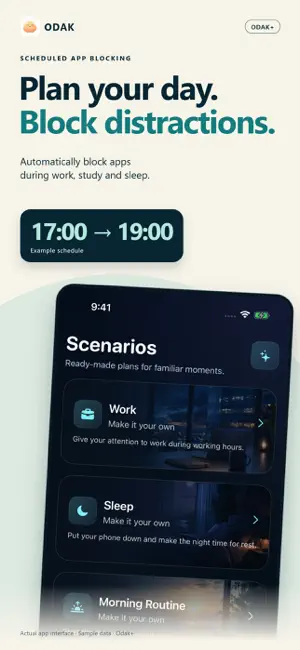
What will you make time for? ODAK is a productivity app for getting started, focusing on one thing and building more intentional daily habits. Take a small step toward your work, studies, reading or time for yourself. ONE STEP EACH DAY Explore Odak+ Personal Reset programs for work, procrastination, morning routines, sleep and phone habits. Each seven-day guide offers a short explanation and a practical task to try in real life. Track the steps you complete. Each program's first day is free, and the content works without Screen Time permission. MAKE SPACE TO FOCUS Start an Odak+ focus session and create routines around work and rest. Add an optional location rule. Set a shared daily allowance for selected apps and Safari websites, or give each one its own allowance. PAUSE BEFORE OPENING Choose distracting apps and Safari websites. Complete the included breathing step, then choose 5, 10 or 15 minutes of access when your active rules allow it. Odak+ also offers code and push-up tasks, with a separate task choice for each website. Temporary access does not bypass exhausted daily limits or active blocked hours. Safari protection requires the Odak extension and website access permission; other browsers are not covered. NOTICE YOUR PATTERNS Review usage and past days in Today and Progress. The Odak score summarizes screen-use habits. Focus time is estimated within the 7 a.m.–1 a.m. window by subtracting screen use that affects the score; it does not measure uninterrupted productive work. Odak and recognized functional apps are excluded from the score. You can choose additional exceptions after completing a deliberate-change step. INCLUDED AND ODAK+ App and website protection with breathing, permitted temporary access, usage reports, protection repair and disabling existing rules are included. Full guided programs, new schedules and location rules, daily limits, focus sessions, Plan Lock and code/push-up tasks require Odak+. Saved protections and program progress are retained when a subscription ends. PRIVACY No Odak account is required. Detailed usage reports, selections and program progress are processed on your device. Camera-based push-up counting does not record video. Location routines are optional; address searches and maps use Apple Maps services. The score and programs are not medical measurements or treatment. Optional ad measurement can be enabled only from Settings. With your permission, install and app launch information is shared with Meta and TikTok. All features work without this permission. SUBSCRIPTIONS Odak+ offers monthly and annual auto-renewable subscriptions. The purchase screen shows the price and any trial you are eligible for. Manage subscriptions in your Apple Account settings. Deleting the app does not cancel a subscription. Support: [email protected] Terms of Use: https://www.apple.com/legal/internet-services/itunes/dev/stdeula/
What’s new
Version 1.0.2 · Updated October 18, 2026
Improved layouts for app-opening tasks and the 5, 10 and 15-minute temporary access screen. Compatibility and stability improvements for the selected app name display.
App privacy
The developer, TOLUNAY BAS, reported these privacy practices to Apple.
Data Used to Track You
The following data may be used to track you across apps and websites owned by other companies:
- Identifiers: Device ID
- Usage Data: Product Interaction
Data Linked to You
The following data, which may be collected and linked to your identity, may be used for the following purposes:
- Identifiers: Device ID
- Usage Data: Product Interaction
Used for: Third-Party Advertising, Developer’s Advertising or Marketing, Analytics
Data Not Linked to You
The following data, which may be collected but is not linked to your identity, may be used for the following purposes:
- Other Data: Other Data Types
- Diagnostics: Crash Data
Used for: Analytics, App Functionality
Alternatives to ODAK: Focus & Screen Time
Looking for apps like ODAK: Focus & Screen Time? Here are 6 similar apps on the App Store.
-
 Eyes Up: Reduce Screen Time
-
 Aura: Daily Routine & Focus
-
 Salta: Daily Task Planner
-
 Tudory - Focus Timer & Planner
-
 Flexy: LifeOS
-
 Visionist: Life Planner & OS
| App | Rating | Price | Last updated | Compare |
|---|---|---|---|---|
| ODAK: Focus & Screen Time | – | Free | October 18, 2026 | |
| Eyes Up: Reduce Screen Time | – | Free | Oct 3, 2026 | Compare |
| Aura: Daily Routine & Focus | – | Free | May 13, 2026 | Compare |
| Salta: Daily Task Planner | – | Free | Sep 17, 2026 | Compare |
| Tudory - Focus Timer & Planner | – | Free | Oct 20, 2026 | Compare |
| Flexy: LifeOS | – | Free | Sep 14, 2026 | Compare |
| Visionist: Life Planner & OS | – | Free | Jun 5, 2026 | Compare |