

NoRemote: TV Remote Control
SIA Vesoft Utilities iPhoneiPadiPod touch
NoRemote: TV Remote Control is a free Utilities app for iPhone and iPad by SIA Vesoft. Requires iOS 15.6. Updated October 21, 2026.
- Price
- Free
- on the App Store
- Size
- 49 MB
- Age 4+
- Updated
- Oct 21
- 2026 · v1.0.1
Screenshots


About NoRemote: TV Remote Control
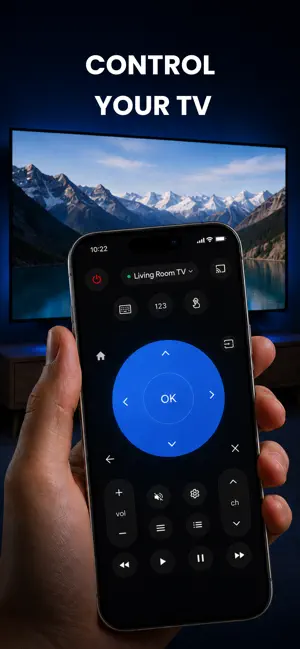
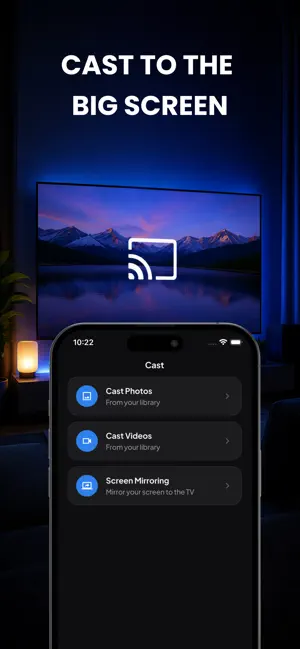
Turn your phone into a universal remote for every TV in your home. NoRemote connects over Wi-Fi and works with Samsung, LG, Roku, Fire TV, Vizio, Android TV, Google TV, Sony, TCL and Hisense — no extra hardware, no infrared, no cables. Open the app, tap your TV, and you are in control in seconds. THE REMOTE IS FREE — AND STAYS FREE • Automatic TV discovery on your Wi-Fi network • Full button remote: power, volume, channels, D-pad, OK, back, home • Switch inputs (HDMI, TV, AV) with a single tap • Type with your phone keyboard instead of hunting letters on screen • Launch your streaming apps straight from your phone • Every button press is free for your connected TV. Forever. WORKS WITH • Samsung Smart TV (2016 and newer, Tizen) • LG Smart TV (webOS) • Roku, TCL Roku TV and Hisense Roku TV • Amazon Fire TV and Fire TV Stick • Android TV and Google TV, including Sony • Vizio SmartCast PREMIUM • Cast photos and videos from your phone to the big screen • Live screen mirroring — share what you see, in real time • Save several TVs and switch between them instantly WHY YOU WILL KEEP IT Remote lost in the sofa? Batteries dead? Kids hid it again? Your phone is always within reach. Everything runs over your home Wi-Fi, so there is nothing to pair, plug in or point at the screen. HOW TO START Connect your phone and your TV to the same Wi-Fi network, open the app and pick your TV from the list. Some TVs ask you to confirm the connection once on screen — after that it simply works. --- NoRemote offers an optional subscription with a 3-day free trial. Payment is charged to your Apple Account at confirmation of purchase. The subscription renews automatically unless auto-renew is turned off at least 24 hours before the end of the current period. Manage or cancel your subscription in your Apple Account settings. Any unused portion of a free trial is forfeited when a subscription is purchased. Not affiliated with, endorsed by or sponsored by Samsung, LG, Roku, Amazon, Vizio, Sony, TCL, Hisense or Google. All trademarks are the property of their respective owners. Terms of Use: https://vesoftapps.com/terms Privacy Policy: https://vesoftapps.com/privacy
What’s new
Version 1.0.1 · Updated October 21, 2026
New: live screen mirroring. Show your iPhone or iPad screen on your TV in real time — photos, apps, websites and more. Also: faster TV discovery, so Roku, Samsung and LG TVs show up more quickly and reliably. Plus bug fixes and improvements.
App privacy
The developer, SIA Vesoft, reported these privacy practices to Apple.
Data Not Linked to You
The following data, which may be collected but is not linked to your identity, may be used for the following purposes:
- Identifiers: Device ID
Used for: Analytics
Alternatives to NoRemote: TV Remote Control
Looking for apps like NoRemote: TV Remote Control? Here are 6 similar apps on the App Store. The highest rated is TV REMOTE for Bravia (5.0/5), and all 6 are free to download.
-
 RemoteTv: Ad-Free TV Remote
-
 Sofa: TV Remote & Keyboard
-
 TV Remote Control - TVRe
-
 TV REMOTE for Bravia
5.0
-
 TV Remote - Controller
-
 Zappy Remote
| App | Rating | Price | Last updated | Compare |
|---|---|---|---|---|
| NoRemote: TV Remote Control | – | Free | October 21, 2026 | |
| RemoteTv: Ad-Free TV Remote | – | Free | Oct 10, 2026 | Compare |
| Sofa: TV Remote & Keyboard | – | Free | Oct 13, 2026 | Compare |
| TV Remote Control - TVRe | – | Free | Oct 12, 2026 | Compare |
| TV REMOTE for Bravia | 5.0 / 5 (1) | Free | Jul 20, 2026 | Compare |
| TV Remote - Controller | – | Free | Jul 21, 2026 | Compare |
| Zappy Remote | – | Free | Jun 17, 2026 | Compare |