

PadPad: Drawing Tablet
BlueGuru LLC Graphics & Design iPhoneiPadiPod touch
PadPad: Drawing Tablet is a free Graphics & Design app for iPhone and iPad by BlueGuru LLC. Requires iOS 18.0. Updated October 24, 2026.
- Price
- Free
- on the App Store
- Size
- 8 MB
- Age 4+
- Updated
- Oct 24
- 2026 · v1.3
Screenshots


About PadPad: Drawing Tablet
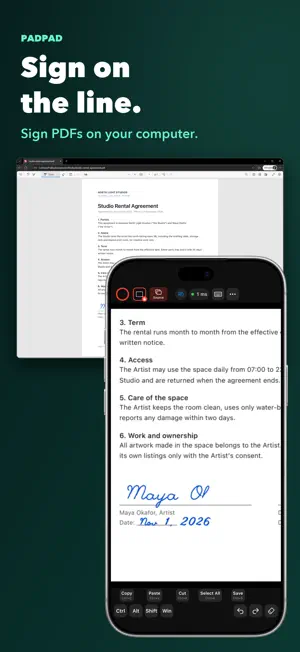
Turn your iPad and Apple Pencil into a pen tablet for your Mac or Windows PC. PadPad shows your computer's screen on your iPad and sends every Pencil stroke back as real pen input — pressure, tilt and a true eraser — so desktop apps like Krita, Photoshop and Clip Studio Paint respond just as they do to a pen tablet. Handwrite notes, mark up slides, or sign a PDF that never leaves your computer. DRAW • Apple Pencil pressure, tilt and eraser in tablet-aware desktop apps • Hover and barrel roll on supported iPads and Pencils • Shape your pressure curve and smoothing • Stream a whole display, one app, one window or an area — fitted to your iPad • Pinch, pan and rotate with two fingers, sent to your drawing app MAC AND WINDOWS • The PadMac (macOS 15+) and PadWin (Windows 10 or 11, beta) apps run on your computer • PadPad shows the right keys for each: ⌘ ⌥ ⇧ ⌃ on a Mac, Ctrl, Alt, Shift and Win on a PC • Quick Keys and gestures for each desktop app WRITE AND SIGN Handwrite equations and class notes, annotate a document or add a signature without moving the file to your iPad. On iPhone, draw with your finger for quick signatures. CONNECTS DIRECTLY PadPad connects straight to your computer over Wi-Fi or a USB-C cable. No account, and your work is not uploaded to a PadPad cloud service. WHAT YOU NEED • An iPad or iPhone on iOS 18 or later • A Mac with PadMac, or a Windows PC with PadWin — from codonic.dev/apps/pad Capabilities depend on your iPad, Pencil and desktop app.
What’s new
Version 1.3 · Updated October 24, 2026
• Shortcuts now follow your computer's keyboard layout. On a French AZERTY keyboard, Undo no longer closes the app, and German, Japanese and other layouts work the same way. • Pinch, pan and rotate with two fingers go to your drawing app. Zooming only PadPad's own view is now a separate mode you can lock. • Quick Keys you can edit: as many keys as you need, presets to start from, and a profile for each app. Profiles live on your computer, so every tablet you connect gets the same setup. • Your pen's eraser and buttons reach the drawing app as a real eraser and real buttons. Double-tap and squeeze can follow your system setting or do something different in each app. • The keyboard types text in any language, including accented letters and Japanese input, and has a row of special keys. • Setup in your language, with buttons on the computer that open the right settings directly. • PadPad, PadMac and PadWin are now in Japanese, German, French, Spanish and Brazilian Portuguese. • PadWin now runs on Windows 10 (version 2004 or later) as well as Windows 11.
App privacy
The developer, BlueGuru LLC, reported these privacy practices to Apple.
Data Not Collected
The developer does not collect any data from this app.
Alternatives to PadPad: Drawing Tablet
Looking for apps like PadPad: Drawing Tablet? Here are 6 similar apps on the App Store. The highest rated is Holo.Draw Lite (5.0/5), and all 6 are free to download.
-
 InkBridge
-
 VirtualTablet
3.2
VirtualTablet
3.2
-
 VirtualTablet: Bluetooth
2.2
VirtualTablet: Bluetooth
2.2
-
 Color Palette Conversion: UPC
3.0
Color Palette Conversion: UPC
3.0
-
 Holo.Draw Lite
5.0
Holo.Draw Lite
5.0
-
 DataWeave
| App | Rating | Price | Last updated | Compare |
|---|---|---|---|---|
| PadPad: Drawing Tablet | – | Free | October 24, 2026 | |
| InkBridge | – | Free | Sep 9, 2026 | Compare |
| VirtualTablet | 3.3 / 5 (4) | Free | Oct 24, 2026 | Compare |
| VirtualTablet: Bluetooth | 2.3 / 5 (8) | Free | Oct 26, 2026 | Compare |
| Color Palette Conversion: UPC | 3.0 / 5 (1) | Free | Oct 26, 2026 | Compare |
| Holo.Draw Lite | 5.0 / 5 (1) | Free | Jun 27, 2024 | Compare |
| DataWeave | – | Free | Mar 9, 2026 | Compare |