

SpiroCanvas Spirograph Mandala
Wei Li Graphics & Design iPhoneiPadiPod touch
SpiroCanvas Spirograph Mandala is a free Graphics & Design app for iPhone and iPad by Wei Li. Requires iOS 15.0. Updated September 19, 2026.
- Price
- Free
- on the App Store
- Size
- 27 MB
- Age 4+
- Updated
- Sep 19
- 2026 · v1.3.0
Screenshots



About SpiroCanvas Spirograph Mandala
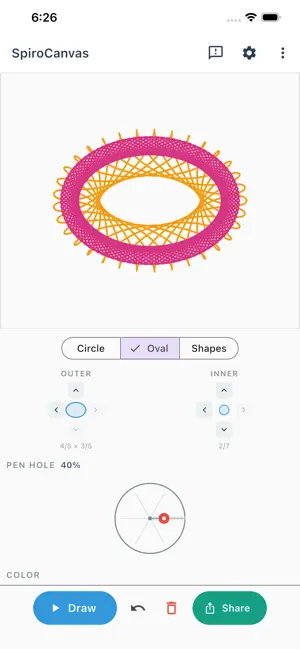
SpiroCanvas is a spirograph app and mandala maker. Pick a disc, choose a pen hole, tap Draw, and watch the pen trace a hypotrochoid curve across the canvas: the classic Spirograph toy, on your phone. Layer curve on curve to build mandala-like compositions, then save or share them. FEATURES Draw & Design - 10 disc sizes, from simple triangles to complex rosettes - Custom disc ratios for unlimited pattern variety - 10 pen hole positions for different curve shapes - 8 colors plus a custom color picker and rainbow mode Three Track Modes - Circle: the classic circle-in-circle spirograph patterns - Oval: elliptical tracks for asymmetric, organic shapes, with 20+ presets - Shapes: roll the disc around a heart, star, flower, triangle, square, egg, stadium or blob - Shapes also covers every digit 0-9 and every letter A-Z, for names and numbers as patterns - Run the disc inside or outside the track for two different families of curve - Independent inner disc shapes Layers - Stack unlimited patterns on one canvas - Show or hide individual layers - Undo and clear with one tap - Per-layer transforms: scale, rotate, and drag to reposition Save & Share - Export high-resolution PNG images - Share to social apps, messaging, or your photo library - Save compositions to revisit and keep editing later - Auto-save restores your session Pattern Gallery - Browse a curated gallery of pattern presets - One tap to load and draw any preset Extras - Adjustable drawing speed, 0.25x to 4x - Sound effects while you draw - Available in 11 languages - Works on iPhone and iPad No ads, no in-app purchases, and no account required. Whether you had a Spirograph as a kid or you are coming to mandala drawing for the first time, SpiroCanvas makes it quick to experiment and to share what you make.
What’s new
Version 1.3.0 · Updated September 19, 2026
New: • Name your artwork when you share it — and the next share remembers the title you used last. Fixes: • Editing a layer now changes the layer you picked, not whichever one sits in that row. • Settings changed right after launch are saved instead of being quietly discarded. • Layers in a drawing queue no longer dim while the rest of the queue finishes drawing. • Replaying a drawing now animates each layer with its own pen and frame.
App privacy
The developer, Wei Li, reported these privacy practices to Apple.
Data Not Linked to You
The following data, which may be collected but is not linked to your identity, may be used for the following purposes:
- Location: Coarse Location
- Identifiers: Device ID
- Usage Data: Product Interaction
- Diagnostics: Crash Data, Performance Data, Other Diagnostic Data
Used for: Analytics, App Functionality
Alternatives to SpiroCanvas Spirograph Mandala
Looking for apps like SpiroCanvas Spirograph Mandala? Here are 6 similar apps on the App Store. The highest rated is Spirograph Studio (5.0/5), and all 6 are free to download.
-
 Artisan Forge
-
 Orsym: Mandala Kaleidoscope
-
 Spirogears: Spirographic Art
-
 KaleidoPen - Spin Symmetry Art
-
 Spirograph Studio
5.0
Spirograph Studio
5.0
-
 BeautOfFractals
| App | Rating | Price | Last updated | Compare |
|---|---|---|---|---|
| SpiroCanvas Spirograph Mandala | – | Free | September 19, 2026 | |
| Artisan Forge | – | Free | Jun 10, 2026 | Compare |
| Orsym: Mandala Kaleidoscope | – | Free | Oct 20, 2026 | Compare |
| Spirogears: Spirographic Art | – | Free | Jun 18, 2026 | Compare |
| KaleidoPen - Spin Symmetry Art | – | Free | Oct 17, 2026 | Compare |
| Spirograph Studio | 5.0 / 5 (8) | Free | Mar 5, 2026 | Compare |
| BeautOfFractals | – | Free | Oct 25, 2026 | Compare |