

MPO Viewer
G.G. van der Steen Photo & Video iPhoneiPadiPod touch
MPO Viewer is a free Photo & Video app for iPhone and iPad by G.G. van der Steen. Requires iOS 26.0. Updated October 14, 2026.
- Price
- Free
- on the App Store
- Size
- 65 MB
- Age 4+
- Updated
- Oct 14
- 2026 · v1.17
Screenshots


About MPO Viewer
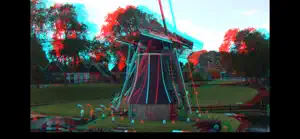
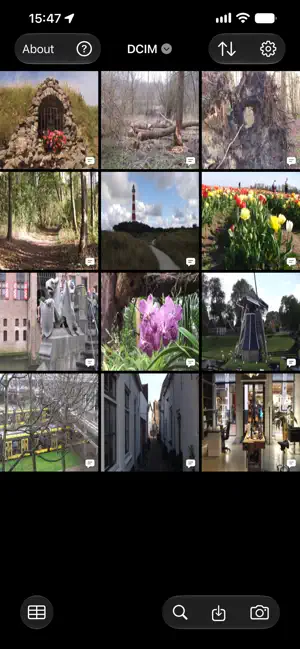
A box of Keystone cards, a Fujifilm FinePix and a phone: MPO Viewer brings them together. It opens stereo photographs and stereo video straight from the camera, with no conversion and no computer, and lets you look at them the way they were meant to be seen. Through a viewer, with coloured glasses, or together on the television. A dual-lens camera such as the FinePix REAL 3D W1 or W3 writes every photograph to the card as an .mpo with both eyes inside it, and films in .avi. Point the app at a folder on your device or in iCloud Drive and they are all in one place, in a grid or a table, searchable. Keep them apart in as many folders as you like: each has its own captions, hidden photographs and playlists, and the name at the top of the grid switches between them. Six ways to look • Side by Side: the classic pair, for free viewing or a stereoscope, from a Holmes to an OWL • Crossed Eye: the same pair swapped, for anyone who crosses their eyes • Anaglyph: both eyes in one picture for coloured glasses, red/cyan, magenta/green, amber/blue or red/blue, with ghost reduction • Cardboard: the pair bent so the lenses of a cheap VR viewer straighten it out again; set it to your own viewer once • Wiggle: the two eyes flicker back and forth, on a timer or as you tilt the phone • Depth: a depth map built from the pair, moving along as you tilt Cardboard and Depth are marked experimental. Clips play with sound in the first four. Whichever you pick, the pair is put straight first: the eyes brought into line, the nearest thing placed at the screen plane. That is the difference between depth and a headache. Watching together A few red/cyan glasses and a television, and the whole room joins in. Mirror to an Apple TV or AirPlay screen, or plug in HDMI: the picture moves to the big screen and the phone becomes the remote. A strip of thumbnails under the photograph holds the whole folder, the one on the television in the middle: look ahead without the room noticing, and tap to send one over. Swipe through them or start a slideshow, which carries on from whatever you pick. Set the depth once per television and every photograph sits right on that screen from then on. Old cards A stereo card from 1900 becomes an MPO here like any other. Photograph one inside the frame the app draws, or hand it a scan to convert: it finds the two prints, straightens them, lays them on each other and takes out the colour cast. Every card then has three buttons of its own: turn it over, put the light back, or keep it without colour. And if you like, a model running on the device itself will colour it in. The card is never touched. A picture that already holds the pair side by side goes in the same way, and so does an anaglyph: that one the app takes back apart into its two views, in grey, the depth unchanged. Framing, keeping, sharing Put a photograph in a border in the colour you choose, or in one of six passepartouts, from a stereo card to a cardboard peep box, with a caption in a colour of its own. Save a selection as a playlist, in your order or shuffled. Side by Side, Crossed Eye and Anaglyph go out as PNG or JPEG, Wiggle as a GIF or a video, Depth as a tilt in MP4, and a clip as MP4 at three sizes. Exports carry a watermark; MPO Viewer Pro takes it off. And the rest A photograph you hide stays hidden, behind Face ID if you want. An info button tells you what the camera recorded, down to lens, aperture, shutter and ISO, with a map when there is a location. All of it works with VoiceOver and with the largest text sizes. With Reduce Motion on, Wiggle and Depth follow your tilt instead of moving by themselves, and those two also work with one eye. Your photographs do not leave your device. No accounts, no analytics, nothing looking over your shoulder. The one thing the app ever fetches is a larger colour model, and only when you ask for it. In English and Dutch. For anyone who finds a box of old stereo photographs again, and anyone who still makes them.
What’s new
Version 1.17 · Updated October 14, 2026
New in 1.17 • More than one folder. The library was one folder; it is now as many as you keep. Every folder holds its own captions, hidden photographs and playlists, so switching away and coming back finds everything the way you left it. Tap the name at the top of the grid to switch, and add or remove folders under Settings, Library. Removing one leaves the folder and the photographs themselves untouched. • A strip of thumbnails while the television has the picture. Under the photograph the whole folder stands as small pictures, with the one on the television in the middle. Scroll ahead without the room noticing anything, and tap one to send it over. A slideshow carries on from the photograph you picked. From earlier versions, in case you skipped a few • A pair that says how it wants to be looked at. A ready made stereo pair may have been made for crossed eyes, and then the depth is inside out. If the file name or the EXIF says so, the app swaps the eyes on import and says underneath what it read. If that is wrong, the swap button keeps the last word. • The screen stays on while you are looking. Looking at stereo happens without touching, and in Cardboard it cannot be done at all, so the screen used to dim in the middle of it. While the viewer is open it now stays on. • Import an anaglyph. A picture made for red and cyan glasses comes apart again into the two views it was built from, after which every way of looking the app has applies to it. • The viewer and the grid stopped caring how big your folder is, even at a few thousand photographs. • The sliders redraw while you drag, in Anaglyph, in Cardboard and in Depth, so you set them by eye instead of by guessing. • Cardboard upright can be pinched and dragged, to look at something closely without leaving the mode.
App privacy
The developer, G.G. van der Steen, reported these privacy practices to Apple.
Data Not Collected
The developer does not collect any data from this app.
Alternatives to MPO Viewer
Looking for apps like MPO Viewer? Here are 6 similar apps on the App Store. The highest rated is ZipPix3D (5.0/5), and 5 of the 6 are free to download.


| App | Rating | Price | Last updated | Compare |
|---|---|---|---|---|
| MPO Viewer | – | Free | October 14, 2026 | |
| ZipPix3D | 5.0 / 5 (1) | 4.99 USD | Jul 23, 2024 | Compare |
| iSpatialAdjuster | – | Free | Mar 24, 2026 | Compare |
| SkateCam3D | – | Free | Sep 24, 2026 | Compare |
| Hyper Stereo Helper | 3.0 / 5 (1) | Free | Nov 25, 2023 | Compare |
| Liftframe | – | Free | Mar 31, 2026 | Compare |
| MS3D ChaCha Video | – | Free | Nov 7, 2025 | Compare |
Compare MPO Viewer with the top alternatives: ratings, updates, ASO score and keyword gaps →