

ClockWork: Workday Alarm
德华 周 Utilities iPhoneiPadiPod touch
ClockWork: Workday Alarm is a free Utilities app for iPhone and iPad by 德华 周. Requires iOS 26.0. Updated October 25, 2026.
- Price
- Free
- on the App Store
- Size
- 79 MB
- Age 4+
- Updated
- Oct 25
- 2026 · v1.0.7
Screenshots


About ClockWork: Workday Alarm
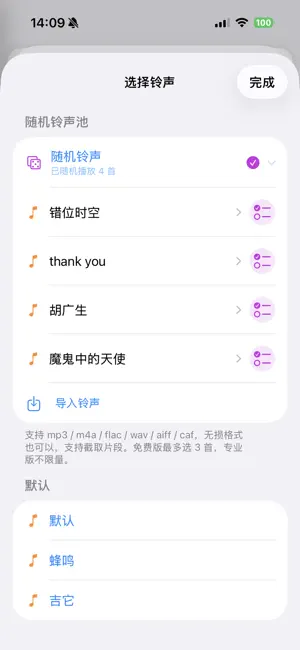
Alarms that ring only on days you actually work. ClockWork follows the official public holidays and makeup workdays of the country you choose, so your alarm stays silent on days off — no more switching it off by hand. ■ SMART ALARMS · Workday alarm: follows holidays and makeup days automatically · Shift alarm: work X days, rest Y days cycles · Interval alarms: repeat reminders inside a time window (stand up, drink water, eye breaks) · Specific date / rotating weeks / yearly (birthdays) / monthly (rent, bills) · Custom shuffle ringtone pool: import songs you love and play one at random each ring · Ringtone trimming: set exact begin/end times, view an energy strip and use a suggested clip · Snooze length and skip-on-leave days ■ CALENDAR · Gregorian + lunar calendar + 24 solar terms; holidays and makeup days at a glance · This month's workdays / rest days, month and year progress · Check-in projects and records (Pro) ■ WORLD CLOCK · Live time differences and day/night for the cities you follow · Time conversion (free): pick any city as the reference and see the rest ■ COUNTDOWNS · Target date, repeat periods and periodic reminders · Assign to small / medium / large widget groups ■ WIDGETS · Monthly/weekly calendar, world clock, countdown and check-in widgets ■ VERSION BACKUP · Automatic daily snapshots, keep 7 / 15 days · Optional sync to your own iCloud — sign in with the same Apple ID on a new device to restore ■ ABOUT PRO The free version includes alarms, calendar and world clock basics, plus a 30-day Pro trial. Pro unlocks countdowns, check-in, interval alarms, leave-day schedules for the ringing calendar and unlimited random alarm sounds. · Lifetime purchase ¥20 (one-time) Privacy first: your data stays on your device by default; backups are optional and go to your own iCloud. No location or contacts collection, no ads, no third-party analytics SDKs.
What’s new
Version 1.0.7 · Updated October 25, 2026
Full iPhone Duo support with adaptive side navigation, landscape and portrait calendar layouts, stable split positioning, and upcoming-day summaries. Existing iPhone layouts remain unchanged.
App privacy
The developer, 德华 周, reported these privacy practices to Apple.
Data Linked to You
The following data, which may be collected and linked to your identity, may be used for the following purposes:
- Contact Info: Email Address
- User Content: Other User Content
- Identifiers: User ID
Used for: App Functionality
Alternatives to ClockWork: Workday Alarm
Looking for apps like ClockWork: Workday Alarm? Here are 6 similar apps on the App Store. The highest rated is Time Kept: Countdown Tracker (5.0/5), and all 6 are free to download.
-
 Lemi Diary
-
 Time Kept: Countdown Tracker
5.0
Time Kept: Countdown Tracker
5.0
-
 PlainTick Flip Clock
5.0
PlainTick Flip Clock
5.0
-
 Chat Advisor
5.0
Chat Advisor
5.0
-
 Simple Subnet Calc
5.0
Simple Subnet Calc
5.0
-
 StandBy Clock: Custom Widgets
4.0
StandBy Clock: Custom Widgets
4.0
| App | Rating | Price | Last updated | Compare |
|---|---|---|---|---|
| ClockWork: Workday Alarm | – | Free | October 25, 2026 | |
| Lemi Diary | – | Free | Oct 6, 2026 | Compare |
| Time Kept: Countdown Tracker | 5.0 / 5 (1) | Free | Aug 19, 2026 | Compare |
| PlainTick Flip Clock | 5.0 / 5 (1) | Free | Oct 23, 2026 | Compare |
| Chat Advisor | 5.0 / 5 (2) | Free | Sep 21, 2026 | Compare |
| Simple Subnet Calc | 5.0 / 5 (1) | Free | May 3, 2025 | Compare |
| StandBy Clock: Custom Widgets | 4.0 / 5 (6) | Free | Aug 12, 2026 | Compare |