

ClearPlayer TV
Matteo Nunziati Entertainment iPhoneiPadiPod touch
ClearPlayer TV is a free Entertainment app for iPhone and iPad by Matteo Nunziati. Rated 5.0/5 from 2 ratings. Requires iOS 18.0. Updated October 27, 2026.
- Rating
- 5.0
- 2 ratings
- Price
- Free
- on the App Store
- Size
- 33 MB
- Age 4+
- Updated
- Oct 27
- 2026 · v2026.10.0
Screenshots


About ClearPlayer TV
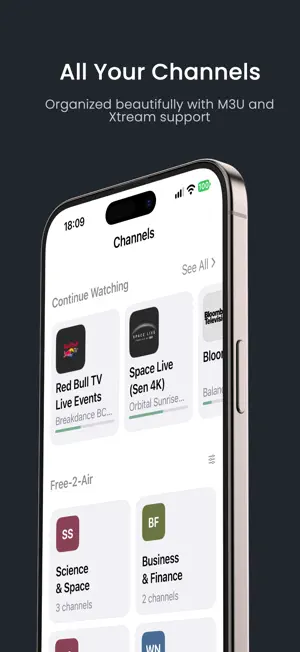
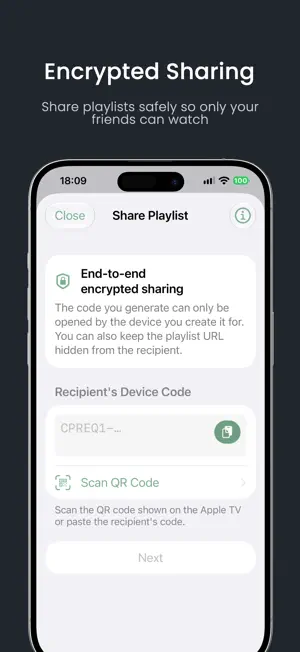
ClearPlayer is a universal media player for iOS, iPadOS, and Apple TV, engineered for modern streaming standards, custom playlists, ClearKey, and XMLTV EPG integration — built from the ground up for viewers who demand total control over their playback experience. Stream Engine & Performance • Unified Native Playback: Hardware-accelerated bitstream processing powered by AVFoundation and VideoToolbox for smooth, battery-efficient playback • Advanced Protocol Pipeline: Seamless playback of HLS (RFC 8216) and MPEG-DASH (ISO/IEC 23009-1) streams across fragmented MP4 (fMP4), CMAF, and MPEG-TS containers, with integrated ClearKey support • Real-Time Stream Inspector: Live technical readout of resolution (up to 4K UHD), frame rate (50/60 fps), bitstream codec (HEVC, AVC), instantaneous bitrate, and dynamic range (HDR10, HLG, Dolby Vision, SDR) • Live DVR & Extended Time-Shift: Pause, rewind, and scrub live broadcasts with deep time-shift buffer support and configurable seek jump steps (10s, 30s, 1m, 2m) • Multi-Channel Audio & Subtitles: Instant track selection for multi-language audio, spatial formats (including Dolby Digital Plus), and embedded subtitles • Quick Play: Instantly test and launch any stream URL or M3U snippet with a single tap, without adding it to your permanent library • Native Picture in Picture (PiP) and continuous background / lock-screen audio playback Playlists & Formats • Comprehensive M3U & M3U8 Support: Handles nested playlists, extended tags (#EXTINF, #EXTGRP, #EXTVLCOPT, #EXTHTTP), and compressed archives • Xtream Codes Integration: Full organization for Live TV and VOD libraries, complete with account status and connection monitoring • Extended Streaming Parameters: Native handling for Kodi and VLC streaming metadata (#KODIPROP), custom HTTP headers, user-agent overrides, and key system parameters • Direct File Import: Add playlist files directly from the Files app or iCloud Drive • Automated Background Refresh: Scheduled synchronization with smart token renewal and offline cache persistence Interactive TV Guide (XMLTV EPG) • Visual EPG Grid: Interactive program schedule matrix across channels and timelines, optimized for touch and the big screen • Rich Program Metadata: Detailed program sheets featuring synopsis, cast, directors, release year, genres, and episode details • Multi-Source Hierarchy: Attach multiple XMLTV sources with customizable prioritization and intelligent channel matching • High-Definition Channel Logos: Crisp vector SVG and raster logo rendering with intelligent dark and light contrast adaptation • Now Playing Integration: Automatic program progress tracking and artwork updates on the lock screen and Control Center Privacy & Asymmetric Sharing • End-to-End Encrypted Sharing: Share playlists securely between devices using state-of-the-art asymmetric device-key cryptography (HPKE Curve25519) • Protected Source URLs: Keep underlying stream URLs and credentials safely locked in the recipient's secure Keychain, completely hidden and non-exportable • Expiration Controls: Set optional time-based expiration dates on shared access • Absolute Privacy: No advertisements. No user tracking. No accounts required. Your playlists and viewing habits stay entirely on your device. Tailored Design & Localization • Liquid Glass Visual Design: 14 customizable accent colors, adaptive light and dark themes, and selectable channel layouts (Grid or List) • Global Reach: Fully localized in 22 languages ClearPlayer does NOT provide, host, or distribute any media content or channels. It is a technical playback tool: users must supply their own content sources and are solely responsible for the links they choose to play.
What’s new
Version 2026.10.0 · Updated October 27, 2026
Version 2026.10.0 • Brand New VOD Experience: Dedicated Movies & Series tabs with categorized browsing, posters, and full episode guides. Supports OTV specification and Xtream Codes API. • Aether Playback Engine: Added a high-performance multi-format playback engine for VOD (.ts, .mkv, .avi) with automatic format fallback. • System Now Playing Integration: Full support for system media controls across the Lock Screen, Control Center, and Dynamic Island, displaying live program metadata and composited channel artwork. • Continue Watching: Seamlessly track playback progress across on-demand movies, series episodes, and live channels. • Multi-Day Full Schedule: Browse full multi-day program guides for any channel with a dedicated day picker and instant jump to the currently airing program. • Revamped Program Details & EPG: Redesigned program sheets with rich metadata, visual progress indicators, and artwork previews in Bento and grid cards. • Customizable Card Artwork: New appearance settings allowing you to toggle program poster backgrounds on or off across Continue Watching, Favorites, and TV Guide Bento cards for a tailored visual experience. • Dynamic Auto Accent Color: Added an adaptive "Auto" theme accent that matches your system appearance with custom two-tone swatches and contrast-safe switch toggles across iOS and tvOS. • Favorites Rail: Access and manage your favorite channels directly from the top of the Channels tab. • Enhanced EPG Matching & Time-Shift: Multi-candidate fallback across XMLTV sources and improved handling for time-shifted channels (+1/+2) to eliminate missing guide info. • Auto-Sync & Smart Polling: Immediate playlist and EPG refresh when sources are edited or toggled, with optimized background polling to preserve battery and keep streaming tokens valid. Version 2026.9.4 A redesigned experience is here! • New iOS Interface: Introducing a modern native navigation experience with dedicated tabs for Channels, TV Guide, Favorites, and Settings. • Redesigned TV Guide: New Bento-style EPG featuring live progress indicators, current and upcoming programs, and full 24-hour channel schedules. • Continue Watching & Custom Layouts: Quickly resume your content and choose between Grid or List channel views. • QR Code Sharing: Instantly share playlists between your iPhone and your Apple TV with built-in QR code support. • Enhanced Playback: Improved DASH streaming, subtitle support, smoother seeking, and more reliable live synchronization. • Greater Reliability: Automatic playback engine fallback ensures uninterrupted viewing. • Performance Improvements: Reduced memory usage and overall app responsiveness optimizations. 2026.9.3: • Native Playback Engine (iOS): Introduced the new Native playback engine on the iOS app. • Automatic Picture-in-Picture: Added automatic PiP support (requires Native engine). • Stream Info Panel: Added a new real-time stream info and metrics overlay. • Forced Resolution: Added the ability to manually select and force a specific video resolution during playback (requires Native engine). • Extended Playback Support: Added support for MPEG-TS SAMPLE-AES. • Default Resolution Setting: Added a new setting to choose your preferred default resolution (Auto, Maximum, Minimum). • Buffer Size Setting: Added a new setting to customize the forward buffer duration (from 0s up to 30s). • Playback Menu: Reorganized the settings screen by moving playback-related preferences into a dedicated sub-menu. • Native 4K & HEVC Playback: Fixed playback issues with HEVC video codecs, enabling proper native 4K playback. • Playlist Auto-Refresh: Playlists now automatically refresh their content when re-enabled from the settings. • M3U Parser Support: Added parsing support for more properties in M3U files. • Player UI Polish: Player controls now gracefully dissolve and hide when modal panels appear.
App privacy
The developer, Matteo Nunziati, reported these privacy practices to Apple.
Data Not Linked to You
The following data, which may be collected but is not linked to your identity, may be used for the following purposes:
- Usage Data: Product Interaction
- Diagnostics: Crash Data, Performance Data
Used for: Analytics
Alternatives to ClearPlayer TV
Looking for apps like ClearPlayer TV? Here are 6 similar apps on the App Store. The highest rated is Karaoke Mic - Mic to Speaker (4.8/5), and 5 of the 6 are free to download.
-
 IPTV Room
-
 Karaoke Mic - Mic to Speaker
4.8
-
 RetroPaint
-
 nanoTV
4.3
-
 iNAS Player: NAS Video & Music
1.0
-
 OneMovie: What To Watch
4.6
| App | Rating | Price | Last updated | Compare |
|---|---|---|---|---|
| ClearPlayer TV | 5.0 / 5 (2 ratings) | Free | October 27, 2026 | |
| IPTV Room | – | Free | Oct 24, 2026 | Compare |
| Karaoke Mic - Mic to Speaker | 4.8 / 5 (4) | Free | Oct 28, 2026 | Compare |
| RetroPaint | – | 0.99 USD | Oct 6, 2026 | Compare |
| nanoTV | 4.3 / 5 (13) | Free | Oct 23, 2026 | Compare |
| iNAS Player: NAS Video & Music | 1.0 / 5 (2) | Free | Oct 27, 2026 | Compare |
| OneMovie: What To Watch | 4.6 / 5 (58) | Free | Oct 18, 2026 | Compare |
Compare ClearPlayer TV with the top alternatives: ratings, updates, ASO score and keyword gaps →