

Textream
Fatih Kadir Akin Utilities iPhoneiPadiPod touchMac
Textream is a free Utilities app for iPhone and iPad by Fatih Kadir Akin. Requires iOS 26.0. Updated August 22, 2026.
- Price
- Free
- on the App Store
- Size
- 3 MB
- Age 4+
- Updated
- Aug 22
- 2026 · v1.0
Screenshots

About Textream
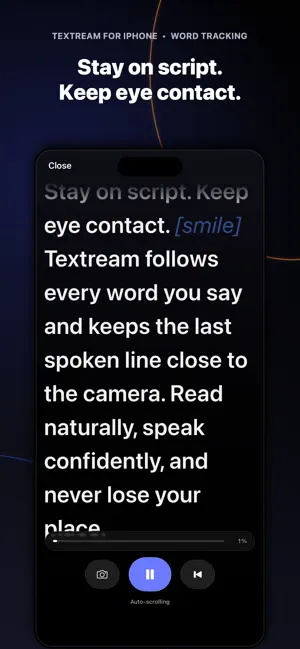
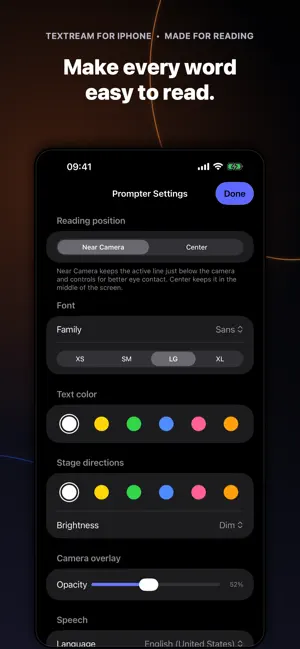
Keep your eyes close to the camera and your place in the script. Textream is a teleprompter for iPhone and iPad that can follow the words you say, scroll at a steady pace, or move only while you speak. Paste or write a script, choose Read or Record, and start presenting. THREE WAYS TO STAY ON SCRIPT • Word Tracking follows and highlights the words you say using Apple Speech Recognition. • Classic scrolls at a steady speed without speech recognition. • Voice-Activated scrolls while you speak and pauses when you stop. BETTER EYE CONTACT Keep the active line just below the front camera, or place it in the center of the screen. Textream keeps the last spoken line visible in Word Tracking mode so you can continue naturally. In Classic and Voice-Activated modes, swipe left or right to change speed without interfering with vertical scrolling. If your script appears to use a different language, Textream can suggest a matching Word Tracking language. READ OR RECORD Use a clean fullscreen teleprompter in portrait or landscape. Show the camera behind your script when you want a live preview, or use Record mode to capture front- or back-camera video with microphone audio. The teleprompter stays visible to you but is not added to the saved video. YOUR RECORDINGS Completed videos are saved to Photos. Open Textream’s recordings gallery to play videos made with Textream, trim a recording with the system video editor, select multiple recordings, or delete them from Photos. If a save fails, Textream keeps a local pending copy so you can retry or discard it. MAKE IT COMFORTABLE TO READ Choose the typeface, size, text color, stage-direction color, and camera-overlay opacity. OpenDyslexic is included. Put stage directions in brackets; Textream displays them without treating them as spoken words. A fullscreen editor gives longer scripts more room. PRIVATE BY DESIGN Textream has no account, ads, analytics, or developer-operated cloud service. Scripts and settings stay on your device. Word Tracking uses Apple’s speech-recognition framework; depending on your device, selected language, and service availability, Apple may process speech on-device or send microphone audio to Apple. Textream’s source code is available on GitHub. A separate Textream app is also available for Mac.
App privacy
The developer, Fatih Kadir Akin, reported these privacy practices to Apple.
Data Not Collected
The developer does not collect any data from this app.
Alternatives to Textream
Looking for apps like Textream? Here are 6 similar apps on the App Store. The highest rated is Puzzle Alarm Clock, Wake Me Up (5.0/5), and 5 of the 6 are free to download.
-
 Extra Actions
-
 Deflector ◇
-
 Puzzle Alarm Clock, Wake Me Up
5.0
-
 Crest Browser
4.0
-
 TV Remote - Clicker
5.0
-
 Memodo: Local AI Note Taker
4.8
| App | Rating | Price | Last updated | Compare |
|---|---|---|---|---|
| Textream | – | Free | August 22, 2026 | |
| Extra Actions | – | Free | Oct 14, 2026 | Compare |
| Deflector ◇ | – | Free | Oct 23, 2026 | Compare |
| Puzzle Alarm Clock, Wake Me Up | 5.0 / 5 (2) | Free | Oct 10, 2026 | Compare |
| Crest Browser | 4.0 / 5 (11) | Free | Oct 25, 2026 | Compare |
| TV Remote - Clicker | 5.0 / 5 (11) | Free | Oct 20, 2026 | Compare |
| Memodo: Local AI Note Taker | 4.8 / 5 (5) | 4.99 USD | Oct 12, 2026 | Compare |
Compare Textream with the top alternatives: ratings, updates, ASO score and keyword gaps →