

UniClip - Clipboard Sync
UniAuth Inc. Productivity iPhoneiPadiPod touchMac
UniClip - Clipboard Sync is a free Productivity app for iPhone and iPad by UniAuth Inc. Requires iOS 17.0. Updated October 9, 2026.
- Price
- Free
- on the App Store
- Size
- 5 MB
- Age 4+
- Updated
- Oct 9
- 2026 · v1.5
Screenshots

About UniClip - Clipboard Sync
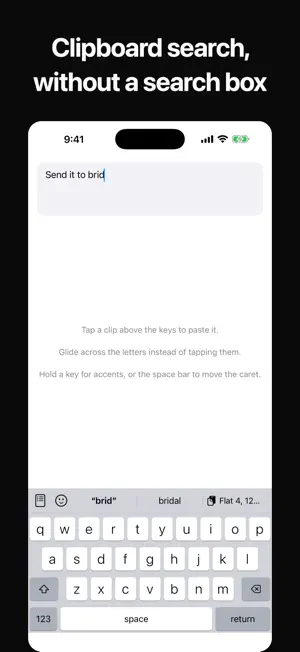
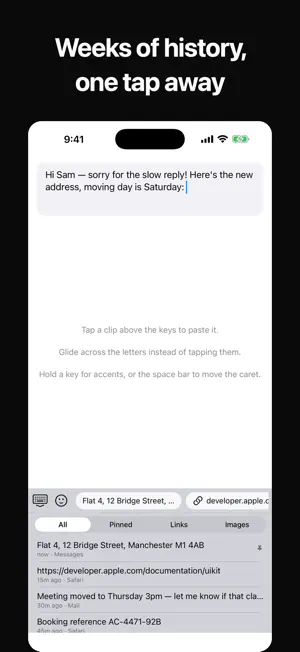
macOS forgets what you copied the moment you copy something else. Windows has had a clipboard history since 2018. UniClip is that, for the Mac — and it follows you to your iPhone and iPad. Copy on your Mac. Paste on your phone. Search everything you have copied, going back weeks. A KEYBOARD, NOT A PANEL UniClip's iPhone keyboard is a real keyboard — full QWERTY, emoji, autocorrect and glide typing — with your clipboard along the top. Leave it as your default and everything you have copied is one tap away, wherever you are typing. No switching keyboards, no opening an app. Start typing something you copied earlier and it appears beside the word suggestions. That is clipboard search, without a search box. PRIVATE IN A WAY YOU CAN CHECK Everything is encrypted on your device, with a key derived from a passphrase only you know, before it is uploaded. The server stores text it has no way to read. Search runs on your device, because there is nothing on the server worth indexing. IT REFUSES TO RECORD THINGS IT SHOULDN'T Anything an app marks as confidential is never stored — that one is not a setting, because the marker is another app asking not to be recorded. Password managers are excluded when you install it, and you can add your own. Anything shaped like an API key, a private key, a security code or a payment card stays on the device that copied it, masked in the list, and is never uploaded. HONEST ABOUT WHAT IPHONE CAN DO Your Mac captures everything you copy. iPhone and iPad save what you hand over — through the share sheet, or the paste button in the app — because iOS does not let any app read the clipboard on its own. Apple closed that in iOS 16, and we would rather say so than imply otherwise. Free. No account needed to use it on one device; sign in with UniAuth to sync.
What’s new
Version 1.5 · Updated October 9, 2026
Made for the bigger screen. On iPad — and on iPhone Duo unfolded — your clipboard is now a grid of cards instead of a single column, so more of what you have copied is in front of you at once, and images show as real thumbnails. Tap any card to copy it. On iPhone it is the same familiar list. A copy now confirms itself with a tap of haptic feedback and a brief check, so you can see it landed. And the keyboard sizes itself to whatever space it is given, including the Duo's folded and unfolded shapes.
App privacy
The developer, UniAuth Inc., reported these privacy practices to Apple.
Data Linked to You
The following data, which may be collected and linked to your identity, may be used for the following purposes:
- User Content: Other User Content
- Identifiers: User ID
Used for: App Functionality
Alternatives to UniClip - Clipboard Sync
Looking for apps like UniClip - Clipboard Sync? Here are 6 similar apps on the App Store. The highest rated is AutoClose Tabs – Auto Cleanup (4.0/5), and 5 of the 6 are free to download.
-
 Uniclip - Universal Clipboard
-
 AutoClose Tabs – Auto Cleanup
4.0
AutoClose Tabs – Auto Cleanup
4.0
-
 Taphrase - Snippet Keyboard
-
 Phrase Keyboard: KeyBurst
-
 Snippet Keyboard - Quick Paste
-
 Aether - Ai Wingman
| App | Rating | Price | Last updated | Compare |
|---|---|---|---|---|
| UniClip - Clipboard Sync | – | Free | October 9, 2026 | |
| Uniclip - Universal Clipboard | – | Free | Oct 19, 2026 | Compare |
| AutoClose Tabs – Auto Cleanup | 4.0 / 5 (1) | 0.99 USD | Oct 25, 2026 | Compare |
| Taphrase - Snippet Keyboard | – | Free | Oct 26, 2026 | Compare |
| Phrase Keyboard: KeyBurst | – | Free | Jul 7, 2026 | Compare |
| Snippet Keyboard - Quick Paste | – | Free | Oct 1, 2026 | Compare |
| Aether - Ai Wingman | – | Free | May 19, 2026 | Compare |