

aMule Remote
SIMONE DI MAMBRO Utilities iPhoneiPadiPod touchMacApple Watch
aMule Remote is a free Utilities app for iPhone and iPad by SIMONE DI MAMBRO. Requires iOS 17.0. Updated October 21, 2026.
- Price
- Free
- on the App Store
- Size
- 43 MB
- Age 17+
- Updated
- Oct 21
- 2026 · v1.5
Screenshots
About aMule Remote
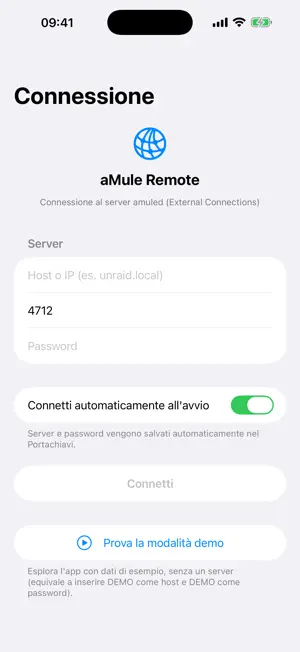
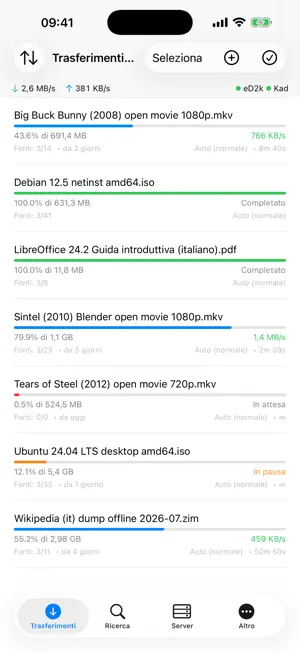
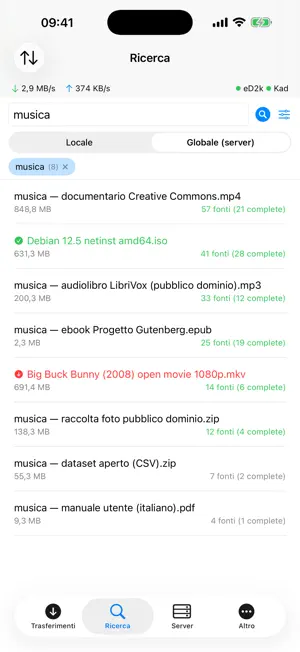
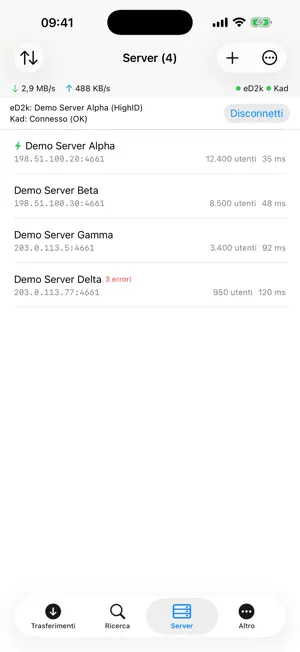
aMule Remote is a remote control for your aMule server (amuled) running on a NAS, Raspberry Pi, Unraid or any home computer. It connects over the EC (External Connections) protocol, the same one used by aMuleGUI, so you can manage everything from your iPhone, iPad, Mac, Apple Vision Pro or Apple TV. MAIN FEATURES - Transfers: download queue with progress, speed, sources and ETA; pause, resume, stop, priority, categories and delete, also in multi-selection. - Tabbed search: local and global (server), with filters for type, extension and size. Several searches at once, each in its own tab. - Servers: list with users, files and ping; connect with a tap, add and remove, update the list, eD2k and Kad network control. - Server statistics and log in real time. - Offline mode: after the idle period, or when the app goes to the background, the connection is closed to save battery and data, but the last data stays on screen and the connection resumes by itself at the first tap or when you come back. - iCloud sync (optional): your server profiles and their passwords follow you on every device, through your own iCloud account and iCloud Keychain. - Quick actions: long-press the app icon (pause all, resume all, add a link, search); on the Mac the same actions live in the Dock menu and in the Transfers menu. - Notifications: download started and completed, aMule server unreachable or reachable again, connection lost, eD2k/Kad drops and reconnections. Nothing to configure in the app: how you receive them is decided in the system Settings. On iPhone they also reach your Apple Watch. - Apple Watch app: speeds, network status and download queue at a glance. - Apple TV app: transfers, search, servers and statistics on the big screen, driven by the Siri Remote (Play/Pause pauses or resumes the highlighted download); type with the iPhone keyboard or dictate with Siri. - Siri and Shortcuts on every platform: status, download and upload speed, queued downloads, status/pause/resume/priority of a single download, add eD2k links, search files, eD2k and Kad control. - Clipboard: paste several eD2k links at once (or any text that contains them) and share a download's eD2k link to Notes, Messages or Mail. - Guided introduction at the first launch, with restore of your server profiles from the iCloud backup. - Server profiles, light/dark theme, 7 app colors that tint the whole interface, Face ID / Touch ID lock, 7 languages. - On the Mac: full remote editor of the aMule preferences (bandwidth, ports, servers, files, security, folders) and the shared files list. aMule Remote does NOT download files to your device and contains no catalog of content: it is simply a control panel for YOUR aMule server. It collects no personal data; the server address and password stay on your device, in the Keychain (or in your own iCloud account if you turn sync on). Free software under the MIT license. Try it right away with the built-in demo mode, no server needed. Requires an amuled server with External Connections enabled.
What’s new
Version 1.5 · Updated October 21, 2026
What's new in 1.5: • iPhone Duo: hinge-aware layouts — half-open on a table, content above the fold and controls below; fully open (and on iPad) a two-column layout with the sections at the side; closed, the classic tab bar. • Server lists (server.met): curated trusted sources, your own URLs, a preview of the servers and one-tap import into aMule. • Continuity: Handoff of the current section and search between iPhone, iPad, Mac and Vision Pro; “Continue the search” on Apple TV too. • Share Extension “Add to aMule Remote”: share text, links or web pages from Notes, Safari, Messages and the eD2k links are queued. • Control Center and Action button: pause all, resume all, add link. “Speed” widget for the Home Screen, Lock Screen and StandBy. • iCloud backup of the app settings together with the server profiles. • The introduction no longer appears after an update when the app is already configured.
App privacy
The developer, SIMONE DI MAMBRO, reported these privacy practices to Apple.
Data Not Collected
The developer does not collect any data from this app.
Alternatives to aMule Remote
Looking for apps like aMule Remote? Here are 6 similar apps on the App Store. The highest rated is NZB-Mule (5.0/5), and all 6 are free to download.
-
 Punctum – Dot-Matrix Clock
-
 NZB-Mule
5.0
NZB-Mule
5.0
-
 QS Milano
-
 WearWithAll
5.0
WearWithAll
5.0
-
 IPTV Player: M3U & Live TV
5.0
IPTV Player: M3U & Live TV
5.0
-
 PDF & Document Translator
4.2
PDF & Document Translator
4.2
| App | Rating | Price | Last updated | Compare |
|---|---|---|---|---|
| aMule Remote | – | Free | October 21, 2026 | |
| Punctum – Dot-Matrix Clock | – | Free | Oct 20, 2026 | Compare |
| NZB-Mule | 5.0 / 5 (1) | Free | Aug 12, 2026 | Compare |
| QS Milano | – | Free | Mar 17, 2026 | Compare |
| WearWithAll | 5.0 / 5 (1) | Free | Jul 24, 2026 | Compare |
| IPTV Player: M3U & Live TV | 5.0 / 5 (1) | Free | Oct 18, 2026 | Compare |
| PDF & Document Translator | 4.3 / 5 (16) | Free | Sep 9, 2026 | Compare |
Compare aMule Remote with the top alternatives: ratings, updates, ASO score and keyword gaps →