

SlideTalk: PPT to Video AI
志颖 蒋 Productivity iPhoneiPadiPod touchMac
SlideTalk: PPT to Video AI is a free Productivity app for iPhone and iPad by 志颖 蒋. Requires iOS 17.0. Updated October 25, 2026.
- Price
- Free
- on the App Store
- Size
- 12 MB
- Age 4+
- Updated
- Oct 25
- 2026 · v1.7
Screenshots


About SlideTalk: PPT to Video AI
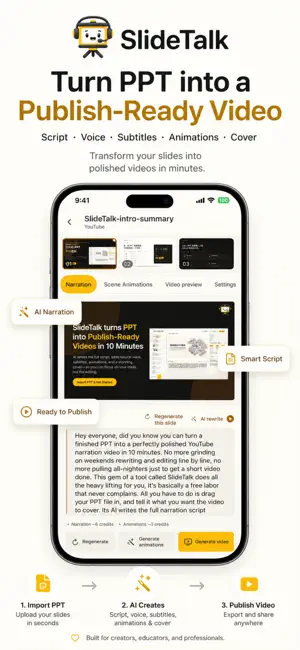
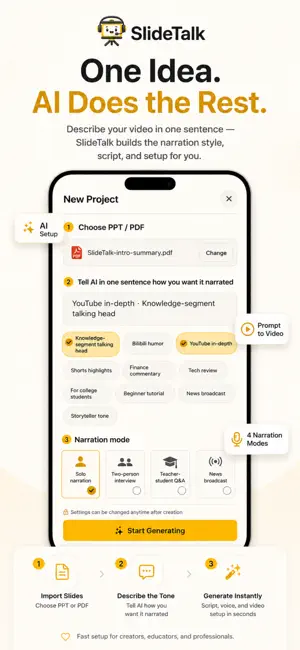
SlideTalk — AI-powered PPT presentation narrator. Turn your presentations into engaging narrated videos. Upload a PPT and let SlideTalk understand your slides, generate a natural presentation script and AI voiceover, and transform your static presentation into a complete narrated video. With Studio, you can edit and refine your script, adjust the visual presentation, and create your presentation video through a simple, streamlined workflow. Core Features 1. AI PPT Analysis SlideTalk intelligently analyzes your slide structure, text, images, charts, and other visual content to understand the key information on each page. 2. AI Presentation Script Generate natural, conversational narration based on your presentation content. Edit and refine the generated script page by page in Studio, so you can make the narration fit your message and style. 3. AI Voiceover Turn your presentation script into natural AI voice narration. Voiceover, subtitles, and visual effects are coordinated along the timeline to create a smoother and more coherent presentation experience. 4. Intelligent Visual Effects Automatically generate visual effects based on your slide content and narration, including highlights, underlines, arrows, zooms, and camera movements. Visual effects help guide your audience's attention to the key points as you explain them. 5. PPT to Video Transform static PPT presentations into complete videos with AI narration, subtitles, and visual effects. From importing your presentation and generating the script to adding AI voiceover and creating the final video, everything is connected in one simple workflow. 6. Flexible Video Creation Fine-tune your narration and visual presentation in Studio to make each video fit your needs. You can also open and import supported files directly from other apps, making it easier to create on your iPhone and iPad. 7. AI Writing Style Memory SlideTalk can learn from the changes you make to AI-generated scripts and apply your writing preferences to future presentations. You can view, edit, or clear your learned preferences at any time. 8. PPT Visual Content Recreation SlideTalk can recognize and recreate visual elements such as charts from your presentation, helping preserve the information structure and visual expression of your original slides. 9. Video Covers & Title Suggestions Create engaging video covers with multiple design options, and get title suggestions based on your presentation content to help prepare your video for publishing. Perfect for • Product presentations and demos • Corporate training and internal communication • Courses and educational content • Business presentations and reports • Knowledge sharing and content creation • Turning existing PPTs into videos Start with your PPT. Go beyond the slide. Import your presentation, edit the script, add AI voiceover, and let SlideTalk turn your static slides into a more engaging narrated video.
What’s new
Version 1.7 · Updated October 25, 2026
Version 1.7 brings a more natural, more flexible PPT-to-video experience. • Improved PPT analysis for slide structure, text, imagery, and visual information. • More fluent, locally adapted AI narration scripts, with 12 newly supported languages: Spanish, Russian, French, Japanese, Korean, Hindi, Italian, Portuguese, German, Dutch, Norwegian, and Swedish. • Refined highlights, zooms, arrows, and other visual effects for different languages and reading patterns. • General improvements to the presentation-to-video workflow.
App privacy
The developer, 志颖 蒋, reported these privacy practices to Apple.
Data Linked to You
The following data, which may be collected and linked to your identity, may be used for the following purposes:
- Purchases: Purchase History
- User Content: Photos or Videos
Used for: App Functionality
Alternatives to SlideTalk: PPT to Video AI
Looking for apps like SlideTalk: PPT to Video AI? Here are 6 similar apps on the App Store. The highest rated is Skiii Note (5.0/5), and all 6 are free to download.
-
 Skiii Note
5.0
Skiii Note
5.0
-
 Aimward: Goal & Focus Planning
-
 云上的日子
云上的日子
-
 TinyDrawer - AI Study Helper
-
 ToDoStacker – Smart To Do List
-
 Focove: Scenes & Focus Timer
| App | Rating | Price | Last updated | Compare |
|---|---|---|---|---|
| SlideTalk: PPT to Video AI | – | Free | October 25, 2026 | |
| Skiii Note | 5.0 / 5 (1) | Free | Oct 23, 2026 | Compare |
| Aimward: Goal & Focus Planning | – | Free | Sep 21, 2026 | Compare |
| 云上的日子 | – | Free | Dec 7, 2025 | Compare |
| TinyDrawer - AI Study Helper | – | Free | Aug 7, 2026 | Compare |
| ToDoStacker – Smart To Do List | – | Free | Apr 1, 2025 | Compare |
| Focove: Scenes & Focus Timer | – | Free | Oct 29, 2026 | Compare |