

SecurityOne: safe Toolkit
Bohui Tongda Co., Limited Utilities iPhoneiPadiPod touch
SecurityOne: safe Toolkit is a free Utilities app for iPhone and iPad by Bohui Tongda Co., Limited. Rated 3.0/5 from 2 ratings. Requires iOS 15.0.
- Rating
- 3.0
- 2 ratings
- Price
- Free
- on the App Store
- Size
- 61 MB
- Age 4+
- Updated
- Sep 24
- 2026 · v1.0.2
Screenshots
About SecurityOne: safe Toolkit
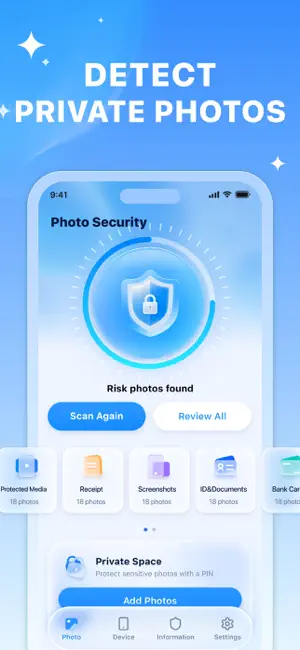
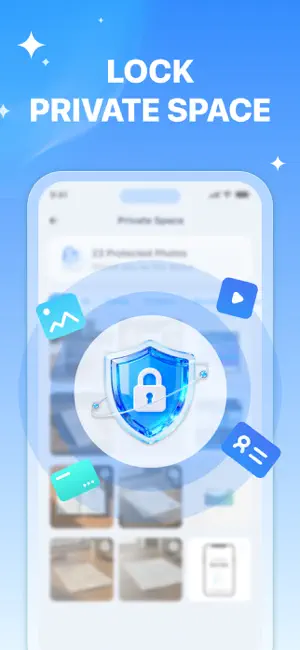
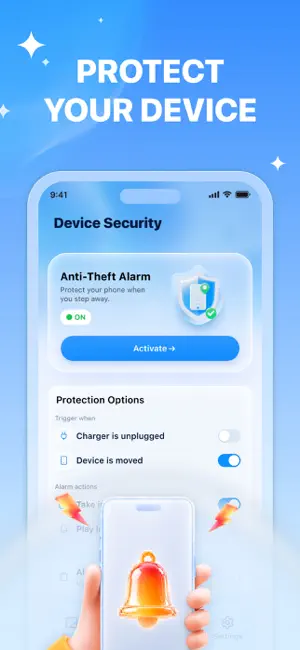
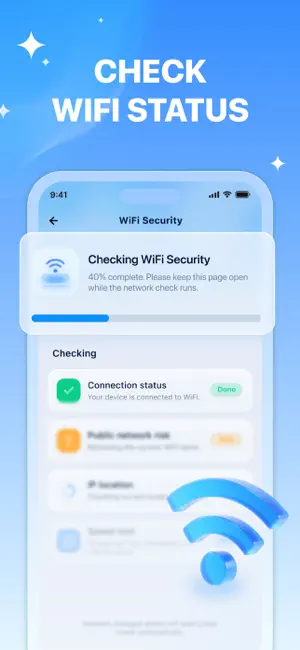
SecurityOne is designed for everyday iPhone users who care about privacy and personal security but do not have specialized security knowledge. It provides complementary, independently accessible security features covering sensitive photos, physical device protection, WiFi awareness, and credential safety. Each feature guides you from identifying a potential risk to understanding and addressing it. 【PHOTO SECURITY】 Discover sensitive photos before deciding how to protect them. SecurityOne scans accessible photos and identifies items that may contain personal information, including IDs, documents, bank cards, screenshots, receipts, bills, and private photos. Review the results by category, confirm which photos require additional protection, and move selected items to Private Space. You remain in control of every photo and every action. 【PRIVATE SPACE】 Keep selected photos in a private area protected by a 4-digit PIN. Add photos from scan results or import them directly from your photo library. After unlocking Private Space, you can browse protected photos by category, manage multiple items, and restore selected photos to the Photos app whenever needed. Photos in Private Space are stored only on your device and are never uploaded. After importing a photo, you decide whether to keep or delete the original from your system photo library. 【ANTI-THEFT ALARM】 Set up temporary device monitoring for situations such as leaving your iPhone on a desk or connected to a charger. Choose whether to monitor unexpected movement, charger disconnection, or both. Select the alarm responses you want, complete calibration, and activate protection. If a selected trigger is detected, SecurityOne provides a short pre-alarm warning before starting the configured alarm. Depending on your settings and permissions, the response can include sound, vibration, and an optional intruder photo. Keep SecurityOne open and the screen on while Anti-Theft Mode is active. 【WI-FI SECURITY】 Check your current Wi-Fi connection before signing in, making a payment, or sharing sensitive information. SecurityOne reviews available connection information and presents it as an easy-to-understand result for everyday users. You can view potential public-network indicators, IP-based location information, download and upload speed estimates, and ping. These results help you better understand your current connection. They do not guarantee that a network or online activity is completely secure. 【PASSWORD SAFETY】 Evaluate different types of credentials and receive suggestions based on what you enter. SecurityOne helps you check the estimated strength of passwords, PINs, numeric passwords, and passphrases. If a credential appears weak or could be improved, you can review practical suggestions and continue to the corresponding generator. Create customizable strong passwords, PINs, numeric passwords, or memorable passphrases whenever you need new credentials. SecurityOne turns everyday privacy and personal-security concerns into clear, guided actions. Use each feature independently whenever you need it, without specialized security knowledge or complicated setup. Privacy Policy: https://rite88older.com/privacy-policy/ User Agreement: https://rite88older.com/terms-of-use/ Contact Us: [email protected]
What’s new
Version 1.0.2 · Updated September 24, 2026
Minor bug fixes.
App privacy
The developer, Bohui Tongda Co., Limited, reported these privacy practices to Apple.
Data Used to Track You
The following data may be used to track you across apps and websites owned by other companies:
- Identifiers: Device ID
- Usage Data: Advertising Data
Data Not Linked to You
The following data, which may be collected but is not linked to your identity, may be used for the following purposes:
- Identifiers: Device ID
- Usage Data: Advertising Data
- Diagnostics: Crash Data, Performance Data
Used for: Third-Party Advertising, Developer’s Advertising or Marketing, Analytics
Alternatives to SecurityOne: safe Toolkit
Looking for apps like SecurityOne: safe Toolkit? Here are 6 similar apps on the App Store. The highest rated is Safer Clean: Storage Cleanup (5.0/5), and all 6 are free to download.
-
 AI Safe Cleanup: Fast & Easy
4.0
AI Safe Cleanup: Fast & Easy
4.0
-
 AI CleanKit: Smart Cleaner
1.0
AI CleanKit: Smart Cleaner
1.0
-
 LockOn: Smart Protection
4.6
LockOn: Smart Protection
4.6
-
 Safer Clean: Storage Cleanup
5.0
Safer Clean: Storage Cleanup
5.0
-
 Neatio: Easy Phone Cleaner
4.6
Neatio: Easy Phone Cleaner
4.6
-
 MaxSecure: Cleanup & Protect
1.0
MaxSecure: Cleanup & Protect
1.0
| App | Rating | Price | Last updated | Compare |
|---|---|---|---|---|
| SecurityOne: safe Toolkit | 3.0 / 5 (2 ratings) | Free | September 24, 2026 | |
| AI Safe Cleanup: Fast & Easy | 4.0 / 5 (2) | Free | Sep 4, 2026 | Compare |
| AI CleanKit: Smart Cleaner | 1.0 / 5 (1) | Free | Sep 9, 2026 | Compare |
| LockOn: Smart Protection | 4.6 / 5 (11) | Free | Aug 24, 2026 | Compare |
| Safer Clean: Storage Cleanup | 5.0 / 5 (1) | Free | Sep 3, 2026 | Compare |
| Neatio: Easy Phone Cleaner | 4.6 / 5 (31) | Free | Aug 19, 2026 | Compare |
| MaxSecure: Cleanup & Protect | 1.0 / 5 (1) | Free | Sep 25, 2026 | Compare |