

Haven: AI Interior Design
Sunil Jindal Graphics & Design iPhoneiPadiPod touch
Haven: AI Interior Design is a free Graphics & Design app for iPhone and iPad by Sunil Jindal. Rated 5.0/5 from 1 ratings. Requires iOS 16.4.
- Rating
- 5.0
- 1 ratings
- Price
- Free
- on the App Store
- Size
- 48 MB
- Age 4+
- Updated
- Oct 26
- 2026 · v1.0.4
Screenshots

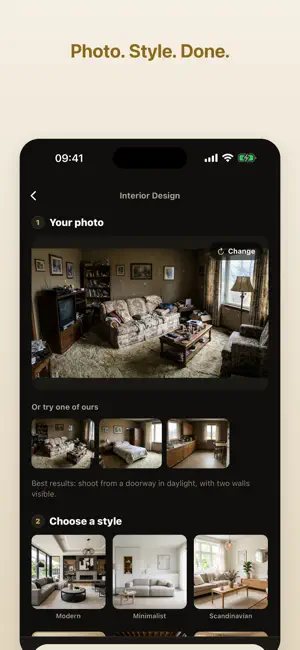
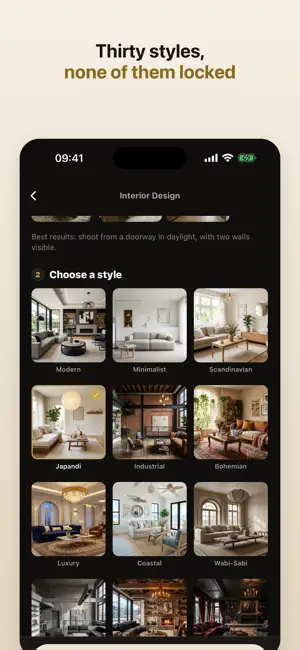

About Haven: AI Interior Design
Take a photo of a room. Pick a style. See it redesigned in seconds. Haven keeps your room's shape, its windows and its doors exactly as they are, and changes everything else: the furniture, the colours, the materials, the light. It is the quickest way to see what a room could look like before you spend anything on it. SEVEN WAYS TO REDESIGN Interior: restyle a whole room Exterior: the front of your house Garden: patios, planting and landscaping Replace: swap out a single piece of furniture Declutter: see the room empty and tidy Walls: try a colour or a wallpaper Flooring: wood, tile, carpet or stone DRAG TO COMPARE Every design opens with a slider across your original photo, so you can see exactly what changed and show someone else in one gesture. NO ACCOUNT, NO SIGN UP There is no login and no password. Nothing to create, nothing to remember, nothing to delete later. YOUR PHOTOS ARE NOT KEPT Your photo is sent to be redesigned and is not stored afterwards, by us or by the provider that generates the design. We do not use your photos to train any model. Your finished designs stay on your phone. FREE TO TRY Three designs when you start, then one every day, free. Haven Pro gives you 60 designs a month on the yearly plan, or 25 a week on the weekly plan, and saves your designs without a watermark. The yearly plan starts with a three day free trial. Questions or problems: [email protected] Subscriptions renew automatically unless cancelled at least 24 hours before the end of the current period. Manage or cancel in your Apple account settings. Terms of Use (EULA): https://tryhavenai.com/terms Privacy Policy: https://tryhavenai.com/privacy
What’s new
Version 1.0.4 · Updated October 26, 2026
Designs arrive faster: your photo uploads quicker on mobile data, and the finished design appears sooner. If a photo can't be used, Haven now says so, instead of suggesting you try again. Small photos and screenshots are no longer enlarged before they're sent, so results stay sharp.
App privacy
The developer, Sunil Jindal, reported these privacy practices to Apple.
Data Not Linked to You
The following data, which may be collected but is not linked to your identity, may be used for the following purposes:
- User Content: Other User Content
- Identifiers: User ID
- Usage Data: Product Interaction
Used for: Analytics, App Functionality
Alternatives to Haven: AI Interior Design
Looking for apps like Haven: AI Interior Design? Here are 6 similar apps on the App Store. The highest rated is RoomFigure: AI Home Remodel (5.0/5), and all 6 are free to download.
-
 RoomFigure: AI Home Remodel
5.0
-
 Redo AI
4.4
-
 AI Home Design: Room Remodel
5.0
-
 AI Home Design - iHome
4.4
-
 Parent Pay - School Finance AI
-
 GridArt - Drawing Grid
4.5
| App | Rating | Price | Last updated | Compare |
|---|---|---|---|---|
| Haven: AI Interior Design | 5.0 / 5 (1 rating) | Free | October 26, 2026 | |
| RoomFigure: AI Home Remodel | 5.0 / 5 (1) | Free | Aug 25, 2026 | Compare |
| Redo AI | 4.4 / 5 (5) | Free | Oct 19, 2026 | Compare |
| AI Home Design: Room Remodel | 5.0 / 5 (1) | Free | Oct 23, 2026 | Compare |
| AI Home Design - iHome | 4.4 / 5 (64) | Free | Oct 28, 2026 | Compare |
| Parent Pay - School Finance AI | – | Free | May 14, 2026 | Compare |
| GridArt - Drawing Grid | 4.5 / 5 (227) | Free | Sep 29, 2026 | Compare |