

Clutter - Screenshot Organizer
hayoung jin Utilities iPhoneiPadiPod touch
Clutter - Screenshot Organizer is a free Utilities app for iPhone and iPad by hayoung jin. Rated 5.0/5 from 43 ratings. Requires iOS 15.1.
- Rating
- 5.0
- 43 ratings
- Price
- Free
- on the App Store
- Size
- 53 MB
- Age 4+
- Updated
- Oct 2
- 2026 · v1.4.0
Screenshots

About Clutter - Screenshot Organizer
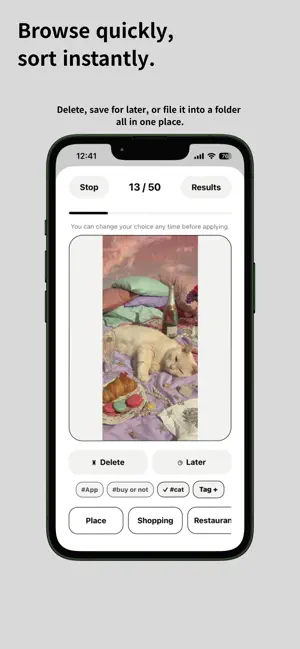
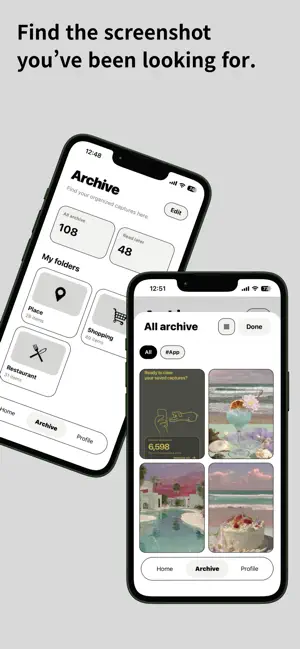
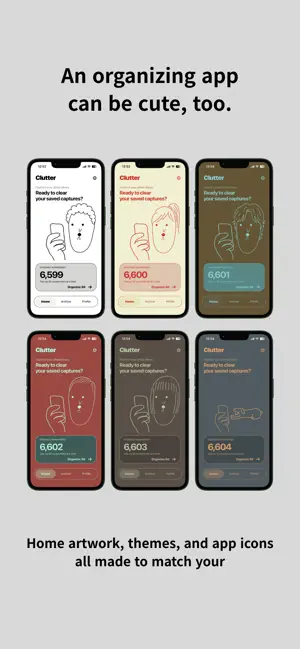
Screenshots piling up? Things to read later. Things you want to buy. Places you want to visit. Little things you want to remember. Screenshots are easy to save. Organizing them? Not so much. ◆ Clutter makes screenshot cleanup simple. Clear what you don’t need. Keep what matters. Find it again when you need it. You don’t have to clean up everything at once. Just start with a few. ◆ Quickly review and sort Go through screenshots one by one. Delete, save for later, or move to a folder. All from one screen. ◆ Keep screenshots in folders Shopping, travel, restaurants, ideas—or anything you want. Add tags and notes to find things faster. ◆ Browse them anytime See screenshots by folder. Or flip through them one by one. You can even copy text directly from a screenshot. ◆ Save right after capture Use the Share button to save directly to Clutter. No need to open the app. ◆ Make Clutter yours Choose your home artwork, theme, and app icon. Organizing can be cute, too. ◆ Your photos stay on your device Clutter doesn’t upload your photos or screenshots to external servers. Your photos are processed on your device. Thousands of screenshots? That’s okay. Start small. Clear a few today. Turn screenshot clutter into something you can find again.
Ratings & reviews
5.0
43 ratings
What’s new
Version 1.4.0 · Updated October 2, 2026
We've made major improvements to Clutter for faster, smoother screenshot organization. • Added a three-column view to the archive. Choose between single-item, two-column, or three-column layouts. • Improved image-loading performance for faster, more stable scrolling in folders with lots of screenshots. • Paste a URL into a note to open the link directly from the detail view. • Share a link from Safari or another app to Clutter and quickly attach it to the most recently saved screenshot. • Enhanced backup and restore. Images saved only in Clutter through “Share → Clutter,” along with edited copies, can now be backed up and restored. • Closing the zoomed view while organizing no longer ends your current organizing session.
App privacy
The developer, hayoung jin, reported these privacy practices to Apple.
Data Used to Track You
The following data may be used to track you across apps and websites owned by other companies:
- Purchases: Purchase History
- Identifiers: Device ID
- Usage Data: Product Interaction
Data Linked to You
The following data, which may be collected and linked to your identity, may be used for the following purposes:
- Location: Coarse Location
- Identifiers: Device ID
- Usage Data: Product Interaction, Advertising Data
- Purchases: Purchase History
Used for: Third-Party Advertising, Developer’s Advertising or Marketing, Analytics, App Functionality
Data Not Linked to You
The following data, which may be collected but is not linked to your identity, may be used for the following purposes:
- Diagnostics: Performance Data, Other Diagnostic Data, Crash Data
- Other Data: Other Data Types
Used for: Third-Party Advertising, Developer’s Advertising or Marketing, Analytics, App Functionality
Alternatives to Clutter - Screenshot Organizer
Looking for apps like Clutter - Screenshot Organizer? Here are 6 similar apps on the App Store. The highest rated is Joguman Pomodoro Timer (5.0/5), and all 6 are free to download.
-
 Pochi — Cute Art, One Line
3.0
Pochi — Cute Art, One Line
3.0
-
 Joguman Pomodoro Timer
5.0
Joguman Pomodoro Timer
5.0
-
 Life Dots: Visualize Time
5.0
Life Dots: Visualize Time
5.0
-
 Second-Sync
5.0
Second-Sync
5.0
-
 東港鎮海宮靈籤
4.2
東港鎮海宮靈籤
4.2
-
 Where was I ?
4.5
Where was I ?
4.5
| App | Rating | Price | Last updated | Compare |
|---|---|---|---|---|
| Clutter - Screenshot Organizer | 5.0 / 5 (43 ratings) | Free | October 2, 2026 | |
| Pochi — Cute Art, One Line | 3.0 / 5 (2) | Free | Aug 19, 2026 | Compare |
| Joguman Pomodoro Timer | 5.0 / 5 (2) | Free | Aug 17, 2026 | Compare |
| Life Dots: Visualize Time | 5.0 / 5 (26) | Free | Sep 29, 2026 | Compare |
| Second-Sync | 5.0 / 5 (4) | Free | Oct 6, 2026 | Compare |
| 東港鎮海宮靈籤 | 4.2 / 5 (13) | Free | Jul 22, 2024 | Compare |
| Where was I ? | 4.5 / 5 (18) | Free | Oct 2, 2026 | Compare |