

Orderly - To Do Planner
MICAH BENJAMIN BOCKISCH Productivity iPhoneiPadiPod touchMac
Orderly - To Do Planner is a free Productivity app for iPhone and iPad by MICAH BENJAMIN BOCKISCH. Requires iOS 17.0. Updated August 16, 2026.
- Price
- Free
- on the App Store
- Size
- 7 MB
- Age 4+
- Updated
- Aug 16
- 2026 · v1.0
Screenshots


About Orderly - To Do Planner
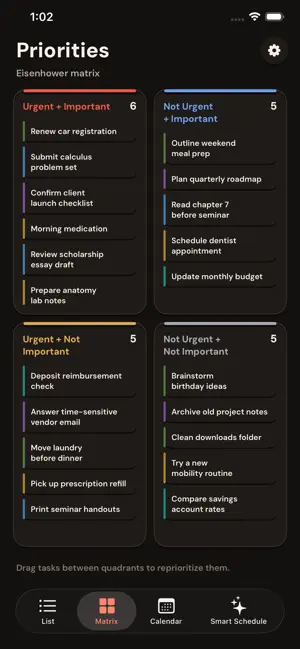
Orderly is a to-do list for people with more to do than time to sort it. Keep tasks, categories, due dates, coursework, and priorities together across iPhone, iPad, and Mac. Add anything you need to remember, then view it as a clean list, a calendar, or an urgency-and-importance matrix that helps you decide what actually deserves today. Why Orderly • Organize tasks by category, due date, completion state, and priority • See the same tasks in List, Priorities, and Calendar views • Use the Do, Schedule, Delegate, and Drop matrix to sort what matters now • Create repeating tasks for habits, classes, routines, and regular work • Check off today’s tasks from Home Screen widgets • Sync through iCloud across iPhone, iPad, and Mac • Connect Apple Calendar so dated tasks show up where you already plan • Mirror coursework from Canvas, Brightspace, or any school calendar feed • Keep the core app free, with no ads and no tracking Smart Schedule Paste a syllabus, upload a file, add a screenshot, or drop in a messy note. Smart Schedule drafts tasks with due dates and priorities for you to review before they join your list. Orderly includes 3 free Smart Schedule drafts with an account. Orderly Plus unlocks unlimited Smart Schedule plans. Built for students, workers, and everyone else Orderly is simple enough for groceries and errands, but structured enough for coursework, client deadlines, repeating routines, and the quiet important things that usually lose to whatever feels urgent. Requires iOS 17 or later, iPadOS 17 or later, or macOS 14 or later. Terms of Use (EULA): https://www.apple.com/legal/internet-services/itunes/dev/stdeula/ Privacy Policy: https://orderly-ac9b6.web.app/privacy/
App privacy
The developer, MICAH BENJAMIN BOCKISCH, reported these privacy practices to Apple.
Data Linked to You
The following data, which may be collected and linked to your identity, may be used for the following purposes:
- Purchases: Purchase History
- Contact Info: Email Address
- User Content: Photos or Videos, Other User Content
- Identifiers: User ID
- Usage Data: Product Interaction
Used for: App Functionality
Alternatives to Orderly - To Do Planner
Looking for apps like Orderly - To Do Planner? Here are 6 similar apps on the App Store.
-
 ilo: All Your Work, One Place
-
 dodot: To-Do
-
 Pinwork - To-Do List & Tasks
-
 Zutext - Private Notes
-
 Idea Notes - Quick Capture
-
 Write.r - Idea Draft
| App | Rating | Price | Last updated | Compare |
|---|---|---|---|---|
| Orderly - To Do Planner | – | Free | August 16, 2026 | |
| ilo: All Your Work, One Place | – | Free | Sep 16, 2026 | Compare |
| dodot: To-Do | – | Free | Oct 8, 2026 | Compare |
| Pinwork - To-Do List & Tasks | – | Free | Oct 16, 2026 | Compare |
| Zutext - Private Notes | – | Free | Sep 26, 2026 | Compare |
| Idea Notes - Quick Capture | – | Free | Oct 7, 2026 | Compare |
| Write.r - Idea Draft | – | Free | May 29, 2026 | Compare |