

EditTextImage-Photo Text AI
文君 李 Graphics & Design iPhoneiPadiPod touch
EditTextImage-Photo Text AI is a free Graphics & Design app for iPhone and iPad by 文君 李. Requires iOS 16.4. Updated September 29, 2026.
- Price
- Free
- on the App Store
- Size
- 56 MB
- Age 17+
- Updated
- Sep 29
- 2026 · v1.0.4
Screenshots


About EditTextImage-Photo Text AI
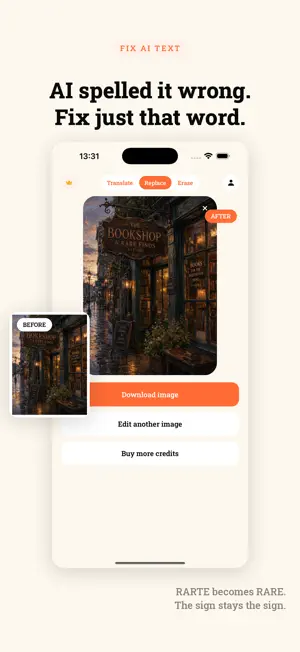
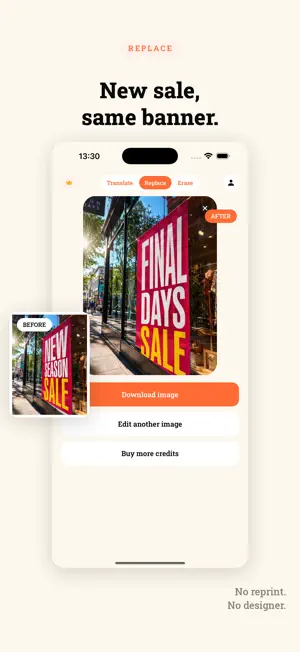
Edit the text inside a picture without redesigning it. EditTextImage rewrites words that are baked into an image — a poster, a screenshot, a thumbnail, a product photo — and keeps the original font, colour, lighting and background intact. No layers, no design file, no font hunting. WHAT YOU CAN DO Replace — Type the words that are in the picture and the words you want instead. The new text takes on the same typeface, weight, colour and perspective as the original. Translate — Turn a whole image into another language in one step. The layout stays exactly where it was, which matters when the picture has to keep its dimensions. Erase — Remove text you do not want and let the background fill back in. WHY IT IS DIFFERENT Most tools ask you for the original design file. This one starts from the finished picture. If all you have is a JPG someone sent you, that is enough. The result comes back at the same dimensions you uploaded, so it drops straight back into wherever the picture came from. Two quality settings: Fast for everyday edits, Pro when the picture is going somewhere it will be looked at closely. TYPICAL USES - Fixing a typo in a poster or flyer after it was exported - Correcting the garbled lettering in an AI-generated image - Localising a screenshot or a thumbnail for another market - Updating the copy on a product photo or a banner - Cleaning stray text out of a picture CREDITS New accounts get a free credit to try it. After that, credits are bought in packs inside the app. Credits are shared with your account on the web, so a pack bought here works in both places. WHAT THIS APP IS NOT FOR EditTextImage may not be used to alter identity documents, certificates, transcripts, receipts, financial records, or anything else where changing the text would misrepresent a fact to someone else. Accounts doing this are closed. You are responsible for having the right to edit any picture you upload. Terms, privacy policy and the full acceptable use policy are readable inside the app under Account. 审核备注 App Review Notes(当前 667) Sign-in is required before an edit can be made, because each edit is billed to an account. Sign in with Apple works without any test credentials. A new account is granted 1 free credit automatically, which is enough to complete one full edit and see a result. To test: sign in with Apple -> pick any photo containing words -> Replace tab -> type the text currently in the picture and the replacement -> Generate. In-app purchases: the paywall reads its packs from RevenueCat. If the in-app purchases are not yet approved at the time of review, the paywall shows a neutral "purchases are unavailable" message; there is no external purchase path anywhere in the app.
What’s new
Version 1.0.4 · Updated September 29, 2026
Faster edits and better reliability. Fixed a case where a finished edit could show as failed.
App privacy
The developer, 文君 李, reported these privacy practices to Apple.
Data Linked to You
The following data, which may be collected and linked to your identity, may be used for the following purposes:
- User Content: Photos or Videos
- Identifiers: User ID
Used for: App Functionality
Alternatives to EditTextImage-Photo Text AI
Looking for apps like EditTextImage-Photo Text AI? Here are 6 similar apps on the App Store. The highest rated is Change text in image (4.4/5), and all 6 are free to download.
-
 Change text in image
4.4
-
 PicTextEdit-Change Photo Text
-
 Edit Text In Photo - Forgeit
4.3
-
 Edit Text In Photo
4.0
-
 Shotpop — Screenshot Beauty
-
 LightPad: Tracing Light Box
| App | Rating | Price | Last updated | Compare |
|---|---|---|---|---|
| EditTextImage-Photo Text AI | – | Free | September 29, 2026 | |
| Change text in image | 4.4 / 5 (18) | Free | Nov 14, 2025 | Compare |
| PicTextEdit-Change Photo Text | – | Free | Oct 9, 2026 | Compare |
| Edit Text In Photo - Forgeit | 4.3 / 5 (13) | Free | Oct 13, 2026 | Compare |
| Edit Text In Photo | 4.0 / 5 (28) | Free | Jan 4, 2026 | Compare |
| Shotpop — Screenshot Beauty | – | Free | Sep 3, 2026 | Compare |
| LightPad: Tracing Light Box | – | Free | Sep 22, 2026 | Compare |