

Bookmarker: Save Links & Reels
Jean Paul Wilson Productivity iPhoneiPadiPod touch
Bookmarker: Save Links & Reels is a free Productivity app for iPhone and iPad by Jean Paul Wilson. Rated 5.0/5 from 1 ratings. Requires iOS 17.0.
- Rating
- 5.0
- 1 ratings
- Price
- Free
- on the App Store
- Size
- 10 MB
- Age 4+
- Updated
- Oct 1
- 2026 · v1.2
Screenshots
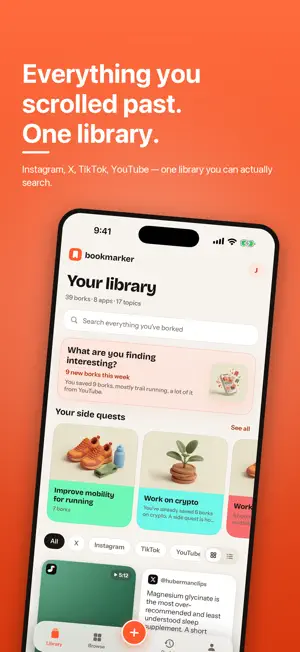


About Bookmarker: Save Links & Reels
You've saved thousands of things. The reel that finally explained mobility work. A thread on sleep supplements. A recipe you meant to cook, a car you meant to research, a place you meant to go. You know you saved them. You just can't find a single one. That's because every app keeps your saves in its own pile — untitled, unsorted, unsearchable, and locked inside that app. Instagram doesn't know about YouTube. YouTube doesn't know about X. Your "saved" folders are where good things go to disappear. bookmarker is the library that sits above all of them. SAVE FROM ANYWHERE, IN ONE TAP Tap Share in Instagram, X, TikTok, YouTube or any other app and pick bookmarker. Done. The title, the account and a thumbnail come along automatically. Or paste a link straight in. IT FILES ITSELF Every save lands in a topic and subtopic — Fitness › Mobility, Recipes › Meal prep, Cars › Detailing. Fifty topics, over six hundred subtopics, and room to add your own. It's a suggestion, not a sentence: change anything it gets wrong, or just search. FIND IT AGAIN IN SECONDS Search titles, tags, notes, people and links. A Related strip surfaces the saves that match what you meant, not just the words you typed. Browse by topic to see everything about running, from every app. Or by app, to see everything you kept from TikTok. REMEMBER WHY YOU SAVED IT Add a dated note to anything. bookmarker also keeps count of how many times you've gone back to it, so you can see what you actually use. SIDE QUESTS Training for a marathon? Choosing a car? Planning a trip? Group the saves that help, give the quest a name, and add a daily habit if it needs one. Your saves stop being a pile and start being a plan. BRING THE THOUSANDS YOU ALREADY HAVE Import your browser bookmarks, or your data export from X, Instagram, TikTok or YouTube. Years of saves become a sorted, searchable library in one step. That's the moment it clicks. YOURS, AND ONLY YOURS bookmarker stores links, not content — opening a save takes you to the original post, in the app it came from. Everything works offline and lives on your phone. Sign in with just an email, no password, if you want it backed up and synced. No ads. No tracking. No analytics. Your saves were never the problem. Finding them was.
What’s new
Version 1.2 · Updated October 1, 2026
The biggest update yet: saving from other apps works reliably, every save shows who made it, and Revisit brings back what you never opened. SAVING FROM ANY APP The share sheet saves in under a second, says so, and gets out of the way. TikToks arrive with their caption, hashtags, creator and cover; X posts with their text and date. Or copy a link and press the Action button: the new Save a link shortcut (Get Clipboard → Save a link) saves it without opening the app. WHO MADE IT, ON EVERY CARD Cards show the creator, @name, even when the platform won't share the page, and a post we couldn't read is called what it is, "Instagram reel" or "TikTok video". Videos wear a play badge. Open a bork to see more from the same creator, or filter a source by creator in Browse. FILING THAT READS THE POST bookmarker looks at the caption, hashtags and creator before deciding where a save goes, and tells you how sure it is. Fifty topics, six hundred subtopics, and your own topics whenever you need one. REVISIT A new tab for what's worth another look: this week's saves, the ones you keep opening, a month ago today, and SAVED, NEVER OPENED. Go through that pile one bork at a time, with Open, Next and Delete. PRESS AND HOLD Hold any bork to open it right back in TikTok, Instagram or YouTube, copy or share its link, put it on a side quest, or delete it. Buttons say where they go. SIDE QUESTS THAT EXPLAIN THEMSELVES A quest wears its topic's art, and its brief is written from what its borks actually say, with next steps you can add with a tap. SHARE WHAT YOU FOUND Send one bork as a clean message, or pick a handful from any apps and share them as one link. Whoever opens it can save the lot, no account needed. Links can close themselves after a day or ten. SEARCH AND BROWSE Search sits at the top of Browse. Topics, Sources and Side quests sort by Most borks, Most recent or A–Z. FAST, AND THE SAME EVERYWHERE The Library builds only what's on screen and loads covers at the size they're shown, so a big library opens fast and scrolls smoothly. Side quests, your own topics and your Revisit history sync between your iPhone and bookmarker.lol, and filling in titles and covers never overwrites anything you chose. 20 SAVES WITHOUT AN ACCOUNT Your first twenty borks work with no account. After that, sign up free with an email and a six-digit code for an unlimited, backed-up library, on the web too. A share at the limit is still saved, marked Waiting. Your borks are private unless you choose to share them. Ideas, bugs, or a platform you want next: the Help tab at bookmarker.lol reaches us.
App privacy
The developer, Jean Paul Wilson, reported these privacy practices to Apple.
Data Linked to You
The following data, which may be collected and linked to your identity, may be used for the following purposes:
- Contact Info: Email Address
- User Content: Other User Content
Used for: App Functionality
Alternatives to Bookmarker: Save Links & Reels
Looking for apps like Bookmarker: Save Links & Reels? Here are 6 similar apps on the App Store. The highest rated is Quill - Commonplace Book (5.0/5), and all 6 are free to download.
-
 Clipfile
-
 SocialMarks: Save & Organize
-
 Bookmark Manager: Nemor
-
 Quill - Commonplace Book
5.0
-
 Commonplace: Save Quotes
5.0
-
 QuickList: Smart Grocery List
5.0
| App | Rating | Price | Last updated | Compare |
|---|---|---|---|---|
| Bookmarker: Save Links & Reels | 5.0 / 5 (1 rating) | Free | October 1, 2026 | |
| Clipfile | – | Free | Oct 20, 2026 | Compare |
| SocialMarks: Save & Organize | – | Free | Oct 13, 2026 | Compare |
| Bookmark Manager: Nemor | – | Free | Oct 11, 2026 | Compare |
| Quill - Commonplace Book | 5.0 / 5 (2) | Free | Aug 30, 2026 | Compare |
| Commonplace: Save Quotes | 5.0 / 5 (23) | Free | Sep 25, 2026 | Compare |
| QuickList: Smart Grocery List | 5.0 / 5 (2) | Free | Jan 8, 2026 | Compare |