

Caddis: DWG & CAD Viewer
Jacob Blumsack Productivity iPhoneiPadiPod touch
Caddis: DWG & CAD Viewer is a free Productivity app for iPhone and iPad by Jacob Blumsack. Requires iOS 15.0. Updated October 3, 2026.
- Price
- Free
- on the App Store
- Size
- 52 MB
- Age 4+
- Updated
- Oct 3
- 2026 · v1.0.4
Screenshots

About Caddis: DWG & CAD Viewer
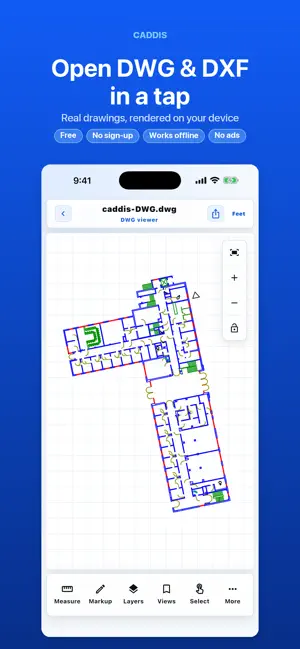
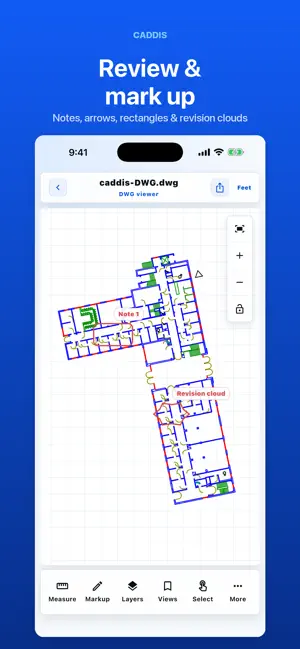
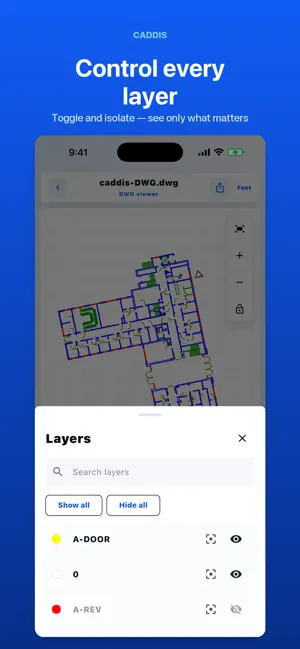
Caddis is the fast, private way to open and review CAD drawings and 3D models on iPhone and iPad — no account, no sign-up, no cloud upload. Open a DWG, DXF, STL, STEP, OBJ, PLY, IFC, or SolidWorks file straight from Files, then measure it, mark it up, and share your review in seconds. WHY CADDIS • Fast — files are parsed and rendered right on your device • Private — no ads and no account. Drawing files leave the app only when you tap Share. • Offline — review drawings on-site, in the field, or on a plane with no connection REVIEW TOOLS • Pan, zoom, fit, rotate, and orbit 2D drawings and 3D models • Measure distance, angle, area, and perimeter • Display in feet, feet and inches, inches, US survey feet, meters, or millimeters • Mark up with notes, arrows, rectangles, and revision clouds • Snap annotations to supported drawing geometry or mesh vertices • Toggle and isolate layers where source layers exist • Save named locations and keep your review state on-device • Share the current view as a PNG, the original file, or portable annotation JSON SUPPORTED FORMATS • DWG and DXF 2D drawings • STL, OBJ, and PLY 3D meshes • STEP / STP tessellated models • IFC building geometry • SolidWorks SLDPRT and SLDASM (saved display tessellation) Caddis renders real, source-derived geometry — never a generated stand-in — and clearly reports anything it cannot open instead of faking a preview. Coverage varies by file version, exporter, and device. FORMAT NOTES DWG supports R14, R2000, R2004, R2007, and R2010–R2018 model-space geometry. Coverage varies by file version, exporter, and device. DXF must be ASCII. STEP/STP, IFC, and SolidWorks coverage is limited to tessellated or faceted geometry, not full parametric or BIM semantics. Some layouts, xrefs, hatches, dimensions, fonts, materials, and textures are not yet covered. IMPORTANT Caddis is a viewing, measuring, and markup tool — not a CAD editor or a source of engineering certification. Always confirm critical dimensions, scale, and geometry against the authoritative source before construction, fabrication, or safety decisions. Snapping targets supported geometry; the visible grid is a navigation aid.
What’s new
Version 1.0.4 · Updated October 3, 2026
Faster, smoother rendering — especially for large, detailed drawings. Panning and zooming are now dramatically faster across the board, with the biggest improvement on big floor plans and dense CAD files.
App privacy
The developer, Jacob Blumsack, reported these privacy practices to Apple.
Data Linked to You
The following data, which may be collected and linked to your identity, may be used for the following purposes:
- Identifiers: Device ID
- Usage Data: Product Interaction
- Diagnostics: Crash Data, Other Diagnostic Data
Used for: Analytics, App Functionality
Alternatives to Caddis: DWG & CAD Viewer
Looking for apps like Caddis: DWG & CAD Viewer? Here are 6 similar apps on the App Store. The highest rated is DWG, STL & 3D CAD File Viewer (5.0/5), and all 6 are free to download.
-
 DWG, STL & 3D CAD File Viewer
5.0
DWG, STL & 3D CAD File Viewer
5.0
-
 STP One - STEP CAD Viewer
-
 Easy CAD - DWG Viewer
-
 DWG CAD Viewer: DXF, STL
-
 SnapCAD : DWG,DXF,STEP,STL,3MF
-
 SnapDWG: DWG Viewer & PDF
1.0
SnapDWG: DWG Viewer & PDF
1.0
| App | Rating | Price | Last updated | Compare |
|---|---|---|---|---|
| Caddis: DWG & CAD Viewer | – | Free | October 3, 2026 | |
| DWG, STL & 3D CAD File Viewer | 5.0 / 5 (1) | Free | Oct 11, 2026 | Compare |
| STP One - STEP CAD Viewer | – | Free | Oct 7, 2026 | Compare |
| Easy CAD - DWG Viewer | – | Free | Jul 8, 2026 | Compare |
| DWG CAD Viewer: DXF, STL | – | Free | Oct 1, 2026 | Compare |
| SnapCAD : DWG,DXF,STEP,STL,3MF | – | Free | Oct 5, 2026 | Compare |
| SnapDWG: DWG Viewer & PDF | 1.0 / 5 (1) | Free | Jul 5, 2026 | Compare |