

Extract Audio from Video MP3
MOBILECRAFT LLC Utilities iPhoneiPadiPod touch
Extract Audio from Video MP3 is a free Utilities app for iPhone and iPad by MOBILECRAFT LLC. Rated 5.0/5 from 1 ratings. Requires iOS 16.4.
- Rating
- 5.0
- 1 ratings
- Price
- Free
- on the App Store
- Size
- 76 MB
- Age 4+
- Updated
- Aug 17
- 2026 · v1.0
Screenshots


About Extract Audio from Video MP3
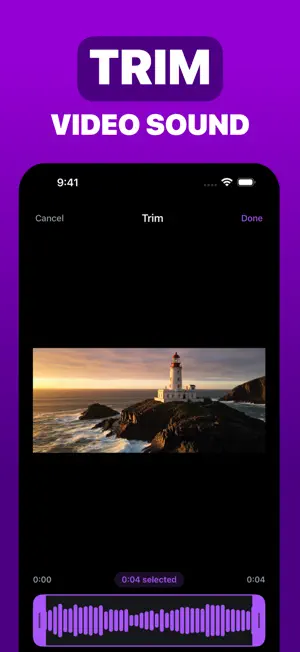
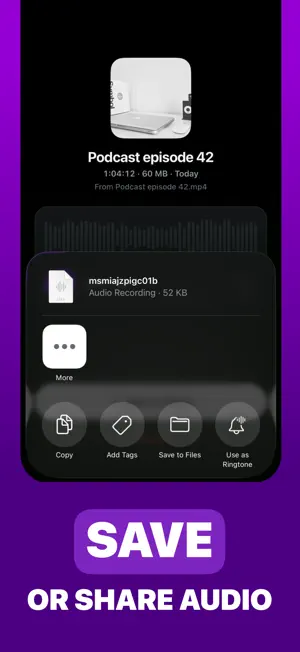
Sometimes the only part of a video you actually want is the sound. A lecture you recorded, an interview, a song idea you hummed into the camera, a voice message someone sent as a clip. Extract Audio pulls the sound out of it and hands you back an audio file you can keep, replay, and send to anyone. Pick a video from your camera roll or from Files, tap once, and the audio is ready. No settings to work through, no account to create, nothing to sign up for. TRIM TO THE PART THAT MATTERS Most of the time you don't need the whole recording. Drag the two handles to the section you want, play it back to make sure you caught it, then extract just that. A thirty second answer out of an hour long interview, and the rest stays behind. EVERYTHING LANDS IN YOUR LIBRARY Each extraction is saved for you automatically. Open one to play it, drag through it to find a moment, see how long it is and which video it came from, and delete it when you're done with it. Nothing gets lost between sessions. KEEP IT OR SEND IT One button opens your share sheet. Save the file to Files or iCloud Drive, message it, email it, drop it into a notes or editing app, AirDrop it to your computer. It's an ordinary M4A audio file, so it plays anywhere audio plays. WHAT PEOPLE USE IT FOR - Turning recorded talks, classes, and meetings into audio for the commute - Keeping the music or voiceover from a clip - Pulling a single quote out of a long interview - Getting a listenable file out of something you filmed - Saving voice notes that arrived as video - Cutting a heavy video down to the few minutes worth hearing YOUR VIDEOS STAY WITH YOU Nothing is uploaded. Your videos and the audio you make from them stay on your phone, which is why it's fast and why it still works with no signal at all. Extract Audio is free to use, with a couple of extractions each day. If you find yourself reaching for it more often than that, Pro lifts the daily limit and lets you extract as much as you like. Privacy policy: https://mobilecraft.io/privacy/posthog Terms and conditions: https://mobilecraft.io/terms
App privacy
The developer, MOBILECRAFT LLC, reported these privacy practices to Apple.
Data Not Linked to You
The following data, which may be collected but is not linked to your identity, may be used for the following purposes:
- Location: Coarse Location
- Identifiers: Device ID
- Usage Data: Product Interaction
- Diagnostics: Crash Data, Performance Data, Other Diagnostic Data
- Purchases: Purchase History
Used for: Analytics, App Functionality
Alternatives to Extract Audio from Video MP3
Looking for apps like Extract Audio from Video MP3? Here are 6 similar apps on the App Store.
-
 MusicLite: Extract & Play
-
 Talkin Calculator: do fast
-
 Calculator: 1-2-3 Number Pad
-
 TATIC SAOP+
-
 EasyStock
-
 Music Prompt Builder
| App | Rating | Price | Last updated | Compare |
|---|---|---|---|---|
| Extract Audio from Video MP3 | 5.0 / 5 (1 rating) | Free | August 17, 2026 | |
| MusicLite: Extract & Play | – | Free | Aug 6, 2026 | Compare |
| Talkin Calculator: do fast | – | Free | Feb 12, 2026 | Compare |
| Calculator: 1-2-3 Number Pad | – | Free | Jun 17, 2026 | Compare |
| TATIC SAOP+ | – | Free | Feb 1, 2024 | Compare |
| EasyStock | – | Free | Jul 10, 2026 | Compare |
| Music Prompt Builder | – | Free | Oct 22, 2026 | Compare |