

SelectGo: AI search, translate
FREEGENT INC. Utilities iPhoneiPadiPod touch
SelectGo: AI search, translate is a free Utilities app for iPhone and iPad by FREEGENT INC. Requires iOS 17.0. Updated September 2, 2026.
- Price
- Free
- on the App Store
- Size
- 1 MB
- Age 4+
- Updated
- Sep 2
- 2026 · v1.0.0
Screenshots


About SelectGo: AI search, translate
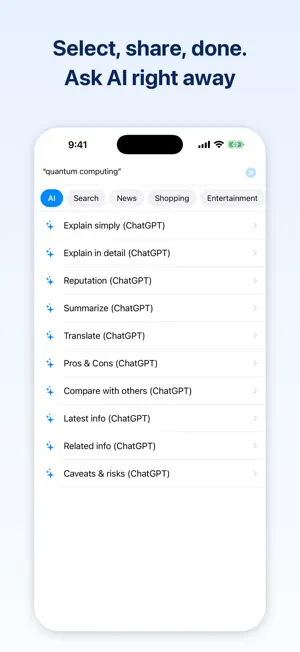
Select anything. Go anywhere. SelectGo is a text-selection search app that works from any app on your iPhone. Select a word in an article, chat, or social feed → tap the Share button → tap "SelectGo" → pick a destination. AI questions, web search, translation, dictionary lookup, shopping search, and news — all without a single copy-paste. No more copy → switch apps → paste → search. ◆ Perfect for moments like these ・An unfamiliar term in the news → ask AI to "Explain simply" ・A product name that caught your eye → compare prices on shopping sites instantly ・Reading a foreign-language article → select and translate on the spot ・"Is this movie any good?" → ask AI for reputation and reviews ・A tricky word → check the dictionary right where you are ◆ Ask AI without typing Send ready-made questions built around your selected text — "Explain simply," "Explain in detail," "Summarize," "Translate," "Reputation," "Pros & cons," and more. Question templates are fully editable. ◆ Send a whole page to AI No text selection needed. Share the page itself from your browser, and SelectGo offers the AI actions only. Pick "Summarize" or "Explain simply" and the AI opens that URL, reads the page, and answers — handy for long reads and pages in another language. ◆ Your favorite services, organized in tabs Google Search, Wikipedia, YouTube, Google News, Amazon, Google Translate, dictionaries, and more — grouped by category. Presets for 12 countries, and destinations adapt to your country and language settings. ◆ Make it truly yours Add, reorder, hide, and edit actions freely — including their URLs. Register any website as your own action and build your own personal search menu. ◆ Easy setup Answer a few questions like "What do you want to look up?" and SelectGo builds a menu just for you. Ready to use right after install. ◆ Put it at the top of your share sheet Tap "Edit Actions" at the bottom of the share sheet, add SelectGo to Favorites, and drag it to the top — from then on it is right there when the sheet opens. The in-app guide walks you through it in four steps. ◆ Simple and private ・No account required ・Your selected text goes only to the destination you tap — the app never collects or stores it ・No ads ◆ Notes ・Destinations open in Safari (if you have the matching app installed, it may open instead) ・Some actions require the corresponding app to be installed ・Search results and answers depend on each external service Turn everyday curiosity into instant answers. For text-selection search, translation, and AI questions — SelectGo has you covered. --- All product and service names mentioned (ChatGPT, Google, Amazon, etc.) are trademarks or registered trademarks of their respective owners. This app is not an official app of, affiliated with, or endorsed by any of these services.
App privacy
The developer, FREEGENT INC., reported these privacy practices to Apple.
Data Not Collected
The developer does not collect any data from this app.
Alternatives to SelectGo: AI search, translate
Looking for apps like SelectGo: AI search, translate? Here are 6 similar apps on the App Store. The highest rated is Bump Search (4.5/5), and all 6 are free to download.
-
 Data Privacy Agent: Cookies
-
 Bring My Gas App
-
 Bump Search
4.5
Bump Search
4.5
-
 Private Web Browser - Internet
4.0
Private Web Browser - Internet
4.0
-
 Safe Browser: Private & Fast
-
 Deflector ◇
4.0
Deflector ◇
4.0
| App | Rating | Price | Last updated | Compare |
|---|---|---|---|---|
| SelectGo: AI search, translate | – | Free | September 2, 2026 | |
| Data Privacy Agent: Cookies | – | Free | Oct 20, 2026 | Compare |
| Bring My Gas App | – | Free | Nov 2, 2025 | Compare |
| Bump Search | 4.5 / 5 (17) | Free | Jun 13, 2024 | Compare |
| Private Web Browser - Internet | 4.0 / 5 (8) | Free | Aug 31, 2026 | Compare |
| Safe Browser: Private & Fast | – | Free | Oct 25, 2026 | Compare |
| Deflector ◇ | 4.0 / 5 (1) | Free | Oct 26, 2026 | Compare |