

LifeShelf
Fnu Shabana Sulthana Begum Productivity iPhoneiPadiPod touch
LifeShelf is a free Productivity app for iPhone and iPad by Fnu Shabana Sulthana Begum. Rated 5.0/5 from 5 ratings. Requires iOS 17.0.
- Rating
- 5.0
- 5 ratings
- Price
- Free
- on the App Store
- Size
- 227 MB
- Age 17+
- Updated
- Sep 21
- 2026 · v1.0.0
Screenshots

About LifeShelf
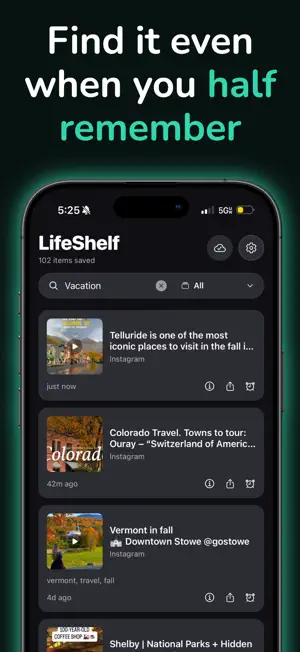
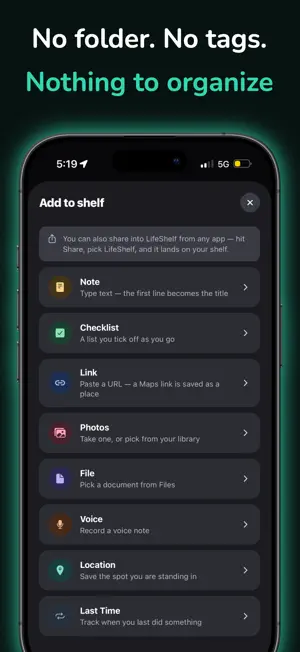
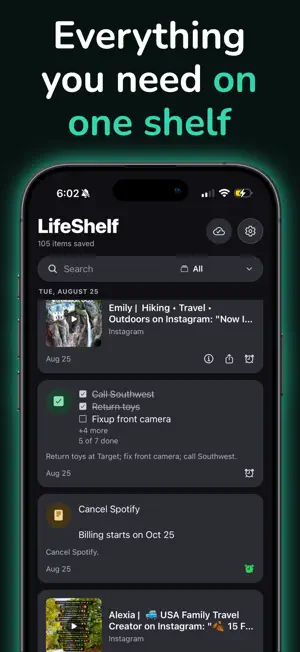
Everything you save ends up somewhere different. A link in Safari, a screenshot buried in Photos, an address in a text message, a voice memo you never played again. LifeShelf gives all of it one place. Notes, checklists, links, photos, files, voice notes and saved places land on a single timeline, newest first and grouped by day. There are no folders and no tags — nothing to file when you save, and nothing to remember about where you put it. FINDS IT BY MEANING Search reaches into your notes, file names, your own descriptions, and text read out of your photos. It matches by meaning as well as by keyword, using a model that runs on your device — so you can still find something when the words you remember are not the words you saved. BUILT FOR APPLE INTELLIGENCE On supported devices, Apple's on-device models write the short description that makes a note findable later. As they get better, so does your shelf. SAVE FROM ANYWHERE Share into LifeShelf from any app that can share — a link, a photo, a PDF, an address from Maps, a line of text someone sent you. It lands on the shelf without LifeShelf ever coming to the foreground. ALSO IN IT • Checklists with section titles, so a long list can be grouped • Do This Later — one reminder, on a day and time you choose • Last Time — know when you last did something, with its full history • Recent, what is coming up, and what you saved on this day in past years • Text in photos and screenshots read on device and made searchable • PDFs open inline; calendar invites can be added to your calendar • Light and dark, on iPhone, iPad and Mac PRIVATE BY DESIGN There is no account. No sign-up, no email, no password — download it and start saving. Your shelf is a database and files on your own device, not a copy of something on a server, and it works with no connection at all. Nothing is tracked and nothing is profiled. iCloud sync is optional and off until you switch it on. When you do, it syncs through your own iCloud account, not ours. You can export the whole shelf as a single file whenever you like. PRICING Your first 50 items are free, with every feature included — no trial period, no card required. After that a single one-time purchase removes the limit for good. It is not a subscription, it covers your iPhone, iPad and Mac together, and it works with Family Sharing.
Ratings & reviews
5.0
5 ratings
App privacy
The developer, Fnu Shabana Sulthana Begum, reported these privacy practices to Apple.
Data Not Collected
The developer does not collect any data from this app.
Alternatives to LifeShelf
Looking for apps like LifeShelf? Here are 6 similar apps on the App Store. The highest rated is Flock - Application Tracker (5.0/5), and all 6 are free to download.
-
 SuperLazy
-
 Flock - Application Tracker
5.0
Flock - Application Tracker
5.0
-
 OneShelf: Save & Organize
-
 Ask Any Place on Maps: Reqly
5.0
Ask Any Place on Maps: Reqly
5.0
-
 Triday To-Do
-
 Twilock: Screen Time Control
4.9
Twilock: Screen Time Control
4.9
| App | Rating | Price | Last updated | Compare |
|---|---|---|---|---|
| LifeShelf | 5.0 / 5 (5 ratings) | Free | September 21, 2026 | |
| SuperLazy | – | Free | Jul 8, 2026 | Compare |
| Flock - Application Tracker | 5.0 / 5 (1) | Free | Oct 23, 2026 | Compare |
| OneShelf: Save & Organize | – | Free | Aug 30, 2026 | Compare |
| Ask Any Place on Maps: Reqly | 5.0 / 5 (20) | Free | Sep 26, 2026 | Compare |
| Triday To-Do | – | Free | Aug 26, 2026 | Compare |
| Twilock: Screen Time Control | 4.9 / 5 (26) | Free | Oct 24, 2026 | Compare |
Compare LifeShelf with the top alternatives: ratings, updates, ASO score and keyword gaps →