

Bedrot: Bedtime Control
ProducerTrackr Labs Health & Fitness iPhoneiPadiPod touch
Bedrot: Bedtime Control is a free Health & Fitness app for iPhone and iPad by ProducerTrackr Labs. Rated 5.0/5 from 1 ratings. Requires iOS 26.0.
- Rating
- 5.0
- 1 ratings
- Price
- Free
- on the App Store
- Size
- 26 MB
- Age 4+
- Updated
- Oct 10
- 2026 · v2.50
Screenshots


About Bedrot: Bedtime Control
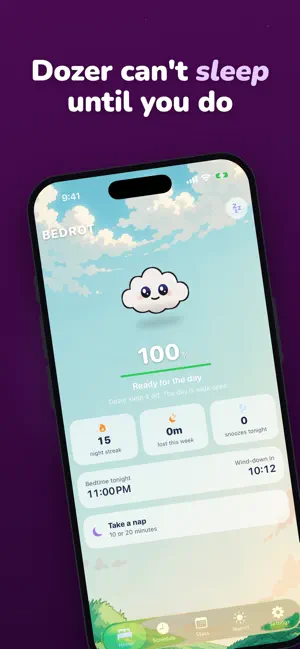
Dozer can't sleep until you do. Bedrot is a bedtime enforcer with a conscience. Set a bedtime, choose the apps that keep you up, and Dozer, a small cloud who takes your sleep personally, starts coming apart the moment you blow past it. A CHARACTER WHO FEELS IT SO YOU DO Dozer is wide awake through your day and gets cozy as bedtime nears. Past it, his sleep health drains from 100% to 0: disturbed, droopy, wrecked, a full zombie, and finally a puddle on the floor. You set how long that collapse takes, anywhere from 30 minutes to 3 hours. Nothing counts against you beforehand; the wind down is for using your phone. BLOCKING THAT ACTUALLY HOLDS Pick the apps, categories and websites that keep you up. At bedtime they're shielded, and opening one gets you Dozer instead. Your first two snoozes each night are free and the night still counts; a third counts as missed, and Bedrot warns you before you tap it. Turn on Strict Mode for no snooze at all. You can also keep apps blocked for a while after your alarm, so the first thing you reach for in the morning isn't a feed. A SCHEDULE THAT FITS A REAL WEEK Set a different bedtime for every night, so Friday can run later than Tuesday. Switch nights off entirely. Choose a wind down window of 30, 45 or 60 minutes. Work nights? Bedrot follows your wake time, not the clock: if you get up at 6 PM, it treats 8 PM as your morning. PAUSE WITHOUT GUILT Pause for tonight and it lifts by itself at wake time, or pause until you turn it back on. Paused nights aren't judged: your streak neither grows nor breaks. SOUNDS TO FALL ASLEEP TO Six soundscapes generated live rather than looped: Rain, Ocean Waves, Wind, White Noise, Deep Rumble and Fan Hum. Set a sleep timer for 15, 30 or 60 minutes. Everything keeps playing with the screen off, with controls on the Lock Screen and in the Live Activity. NAPS THAT END WHEN THEY SHOULD Ten or twenty minutes, capped on purpose: longer naps reach deep sleep and you wake up worse than you went down. Bedrot wakes you with a real alarm that sounds through silent mode and Focus, so a twenty minute nap doesn't quietly become an hour. WHEN YOU MISS ONE A missed bedtime isn't a lost cause. Bedrot builds a recovery plan grounded in how sleep actually works: hold your wake time steady rather than sleeping in, and take a short nap if you need one. Streaks are forgiving too. Every seven nights on time earns a freeze token, and a token covers a missed night instead of your streak. Bedrot tells you the next morning when one saved you. SEE THE WHOLE PICTURE A calendar of every night: clean ones, missed ones and saved ones. Your streak, your sleep debt, and a timeline of last night showing exactly when you picked the phone up and how long you stayed. ON YOUR HOME SCREEN AND LOCK SCREEN Widgets in two sizes showing Dozer, your countdown and your streak. A Live Activity and Dynamic Island that track his state through the night. MADE TO LOOK AT A sunrise meadow by day, a starry sky at night, following your clock, or a clean, simple theme if you'd rather. Dozer floats, blinks, breathes, and every so often gets up to something when he thinks you aren't watching. PRIVATE BY DESIGN Bedrot uses Apple's Screen Time framework. Your app choices and your sleep history never leave your iPhone. There's no account and nothing to sign up for. Bedrot requires a subscription. Blocking requires Screen Time permission, and nap alarms require permission to schedule alarms. Bedrot asks for both in context. Terms of Use (EULA): https://www.apple.com/legal/internet-services/itunes/dev/stdeula/
What’s new
Version 2.50 · Updated October 10, 2026
1. Dozer's wardrobe: a nightcap, sleep mask, cozy scarf, headphones, crown and wizard hat, earned with your best bedtime streak. Breaking a streak never takes a look away. Pick his color too. 2. Dozer looks the same everywhere: his color and outfit show on the widget, the Live Activity and the bedtime shield. 3. Wake up alarm: a real alarm that rings on silent and in Sleep Focus, then opens to an animated good morning from Dozer, upright or sideways. 4. Apple Health: Stats shows how much more you actually sleep on the nights you make bedtime. 5. Share my week: a recap card of your week in Story or Square size, to post, send or save to Photos. 6. iCloud backup: your streak, calendar, schedule and settings back up on their own, and Settings has a Restore from iCloud button. 7. Siri and Shortcuts: check your streak, play a sleep sound, start a nap, or pause Bedrot for tonight by voice, and get a suggested bedtime from your sleep goal. 8. Emergency unlock: a 15 minute way past the shield for real emergencies, made deliberate so it isn't a loophole. 9. Invite friends: invite 5 friends and your next year is free. Everyone who joins with your code gets a free month. 10. iPhone Duo: open it and every tab sits on the right page while Dozer roams the left, running across as you move to and from Home. Improved 11. Live Activity: keeps updating through the night without opening the app, shows one activity per night, and shows the wake alarm correctly. 12. Morning report: redesigned with Dozer's verdict, icon tiles and a timeline of the night, always for the right night. 13. A new splash screen with Dozer asleep under a night sky, and a faster start for subscribers. 14. Sleep sounds, Power nap, the wardrobe, Dozer's color, backgrounds and Share my week now slide in from the right and swipe away with your finger. 15. Schedule: each day shows that night's bedtime and the next morning's wake. 16. Stats: the history chart says plainly that it shows sleep lost. 17. A fresh look for Settings, Schedule and the Morning report, with titles that line up on every tab. 18. Backgrounds keep their ground in view on wide screens. 19. Smoother Dozer animations, with shadows that stay under him. Fixed 20. The app no longer freezes while you spin a bedtime wheel. 21. The app no longer gets stuck on the splash screen. 22. The morning report counts the right bedtime and ends the night at your wake. 23. Settings show changes made elsewhere right away.
App privacy
The developer, ProducerTrackr Labs, reported these privacy practices to Apple.
Data Linked to You
The following data, which may be collected and linked to your identity, may be used for the following purposes:
- User Content: Other User Content
Used for: App Functionality
Data Not Linked to You
The following data, which may be collected but is not linked to your identity, may be used for the following purposes:
- Usage Data: Other Usage Data
Used for: Other Purposes
Alternatives to Bedrot: Bedtime Control
Looking for apps like Bedrot: Bedtime Control? Here are 6 similar apps on the App Store. The highest rated is Breathing Exercises And A Cat (5.0/5), and all 6 are free to download.
-
 Owain
-
 Breathing Exercises And A Cat
5.0
-
 WellLog: Heart & Glucose
-
 HeartKase: Blood Pressure Log
4.7
-
 Samson Fitness
5.0
-
 Crash Out Diary - Safe Place
5.0
| App | Rating | Price | Last updated | Compare |
|---|---|---|---|---|
| Bedrot: Bedtime Control | 5.0 / 5 (1 rating) | Free | October 10, 2026 | |
| Owain | – | Free | Oct 17, 2026 | Compare |
| Breathing Exercises And A Cat | 5.0 / 5 (1) | Free | Oct 6, 2026 | Compare |
| WellLog: Heart & Glucose | – | Free | Oct 17, 2026 | Compare |
| HeartKase: Blood Pressure Log | 4.7 / 5 (19) | Free | Sep 24, 2026 | Compare |
| Samson Fitness | 5.0 / 5 (1) | Free | Oct 3, 2026 | Compare |
| Crash Out Diary - Safe Place | 5.0 / 5 (2) | Free | Jan 20, 2026 | Compare |