

PilotFlight: Flight Planner
Yigit Can Akinci Navigation iPhoneiPadiPod touch
PilotFlight: Flight Planner is a free Navigation app for iPhone and iPad by Yigit Can Akinci. Requires iOS 17.0. Updated September 30, 2026.
- Price
- Free
- on the App Store
- Size
- 28 MB
- Age 4+
- Updated
- Sep 30
- 2026 · v1.3.9
Screenshots



About PilotFlight: Flight Planner
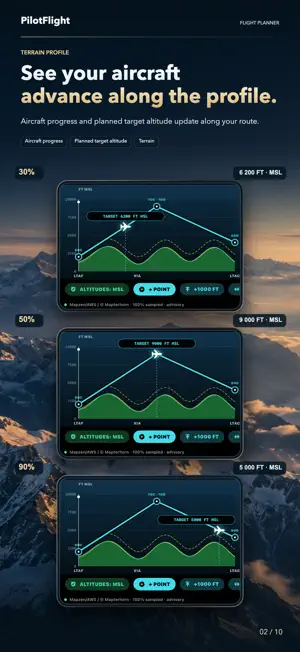
PilotFlight brings route planning, cockpit preparation, navigation and post-flight review into one focused workspace for iPhone and iPad. PLAN EVERY STAGE • Create multi-leg routes with ICAO airports or named waypoints; review course, distance, ETE, altitude, airspeed and entered fuel. • Planning Desk builds a wind-corrected pilot log, sector assumptions and fuel policy from pilot-entered data, with text and printable-PDF export. • Weight & Balance checks pilot-entered aircraft loading against a CG envelope; verify all limits against approved documents. • Flight Kit stores your PDFs and aircraft checklists locally, previews GPX route imports and exports routes/tracks as GPX or the logbook as CSV. The app supplies no certified documents or checklists. • Airfields & Radio combines route/nearby airports, runways and available TWR/APP/COM frequencies. • Airspace & Profile shows imported boundaries, route crossings and comparable MSL bands. • Procedures & Charts manages source-dependent SID, STAR, approaches, holds, runway guidance, navaids, reporting points, information, frequencies and regional NOTAMs. LIVE MAP, TERRAIN AND FLIGHT DECK • See ownship, planned route, Direct-To/live guidance and breadcrumb track on satellite, hybrid or terrain backgrounds, with optional 3D relief. • Map Tools controls available airspace, worldwide SIGMET, PIREP, source-dependent NOTAM, procedure, navigation, information and frequency layers. • View sampled terrain beneath the active route, compare it with planned MSL altitude and a chosen vertical margin, and shape altitude by leg or with movable points. Results appear only where samples are available. • Use the refined HSI/CDI navigation display with BRG, DTK and XTK, plus GPS altitude, groundspeed, vertical speed, ETE and ETA when supported sensor data is available. BRIEF, FLY AND REVIEW Read exact-station METAR/TAF when available; assess runway wind, personal minimums and hazard context. Record or recover a flight, replay tracks or rehearse routes in Flight Review, export GPX and keep notes and a local logbook. READY BEYOND THE SIGNAL Download worldwide offline basemaps and change the background inside Live Map while retaining the active route and guidance. Imported or previously refreshed layers use only the last verified data held on the device. Ten editable tools—including wind triangle, density altitude, fuel/endurance, top of descent, glide and turn performance—work locally. DATA AVAILABILITY Weather and worldwide SIGMET use official AviationWeather.gov/Aviation Weather Center services. NOTAM display is not a complete briefing: FAA supplies a U.S. graphical TFR subset; other NOTAM, procedure, information, frequency and airspace layers depend on installed, imported or configured sources. Coverage and currency vary. An empty layer never means all clear. PAID ACCESS All features require auto-renewable PilotFlight Pro; no free tier. Choose monthly or yearly. Eligible new subscribers receive one month free. Unless canceled at least 24 hours before the trial or period ends, the plan starts or renews at Apple’s displayed local price. Manage in Apple Account settings. IMPORTANT PilotFlight is a supplemental planning and situational-awareness aid, not a certified primary flight/navigation instrument or a substitute for approved charts, AIP data, official weather/NOTAM briefings, ATC instructions, aircraft documentation or pilot judgment. Flight Deck does not provide a certified attitude reference or indicated airspeed. Always verify current approved sources before flight. The interface supports English, Arabic, French, German, Italian, Russian, Spanish (Spain) and Turkish. Terms of Use (Apple Standard EULA): https://www.apple.com/legal/internet-services/itunes/dev/stdeula/ Privacy Policy: https://akincijet.com/pilotflight-ipad-privacy.php?lang=en
What’s new
Version 1.3.9 · Updated September 30, 2026
Red cockpit mode is now one tap away at the bottom of Flight Deck. Turn the red display on or off with either the Edge or Classic instrument theme. Your choice stays active as you move through the app, including Live Map and offline Atlas Pro maps.
App privacy
The developer, Yigit Can Akinci, reported these privacy practices to Apple.
Data Linked to You
The following data, which may be collected and linked to your identity, may be used for the following purposes:
- Usage Data: Product Interaction
- Diagnostics: Other Diagnostic Data
Used for: App Functionality
Data Not Linked to You
The following data, which may be collected but is not linked to your identity, may be used for the following purposes:
- Location: Precise Location
- Search History: Search History
Used for: App Functionality
Alternatives to PilotFlight: Flight Planner
Looking for apps like PilotFlight: Flight Planner? Here are 6 similar apps on the App Store. The highest rated is Flight Whisper (5.0/5), and all 6 are free to download.
-
 GeoCharts
4.3
GeoCharts
4.3
-
 E6B Flight Computer Calc
-
 PilotDeck
4.8
PilotDeck
4.8
-
 FlightPlan Pro
-
 Parky: UAE Parking Assistant
-
 Flight Whisper
5.0
Flight Whisper
5.0
| App | Rating | Price | Last updated | Compare |
|---|---|---|---|---|
| PilotFlight: Flight Planner | – | Free | September 30, 2026 | |
| GeoCharts | 4.3 / 5 (6) | Free | Sep 19, 2026 | Compare |
| E6B Flight Computer Calc | – | Free | Oct 14, 2026 | Compare |
| PilotDeck | 4.8 / 5 (6) | Free | Oct 19, 2026 | Compare |
| FlightPlan Pro | – | Free | Oct 22, 2026 | Compare |
| Parky: UAE Parking Assistant | – | Free | Sep 11, 2026 | Compare |
| Flight Whisper | 5.0 / 5 (3) | Free | Apr 29, 2026 | Compare |