

CardBox Wallet
Prantosh Pran Bhattacharyya Utilities iPhoneiPadiPod touch
CardBox Wallet is a free Utilities app for iPhone and iPad by Prantosh Pran Bhattacharyya. Requires iOS 18.0. Updated August 31, 2026.
- Price
- Free
- on the App Store
- Size
- 11 MB
- Age 4+
- Updated
- Aug 31
- 2026 · v1.0
Screenshots


About CardBox Wallet
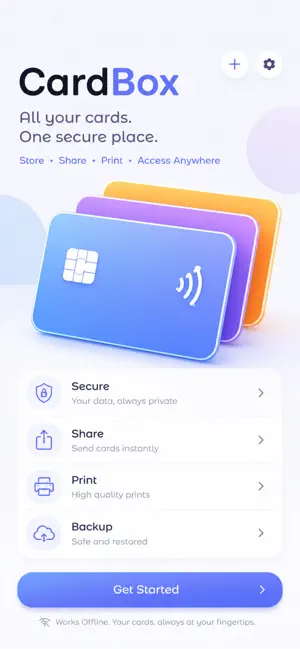
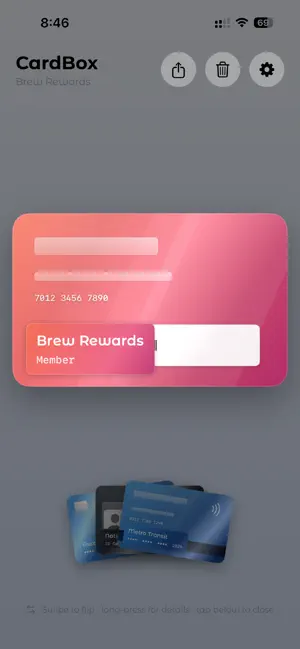
Your wallet, on your iPhone. And nowhere else. CardBox holds the cards you actually carry — bank and payment cards, ID cards, your driver's license, vehicle registration, transit passes, loyalty and membership cards — as a deck you flick through with your thumb. Scan a card and CardBox straightens it, cleans it up, and reads the details off the front. All of that happens on your iPhone. There's no account to create, no server to sync with, and nothing watching what you do. CardBox contains no networking code at all. SCAN IT ONCE • Point the camera at your card, or pick a photo you already have • Drag the four corners onto the card and it's flattened out square • Brightness, saturation and denoise sliders to clean up the result • The original scan is kept, so you can re-adjust later without ever degrading it IT KNOWS WHAT IT'S LOOKING AT CardBox recognises ten kinds of card and fills in the fields each one actually carries — number and expiry for a bank card, valid-till and vehicle class for a licence, chassis and engine number for an RC. Guessed wrong? Change the type in a tap and the fields follow. A DECK, NOT A LIST Your cards fan out like a hand you're holding. Drag to browse. Tap to bring one forward, tap again to lift it out. Swipe to flip it over. Long-press for everything saved on it. BEHIND YOUR FACE Ask for Face ID, Touch ID or your passcode before CardBox opens, before a card is shared, and before a backup is imported. If Face ID fails it falls back to your passcode, so a bad scan can never lock you out of your own cards. SHARE WITHOUT EXPOSING Send a card to someone and it travels encrypted with AES-GCM, behind aand give them the code separately. Without it, the file is unreadable. YOURS TO KEEP • Export any card as a PDF • Back up your whole wallet to Files, or to iCloud Drive if you want it on your other devices • Delete the app and your cards go with it PRIVACY, PLAINLY No servers. No account. No analytics, no advertising, no third-party SDKs, no cloud sync. Text recognition runs on Apple's Vision framework, entirely on your device. We never see your cards because there is nowhere for them to go. The honest flip side: we can't recover them for you either. Make a backup. CARDBOX PLUS Free wallets hold five cards and one card share a month. CardBox Plus is a one-time purchase — not a subscription — and unlocks: • Unlimited cards • PDF export • Unlimited card sharing CardBox is a place to keep your cards, not a payment app. It can't tap, pay, or stand in for the real thing at a counter. Requires iPhone running iOS 18 or later. Terms of Use (EULA): https://www.apple.com/legal/internet-services/itunes/dev/stdeula/
App privacy
The developer, Prantosh Pran Bhattacharyya, reported these privacy practices to Apple.
Data Not Collected
The developer does not collect any data from this app.
Alternatives to CardBox Wallet
Looking for apps like CardBox Wallet? Here are 6 similar apps on the App Store. The highest rated is Cardugo - Offline Card Wallet (5.0/5), and all 6 are free to download.
-
 Clean your photos: PicWiper
-
 Cardoodle
-
 Log of Owe
-
 SweetSpot Signal Finder
-
 Cardugo - Offline Card Wallet
5.0
Cardugo - Offline Card Wallet
5.0
-
 SliceRoll
| App | Rating | Price | Last updated | Compare |
|---|---|---|---|---|
| CardBox Wallet | – | Free | August 31, 2026 | |
| Clean your photos: PicWiper | – | Free | Sep 16, 2025 | Compare |
| Cardoodle | – | Free | Apr 22, 2026 | Compare |
| Log of Owe | – | Free | Jan 12, 2026 | Compare |
| SweetSpot Signal Finder | – | Free | Jul 9, 2026 | Compare |
| Cardugo - Offline Card Wallet | 5.0 / 5 (2) | Free | Oct 12, 2026 | Compare |
| SliceRoll | – | Free | Nov 30, 2025 | Compare |
Compare CardBox Wallet with the top alternatives: ratings, updates, ASO score and keyword gaps →