

Scrinium
Jaydip Patel Productivity iPhoneiPadiPod touch
Scrinium is a free Productivity app for iPhone and iPad by Jaydip Patel. Rated 1.0/5 from 1 ratings. Requires iOS 16.0. Updated September 2, 2026.
- Rating
- 1.0
- 1 ratings
- Price
- Free
- on the App Store
- Size
- 2 MB
- Age 4+
- Updated
- Sep 2
- 2026 · v2.1.1
Screenshots

About Scrinium
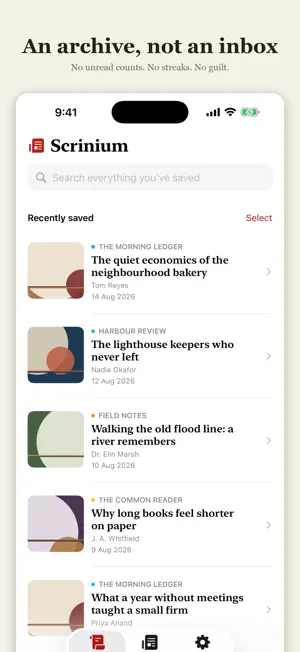
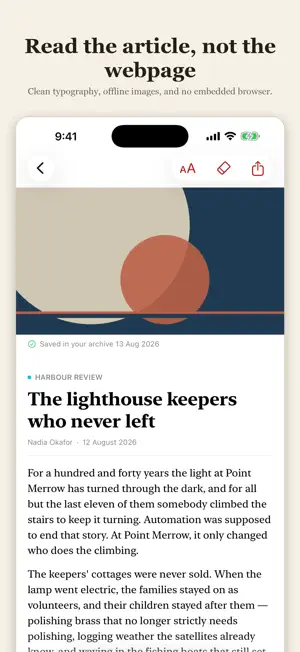
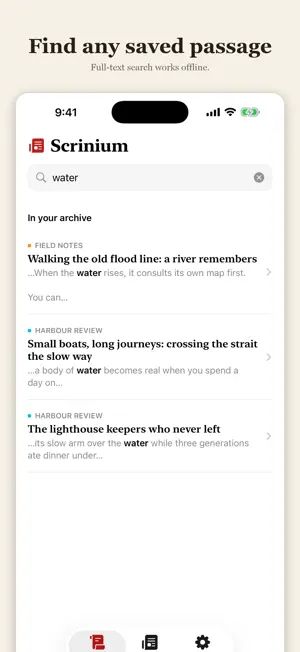
Scrinium is a read-later app with a longer memory. Save an article from Safari or with the Scrinium Clipper on your computer, and keep a private offline copy that remains searchable even if the original page later changes. SAVES Use the Share Sheet or Safari toolbar button on iPhone and iPad. Scrinium saves the page content your browser provides. It does not bypass paywalls or unlock content you could not already access. KEEPS Saved text and available images are kept for offline reading. Scrinium presents articles in a native reader—not an embedded browser—and never executes the captured webpage. Retained source remains inert and private. FINDS Search the full text of your archive instantly, with matching words highlighted in each result. Automatic tags are created on-device from article text and publisher metadata. It's an archive to search, not an inbox to clear—no unread counts, streaks, or guilt. READS Enjoy serif typography, adjustable text size, offline images, and a reader that filters common page clutter such as ads, subscription prompts, and related-story modules. Highlight important passages, hide unwanted blocks, and let Scrinium remember those choices for each publication. LISTENS Tap the headphones and Scrinium reads the article aloud, sentence by sentence, highlighting the current sentence as it speaks. Playback continues on the Lock Screen with play, pause, and sentence skip, along with your place in the article; AirPlay and Bluetooth speakers work; leave mid-article and Listen resumes where you stopped. Articles in other languages are spoken in their own language when your device has a matching voice installed. Reading aloud uses system voices available on your iPhone or iPad. Scrinium does not send article text to a developer server. SYNCS Your archive syncs through your private iCloud database. There is no Scrinium account, developer-run content server, analytics, advertising, or tracking. BUILT TO STAY OUT OF THE WAY No Scrinium account. No subscription. No AI summaries or rewrites. No analytics, advertising, or recommendation feed. Scrinium saves the articles you choose, presents them clearly, and leaves the author's words alone. The free archive holds up to 15 articles. Reading, search, highlights, editing, deleting, and sync are never limited. Scrinium Unlimited removes the save limit and unlocks the desktop Clipper with a one-time purchase—no subscription. Family Sharing is supported.
What’s new
Version 2.1.1 · Updated September 2, 2026
Scrinium can now read your articles aloud. LISTEN Tap the headphones in the reader and Scrinium reads the article aloud, sentence by sentence, highlighting the current sentence as it speaks. Playback continues with the screen locked, with controls and your place on the Lock Screen. Pause and resume, skip a sentence back or forward, choose your speed, and play through AirPlay or Bluetooth speakers. Press stop once to keep your place — Listen resumes there next time — or twice to start the article over. Articles in other languages are read in their own language when a matching voice is installed on your device. When one isn't, Scrinium tells you which voice to add in Settings instead of reading the article badly. Reading aloud uses system voices available on your iPhone or iPad. Scrinium does not send article text to a developer server. ALSO IN THIS RELEASE When a thumbnail isn't available, Scrinium now shows quiet, deterministic cover art instead of an empty box, with colours derived from the publication.
App privacy
The developer, Jaydip Patel, reported these privacy practices to Apple.
Data Not Collected
The developer does not collect any data from this app.
Alternatives to Scrinium
Looking for apps like Scrinium? Here are 6 similar apps on the App Store. The highest rated is Authenticator App - SafeAuth (5.0/5), and all 6 are free to download.
-
 IDN Network
-
 VXT
3.2
-
 Authenticator App - SafeAuth
5.0
-
 Bullet: Daily Planner, Journal
4.7
-
 In Charge App
3.9
-
 Tweek: Minimal Weekly Planner
4.8
| App | Rating | Price | Last updated | Compare |
|---|---|---|---|---|
| Scrinium | 1.0 / 5 (1 rating) | Free | September 2, 2026 | |
| IDN Network | – | Free | Jul 7, 2025 | Compare |
| VXT | 3.2 / 5 (14) | Free | Sep 10, 2026 | Compare |
| Authenticator App - SafeAuth | 5.0 / 5 (9) | Free | Jan 15, 2026 | Compare |
| Bullet: Daily Planner, Journal | 4.7 / 5 (317) | Free | Nov 1, 2026 | Compare |
| In Charge App | 3.9 / 5 (64) | Free | Dec 2, 2025 | Compare |
| Tweek: Minimal Weekly Planner | 4.8 / 5 (1,285) | Free | Nov 2, 2026 | Compare |
Compare Scrinium with the top alternatives: ratings, updates, ASO score and keyword gaps →