

Eluna Budget: Expense Tracker
Serhii Vakulenchyk Finance iPhoneiPadiPod touch
Eluna Budget: Expense Tracker is a free Finance app for iPhone and iPad by Serhii Vakulenchyk. Requires iOS 15.5. Updated October 12, 2026.
- Price
- Free
- on the App Store
- Size
- 44 MB
- Age 4+
- Updated
- Oct 12
- 2026 · v1.0.3
Screenshots


About Eluna Budget: Expense Tracker
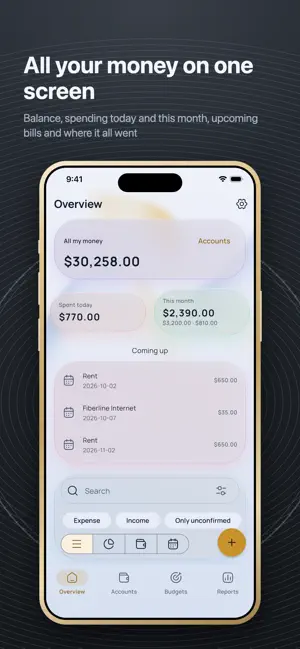
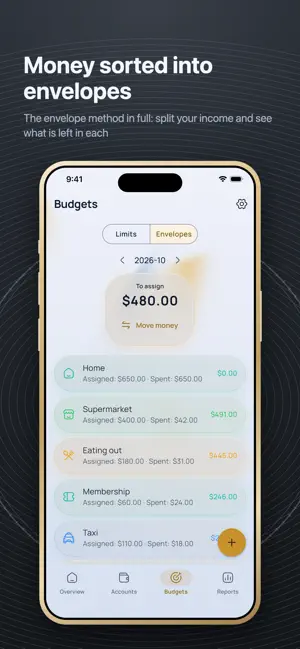
Eluna Budget keeps every transaction on your phone. No bank login, no account, no subscription, no ads. Nothing to sign up for, and nothing to cancel later. WHY NO BANK CONNECTION An aggregator wants your banking credentials and sells what it learns from them. This app never asks. You type an expense in a couple of seconds, or photograph a receipt, and that stays between you and your device. TWO WAYS TO BUDGET Simple limits: a ceiling per category and how much is left. Or envelopes: give every amount that comes in a job until nothing is unassigned. Both support rollover, and a period that starts on your card's statement day instead of the 1st. SEE WHERE IT IS HEADED Net worth across every account as one trend line. Forecast to the end of the month from your recurring bills and income, with a warning before the balance goes under. Auto-categories from local rules — payee contains Starbucks, category is Coffee. No bank sync, no cloud AI; the rules run here. FAST ENTRY A calculator keypad, repeat-last, long-press a category for its subcategories, and receipt scanning that reads the total from a photo on the device itself. The photo goes nowhere. EVERYTHING A LEDGER NEEDS Accounts, categories, tags, transfers, split transactions, recurring payments, savings goals, debts in both directions, and reconciliation against a paper statement. 63 CURRENCIES Each account in its own currency. Rates refresh once a day if you allow it, or you type them in by hand and nothing is ever fetched. IMPORT INSTEAD OF A BANK LOGIN CSV, OFX and QIF files from your bank, read on this device. The app remembers each bank's column layout so the second import is one tap. YOUR DATA, YOURS TO TAKE Full CSV and JSON export, free and always there. Encrypted backups behind a password, automatic backups on a schedule, and PDF reports for any period. SYNC WITHOUT OUR SERVER We do not run one. Sync goes through your own iCloud, or through a file you control — a shared folder, a network disk. Whoever holds that file sees ciphertext and nothing more. PRIVATE BY CONSTRUCTION The database is encrypted with SQLCipher. Lock the app with a passcode or Face ID. There are no analytics, no crash reporters, no ad networks and no cloud AI anywhere in the dependency tree — not switched off, absent — and you can check that yourself on the licenses screen. The only requests the app can make are exchange rates, and only if you turn them on. FREE Every feature, from the first launch. There is no paid tier, no trial and no watermark. The only thing you can buy is a tip, and it unlocks nothing. ONE HONEST NOTE There is no background sync on iOS: changes travel when you open the app, not while it is closed. Also: 61 languages, nine app icons, and achievements awarded for the habit of writing things down — never for how little you spend.
What’s new
Version 1.0.3 · Updated October 12, 2026
Interest on savings. Set a rate and the app accrues it monthly, quarterly or yearly and posts a real transaction — including the periods that passed while the app was closed. Contribution limits for tax-advantaged accounts: ISA, TFSA, PEA and their equivalents. The app tracks the room left for the year, sub-limits and holding periods, and warns before a deadline. PDF statements, alongside CSV. Signed containers — how some banks deliver statements — are unwrapped automatically. Overview and transactions on one screen: the summary, the calendar and the full list without switching tabs. Half the size: 40 MB instead of 87. Sheets now close with a swipe down. Receipt scanning reads currencies without decimals and three-decimal dinars. Weeks start on the day you chose in settings. Fixed: subcategories stayed hidden after deleting a parent category, an edit could be lost when the device clock moved back, and a dozen layout issues on narrow screens.
App privacy
The developer, Serhii Vakulenchyk, reported these privacy practices to Apple.
Data Not Collected
The developer does not collect any data from this app.
Alternatives to Eluna Budget: Expense Tracker
Looking for apps like Eluna Budget: Expense Tracker? Here are 6 similar apps on the App Store.
-
 Finoria – Finances & budget
-
 SpendLens: Budget Envelopes
-
 Pouch: Envelope Budget Planner
-
 Milli: Budget Expense Tracker
-
 BudgetLoop: Expense Tracker
-
 Hikiotoshi - 引き落とし管理
| App | Rating | Price | Last updated | Compare |
|---|---|---|---|---|
| Eluna Budget: Expense Tracker | – | Free | October 12, 2026 | |
| Finoria – Finances & budget | – | Free | Jul 23, 2026 | Compare |
| SpendLens: Budget Envelopes | – | Free | Aug 3, 2026 | Compare |
| Pouch: Envelope Budget Planner | – | Free | Sep 14, 2026 | Compare |
| Milli: Budget Expense Tracker | – | Free | Sep 30, 2026 | Compare |
| BudgetLoop: Expense Tracker | – | Free | Aug 18, 2026 | Compare |
| Hikiotoshi - 引き落とし管理 | – | Free | Oct 1, 2026 | Compare |