

Hey Reachy
Aleksey Kakoulin Utilities iPhoneiPadiPod touchMac
Hey Reachy is a free Utilities app for iPhone and iPad by Aleksey Kakoulin. Requires iOS 18.0. Updated October 28, 2026.
- Price
- Free
- on the App Store
- Size
- 58 MB
- Age 9+
- Updated
- Oct 28
- 2026 · v0.7.4
Screenshots

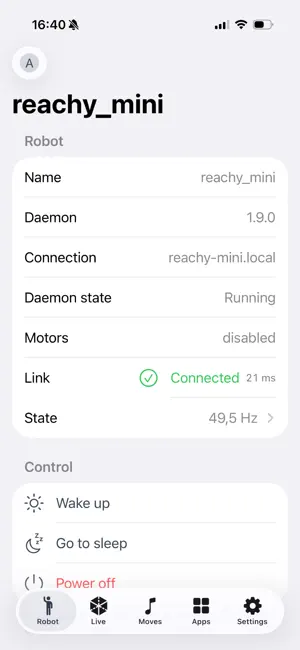


About Hey Reachy
Hey Reachy is an unofficial app for the Reachy Mini desktop robots, native on iPhone, iPad, Mac, Apple TV and Apple Vision Pro. It is not Pollen Robotics' own app, and it is not affiliated with, endorsed by or supported by Pollen Robotics or Hugging Face. It talks to a robot on your own network directly, with no account to create. A Hugging Face sign-in is optional — for installing robot apps, and for reaching your robots from outside their network through its relay. TRY IT WITHOUT A ROBOT Under Developer on the Connect screen, "Start the simulator" opens a session with a robot the app carries itself — no robot, no network, no account. It is drawn from the robot's own description and moved by the same kinematics the app sends to real hardware. A Reachy Mini Wireless on your network is what the app is for. A Lite model, or a daemon run in simulation on a computer, connects the same way. WHAT IT DOES • Connect — Nearby finds robots on your network with a sweep and Bonjour or at an address you type, and on a Mac the daemon on that computer. Remote reaches the robots linked to your Hugging Face account, wherever they are. • Live control — joystick or game controller teleop of the 6-DoF head, the antennas and body rotation, with the robot's camera and two-way audio, so you can talk through its speaker. AirPods that track your head, or Apple Vision Pro itself, can steer the robot's head with yours. Let the head follow a face, at a strength you pick between a glance and a lock. • 3D viewer — a RealityKit model built from the robot's own URDF and meshes, mirroring it in real time. • Moves — browse and play the recorded moves the robot ships with, from the app or by asking Siri for one by name. Record your own takes with the joystick and play them back. • Sounds — a soundboard for the robot's speaker: add audio files from your device and play them with a tap. • Apps — install, update and remove robot apps from Hugging Face Spaces, following each job as it runs. Filter and sort the catalogue, pin the apps you use most, report an app or hide its author. • State and logs — the control loop's frequency, worst interval and error count charted live, beside the robot's processor, memory, temperature and uptime. The daemon's log streams in as it is written. • Files — an SFTP browser for the robot's filesystem. • Setup and recovery — put a brand-new robot onto Wi-Fi over an encrypted Bluetooth channel, guide its first wake-up, or bring back one that fell off the network. AT HOME ON YOUR DEVICES Widgets for the Home Screen, the Lock Screen, StandBy and the Mac's Notification Centre. The Mac also keeps the robot in the menu bar: awake or asleep, one button to change it, and the installed apps underneath. Control Center controls for power, for a move or an app you choose yourself, for a sound, and for stopping whatever is running — each one on the Lock Screen and the Action button too. Siri and Shortcuts for waking, sleeping, powering off, launching an app, playing a move, or asking whether the robot is awake and what is running on it, each able to name which robot it means. Sixteen animated Reachy stickers for Messages, the Stickers app and FaceTime. Six accent themes, each with a matching app icon and a colour for the 3D robot. English, German, Spanish, French and Russian. PRIVACY Nothing is collected. The app talks to your robot and, if you sign in, to Hugging Face with your own account. There is no server on our side. A NOTE ON YOUR NETWORK The robot's daemon provides no authentication and no encryption of its own. Use Hey Reachy on a trusted private network or on the robot's own access point — never through a port forward or a public address. Hey Reachy is an independent client for the robot daemon's documented HTTP and WebSocket API. "Reachy Mini" is a product name of Pollen Robotics, used here solely to describe what this app is compatible with. Requires iOS 18, macOS 15, tvOS 26 or visionOS 26.
What’s new
Version 0.7.4 · Updated October 28, 2026
WITH ROBOT SOFTWARE 1.13 • Share anonymous usage data: a new switch in Settings shows and changes whether the robot sends Pollen Robotics anonymous usage events. The choice belongs to the robot, so it holds for every app that connects to it. • From outside the robot's network, through Hugging Face, the Apps tab now lists what the robot has installed, shows each install as it runs, and updates, removes and restarts apps. • A remote session that drops now reconnects without the robot calling itself in use, and finds a robot that has reconnected to Hugging Face. ALSO • On a Mac, a robot's SSH key stays trusted after you accept it. • Linking a robot to Hugging Face accepts the hf.co sign-in page that newer robots show.
App privacy
The developer, Aleksey Kakoulin, reported these privacy practices to Apple.
Data Not Collected
The developer does not collect any data from this app.
Alternatives to Hey Reachy
Looking for apps like Hey Reachy? Here are 6 similar apps on the App Store. The highest rated is Terrain Attain (5.0/5), and all 6 are free to download.
-
 Reachy Mini
3.0
Reachy Mini
3.0
-
 Reachy's Brain
-
 Terrain Attain
5.0
Terrain Attain
5.0
-
 TTology
-
 M5Stack AIFlow
-
 CO2 on Watch & Lockscreen
1.0
CO2 on Watch & Lockscreen
1.0
| App | Rating | Price | Last updated | Compare |
|---|---|---|---|---|
| Hey Reachy | – | Free | October 28, 2026 | |
| Reachy Mini | 3.0 / 5 (2) | Free | Oct 26, 2026 | Compare |
| Reachy's Brain | – | Free | Jun 14, 2026 | Compare |
| Terrain Attain | 5.0 / 5 (2) | Free | Sep 16, 2026 | Compare |
| TTology | – | Free | Apr 27, 2025 | Compare |
| M5Stack AIFlow | – | Free | Oct 22, 2026 | Compare |
| CO2 on Watch & Lockscreen | 1.0 / 5 (2) | Free | Mar 18, 2026 | Compare |
Compare Hey Reachy with the top alternatives: ratings, updates, ASO score and keyword gaps →