

PDF Scanner OCR: PixaDoc Docs
Danil Tsekhovskiy Business iPhoneiPadiPod touch
PDF Scanner OCR: PixaDoc Docs is a free Business app for iPhone and iPad by Danil Tsekhovskiy. Requires iOS 26.0. Updated October 7, 2026.
- Price
- Free
- on the App Store
- Size
- 22 MB
- Age 4+
- Updated
- Oct 7
- 2026 · v1.3.2
Screenshots
About PDF Scanner OCR: PixaDoc Docs
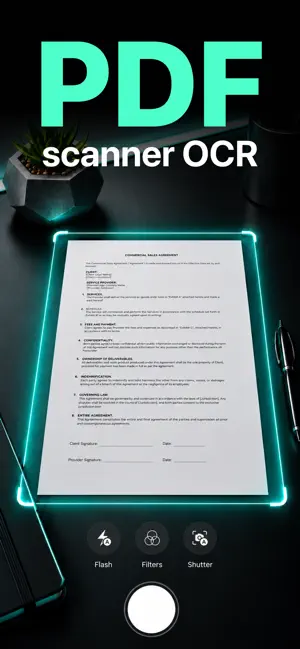
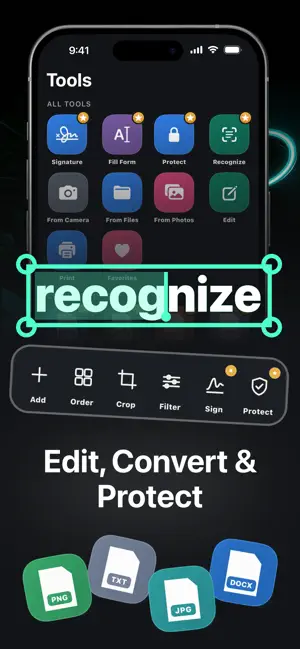
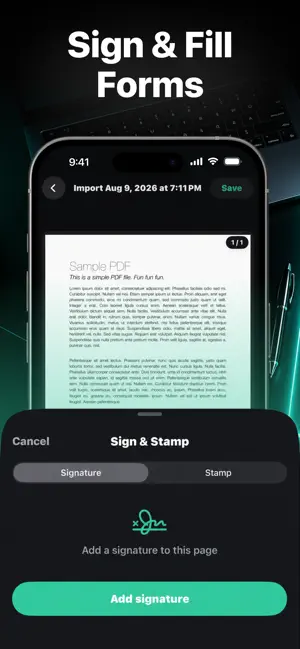
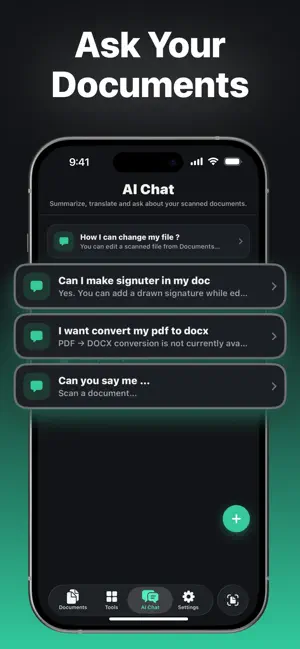
Paperwork in. A clean, ready-to-share PDF out. PixaDoc turns your iPhone or iPad into a fast document scanner for receipts, invoices, contracts, IDs, notes, books, photos, and forms. Capture several pages, clean them up, recognize text, edit, sign, organize, and export without jumping between apps. SCAN CLEAR DOCUMENTS • Automatic edge detection and auto-scan • Crop, straighten, perspective correction, brightness, contrast, and filters • Batch scanning for multi-page documents • Import from Camera, Photos, or Files EXTRACT TEXT WITH OCR Recognize text in scans and images, search the result, and copy the text you need. EDIT, FILL, AND SIGN • Add, delete, crop, rotate, and reorder pages • Add text and fill out forms • Draw and reuse your electronic signature • Choose common page sizes such as A4, Letter, Legal, A3, A5, Ledger, Tabloid, and Business Card CONVERT AND EXPORT Export PDF files to DOCX, XLSX, PPTX, TXT, PNG, or JPG. Save scans as PDF, JPG, or PNG. ORGANIZE AND PROTECT • Sort documents into folders and mark favorites • Lock documents with a passcode • Lock the app with a passcode or Face ID PRINT AND SHARE Print, use the iOS share sheet, or save a copy to Files. From the first photo to the final signed file, PixaDoc keeps the whole document workflow in one place. Privacy Policy: https://docs.google.com/document/d/12kNeQNTe2jX4QrJD2c6CY-is2h1lRrWz6TDAVWSKxcQ/edit?tab=t.0#heading=h.6pt0pzc7p7x7 Terms of Use: https://www.apple.com/legal/internet-services/itunes/dev/stdeula/
What’s new
Version 1.3.2 · Updated October 7, 2026
We improved stability and performance and fixed minor issues.
App privacy
The developer, Danil Tsekhovskiy, reported these privacy practices to Apple.
Data Used to Track You
The following data may be used to track you across apps and websites owned by other companies:
- Identifiers: Device ID
- Usage Data: Product Interaction
Data Not Linked to You
The following data, which may be collected but is not linked to your identity, may be used for the following purposes:
- Identifiers: Device ID
- Usage Data: Product Interaction, Other Usage Data
- Diagnostics: Crash Data, Performance Data, Other Diagnostic Data
Used for: Analytics, Product Personalization, App Functionality
Alternatives to PDF Scanner OCR: PixaDoc Docs
Looking for apps like PDF Scanner OCR: PixaDoc Docs? Here are 6 similar apps on the App Store. The highest rated is PDF Reader&Scanner (5.0/5), and all 6 are free to download.
-
 PDF View-Picture Create
-
 Smart Printer · Print & Scan
4.1
Smart Printer · Print & Scan
4.1
-
 Phone Cleaner-Clean Up Storage
4.6
Phone Cleaner-Clean Up Storage
4.6
-
 Greyer - Smart AI Assistant
3.9
Greyer - Smart AI Assistant
3.9
-
 PDF Reader: Convert & Edit
4.8
PDF Reader: Convert & Edit
4.8
-
 PDF Reader&Scanner
5.0
PDF Reader&Scanner
5.0
| App | Rating | Price | Last updated | Compare |
|---|---|---|---|---|
| PDF Scanner OCR: PixaDoc Docs | – | Free | October 7, 2026 | |
| PDF View-Picture Create | – | Free | Oct 21, 2026 | Compare |
| Smart Printer · Print & Scan | 4.1 / 5 (15) | Free | Oct 27, 2026 | Compare |
| Phone Cleaner-Clean Up Storage | 4.6 / 5 (5) | Free | Oct 15, 2026 | Compare |
| Greyer - Smart AI Assistant | 3.9 / 5 (14) | Free | Oct 15, 2026 | Compare |
| PDF Reader: Convert & Edit | 4.8 / 5 (4) | Free | Jan 5, 2026 | Compare |
| PDF Reader&Scanner | 5.0 / 5 (1) | Free | Sep 14, 2026 | Compare |