

Passport Photo: ID Sizes
ZeroPlay Ltd. Photo & Video iPhoneiPadiPod touch
Passport Photo: ID Sizes is a free Photo & Video app for iPhone and iPad by ZeroPlay Ltd. Requires iOS 15.1. Updated August 26, 2026.
- Price
- Free
- on the App Store
- Size
- 103 MB
- Age 4+
- Updated
- Aug 26
- 2026 · v1.0
Screenshots



About Passport Photo: ID Sizes
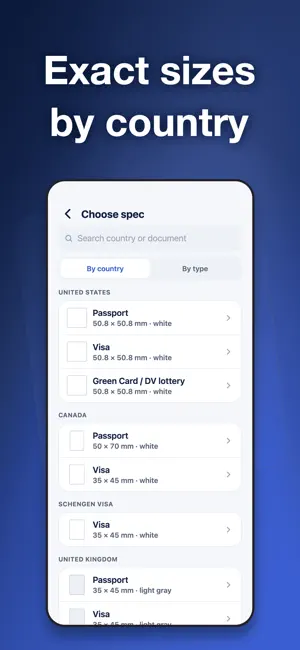
Passport Photo turns a single selfie or photo into a compliant passport, visa, or ID photo — sized to the exact spec of the country and document you choose. Everything happens on your device. Your photos never leave your phone: no upload, no account, no sign-in. HOW IT WORKS 1. Choose your document — 60 built-in specs covering passports, visas, ID cards and job photos for the United States, United Kingdom, Schengen, Canada, China, India, Japan, Korea, Australia, Brazil, Türkiye and more. Not listed? Enter the millimetres your form asks for and everything works the same way. 2. Take a photo with the guided camera, or import one from your library. The camera shows the crown line and chin line for the document you picked, so you know where your head has to sit. 3. The app detects your face, crops to the required head size and position, and replaces the background with the compliant color (white, light gray, or light blue). 4. See every check before you export. CHECK COMPLIANCE FIRST, WITH REAL NUMBERS Most apps make you pay before you can tell whether the photo will work. Here you see the checks first — and each one shows what was actually measured on your photo, not just a tick: • Head height in millimetres, measured from your chin to the top of your head • How far your face sits off centre • One person in frame • Both eyes open • How far your head is tilted or turned • Resolution and DPI • How much of the background came out perfectly plain • The final file size against the limit your form accepts That whole checklist is free, on a watermarked preview, before you pay. If something is off, it tells you what to change. EXACT SIZES FOR EACH DOCUMENT Every spec stores the real dimensions, pixels, DPI, background color, head-height range, and digital file-size limits, so your photo matches what the online form or acceptance office expects — for example US 2x2 in / 600x600 px white, Schengen 35x45 mm, China 33x48 mm, India 35x45 mm. Each spec records the authority and the date it was checked. PRINT AT HOME OR AT THE STORE Export a high-resolution digital file for online applications, or generate a printable sheet (4x6 / A4 / 10x15) that fills the paper with as many photos as fit and adds cut lines and the real size printed on the sheet. Print with AirPrint or take it to any photo counter. Tip: print at 100% / actual size so the dimensions stay correct. YOUR PHOTO STAYS ON YOUR DEVICE Face detection, background replacement, cropping, and compliance checks all run locally with Apple Vision. Your photo is never uploaded, and there is no account and no sign-in. The free version loads ads over the network; your photos are never part of that. FREE TO USE, UPGRADE WHEN YOU NEED IT Take, crop, replace the background, and run the full compliance check for free on a watermarked preview — for as long as you like, with no time limit. One purchase unlocks watermark-free HD export, printable sheets, and an ad-free experience. Choose a weekly or monthly plan, each with a free trial, or unlock everything for good with a one-time lifetime purchase. Restore it anytime on a new device. Note: This app helps you self-check common requirements. Final acceptance is always up to the receiving passport office, embassy, or online system. Terms of Use: https://zeroplay.io/docs/legal/terms-of-service?mode=clean Privacy Policy: https://zeroplay.io/docs/legal/privacy-policy?mode=clean
App privacy
The developer, ZeroPlay Ltd., reported these privacy practices to Apple.
Data Used to Track You
The following data may be used to track you across apps and websites owned by other companies:
- Identifiers: Device ID
- Usage Data: Advertising Data
Data Not Linked to You
The following data, which may be collected but is not linked to your identity, may be used for the following purposes:
- Identifiers: Device ID
- Usage Data: Advertising Data
Used for: Third-Party Advertising
Alternatives to Passport Photo: ID Sizes
Looking for apps like Passport Photo: ID Sizes? Here are 6 similar apps on the App Store.
-
 Passport Photo Maker: ID Kit
-
 Passport Photo App & ID Photo
-
 Phone Studio - AI Photo Editor
-
 Biometric Passport Photo AI
-
 Private ID Photo
-
 IDidem - Passport Photo App
| App | Rating | Price | Last updated | Compare |
|---|---|---|---|---|
| Passport Photo: ID Sizes | – | Free | August 26, 2026 | |
| Passport Photo Maker: ID Kit | – | Free | Jul 24, 2026 | Compare |
| Passport Photo App & ID Photo | – | Free | Aug 29, 2026 | Compare |
| Phone Studio - AI Photo Editor | – | Free | Aug 31, 2026 | Compare |
| Biometric Passport Photo AI | – | Free | Aug 4, 2026 | Compare |
| Private ID Photo | – | Free | Oct 21, 2026 | Compare |
| IDidem - Passport Photo App | – | Free | Sep 16, 2026 | Compare |