

Backyard Designer: Garden AI
Benjamin Smith-d'Agincourt Lifestyle iPhoneiPadiPod touch
Backyard Designer: Garden AI is a free Lifestyle app for iPhone and iPad by Benjamin Smith-d'Agincourt. Requires iOS 17.0. Updated October 14, 2026.
- Price
- Free
- on the App Store
- Size
- 27 MB
- Age 4+
- Updated
- Oct 14
- 2026 · v1.2
Screenshots


About Backyard Designer: Garden AI
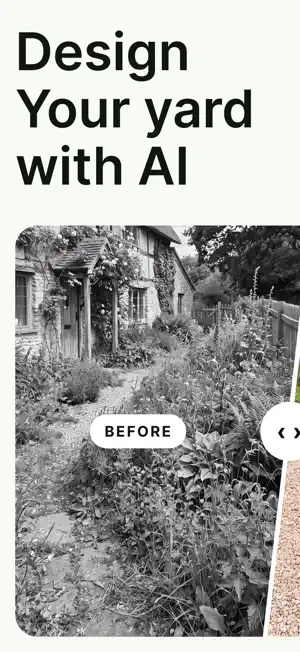
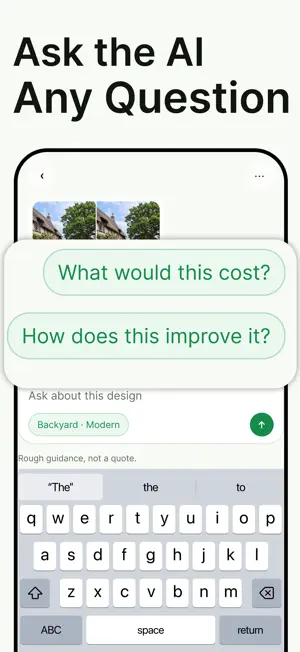
A landscape architect in your pocket. Take one photo of your outdoor space and Backyard Designer shows you what it could become — a finished, photo-real redesign of your actual garden, not a stock picture. Your house, walls, fences and steps stay exactly where they are; the planting, surfaces and layout change. SEE IT BEFORE YOU BUY ANYTHING Slide between before and after. Hold to compare. Look at it at full size, zoom in on the details, and keep every version so a change you don't like never replaces the one you did. YOUR SPACE, YOUR STYLE Backyard, front yard, patio, balcony or courtyard. Choose a look — Modern, Mediterranean, Japanese or Cottage — and add your own notes: keep the apple tree, make room for a table, less lawn. ASK ABOUT ANY DESIGN Every design comes with an assistant that has actually looked at the picture. Ask what a plant is, what something would cost, what you could do yourself, how much upkeep it needs — and get a straight answer in a few lines. CHANGE YOUR MIND Want a grill instead of the planters? Say so in the chat and regenerate. The design keeps your photo's structure and camera angle and applies your change. KEEP THEM ALL Every design saves automatically with its original photo beside it, and follows you to any device when you sign in with Apple. PLANS AND CREDITS Backyard Designer is a subscription. Your plan includes a credit allowance that refreshes every week; half of any unused allowance rolls over. A redesign costs 12 credits and a question costs 1. Subscribers can add top-up credit packs that never expire. Prices are shown in the app before you buy. Subscriptions renew automatically until cancelled; cancel any time in Settings or in your Apple ID subscriptions. Manage, cancel, restore purchases or delete your account and data from inside the app. WHAT PEOPLE USE IT FOR Backyard makeovers before committing to landscaping work. Patio and balcony refreshes. Garden planning for a new season. Trying a zen garden, a pool surround, new planting beds or a lawn-free layout — before spending a cent on the real thing. HOW IT WORKS 1. Photograph your outdoor space. 2. Pick the space and a style, add your notes. 3. Get a photo-real landscape design of your actual garden in about half a minute. 4. Compare, ask questions, request changes, regenerate. Designs are AI-generated illustrations to help you plan, not construction drawings — check with a professional before building. Privacy policy: https://backyard-ai-2.onrender.com/privacy Terms of use: https://backyard-ai-2.onrender.com/terms
What’s new
Version 1.2 · Updated October 14, 2026
A fresh new look. • Home: one big Start button, a Garden kit, and ideas to try. • Make a garden on one simple screen. Use the camera or an example photo. • Get an alert when your garden is ready. You can leave the app while it works. • See your new garden first, then Save, Share or change it. • Ask about your garden in a cleaner chat. • Saved and Account are simpler. • Swipe back from the edge, and lots of small fixes.
App privacy
The developer, Benjamin Smith-d'Agincourt, reported these privacy practices to Apple.
Data Linked to You
The following data, which may be collected and linked to your identity, may be used for the following purposes:
- User Content: Other User Content, Photos or Videos
- Usage Data: Product Interaction
- Purchases: Purchase History
- Identifiers: User ID
- Diagnostics: Other Diagnostic Data
Used for: Analytics, App Functionality
Data Not Linked to You
The following data, which may be collected but is not linked to your identity, may be used for the following purposes:
- Identifiers: User ID
Used for: Analytics
Alternatives to Backyard Designer: Garden AI
Looking for apps like Backyard Designer: Garden AI? Here are 6 similar apps on the App Store. The highest rated is BloomMap - Garden Planner (5.0/5), and all 6 are free to download.
-
 YardWise AI
-
 Verdure: AI Garden Design
-
 Made with God
-
 BloomMap - Garden Planner
5.0
-
 MemberSafe
5.0
-
 Plan Your Room
3.0
| App | Rating | Price | Last updated | Compare |
|---|---|---|---|---|
| Backyard Designer: Garden AI | – | Free | October 14, 2026 | |
| YardWise AI | – | Free | Jul 14, 2026 | Compare |
| Verdure: AI Garden Design | – | Free | Aug 28, 2026 | Compare |
| Made with God | – | Free | Sep 18, 2026 | Compare |
| BloomMap - Garden Planner | 5.0 / 5 (3) | Free | May 13, 2026 | Compare |
| MemberSafe | 5.0 / 5 (1) | Free | Jun 16, 2026 | Compare |
| Plan Your Room | 3.0 / 5 (2) | Free | May 26, 2026 | Compare |