

Tutor Planner: Lesson Schedule
Denys Smirnov Education iPhoneiPadiPod touchMac
Tutor Planner: Lesson Schedule is a free Education app for iPhone and iPad by Denys Smirnov. Requires iOS 17.0. Updated October 10, 2026.
- Price
- Free
- on the App Store
- Size
- 19 MB
- Age 4+
- Updated
- Oct 10
- 2026 · v1.2.4
Screenshots
About Tutor Planner: Lesson Schedule
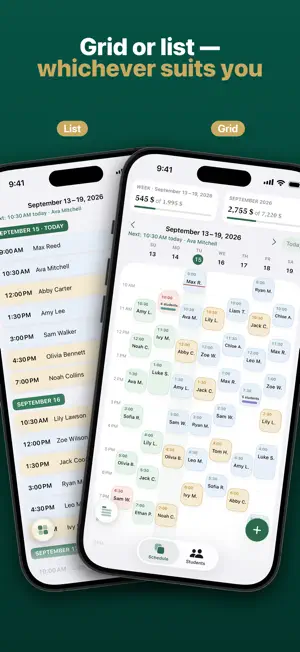
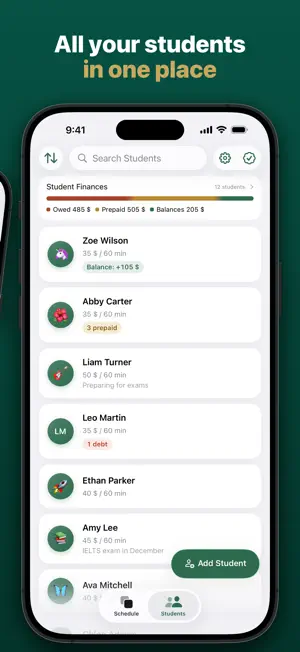
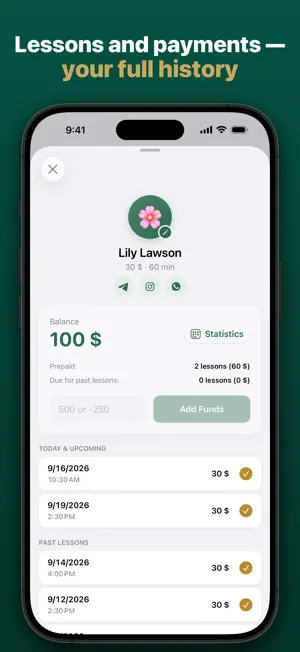
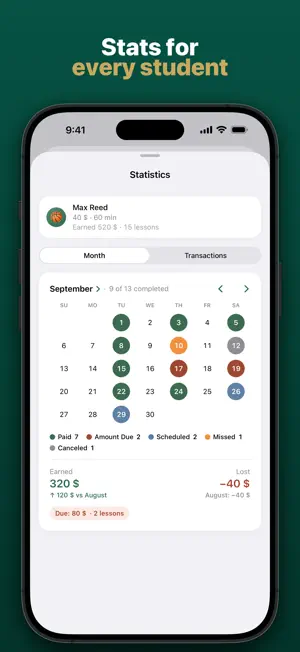
An app for private tutors: your schedule, students, payments and earnings in one place. Schedule View your week as a grid or a list. Set up a recurring lesson once and it will appear in your schedule automatically. Reschedule or cancel a lesson, or end a recurring series, in a few taps. Students and balances Each student has a balance, so you can see what they have paid in advance and what they owe. Payments are reflected in the balance, and you can check the payment history at any time. Student statistics Every student gets their own statistics: monthly totals and how they compare with last month. See how many lessons were taught and missed, what you have earned, what is still due and what was lost to cancellations. The Transactions tab keeps the student’s full payment history. Group lessons Combine students into groups and set an individual price for each student. Track payments and missed lessons separately for each student. Reschedule or cancel lessons for the entire group at once. Earnings See your week and month in one ring: earned, due, upcoming and lost. Tap a part of the ring or a student to see the details. Widgets Keep upcoming lessons on your Home Screen. Choose from three widget sizes, with information that updates automatically. Light or dark Choose a light or dark theme, or follow your device settings. Also included: – Works on iPhone, iPad and Mac. – Reminders before lessons. – Support for different languages and currencies. – Your data is stored on your device and in your private iCloud account. Your schedule, students and balances stay with you when you change your iPhone. The developer cannot access your data. – Back up your data to a file and restore it in a few taps. – Support on Telegram: you get a reply from the developer, not a bot. Try all features free for 14 days, with no payment card required. After that, a subscription is required to keep using all features. Terms of Use: https://telegra.ph/Terms-of-Use---Zhurnal-Repetitora-09-02 Privacy Policy: https://telegra.ph/Privacy-Policy---Zhurnal-Repetitora-09-02
What’s new
Version 1.2.4 · Updated October 10, 2026
The most powerful, most beautiful app ever built. Now even better.
App privacy
The developer, Denys Smirnov, reported these privacy practices to Apple.
Data Not Linked to You
The following data, which may be collected but is not linked to your identity, may be used for the following purposes:
- Usage Data: Product Interaction, Advertising Data
- Purchases: Purchase History
- Identifiers: User ID
Used for: Analytics, App Functionality
Alternatives to Tutor Planner: Lesson Schedule
Looking for apps like Tutor Planner: Lesson Schedule? Here are 6 similar apps on the App Store. The highest rated is TutorPlan (5.0/5), and all 6 are free to download.
-
 Tutoring Tracker
1.0
Tutoring Tracker
1.0
-
 TutorPlan
5.0
TutorPlan
5.0
-
 Menta LMS | Calendar Planner
-
 Teach Space: Tutors & Students
-
 TutorBook: Lesson Planner
-
 Albas: Lesson Manager
| App | Rating | Price | Last updated | Compare |
|---|---|---|---|---|
| Tutor Planner: Lesson Schedule | – | Free | October 10, 2026 | |
| Tutoring Tracker | 1.0 / 5 (2) | Free | Sep 11, 2026 | Compare |
| TutorPlan | 5.0 / 5 (1) | Free | Oct 10, 2026 | Compare |
| Menta LMS | Calendar Planner | – | Free | Oct 1, 2026 | Compare |
| Teach Space: Tutors & Students | – | Free | Oct 2, 2026 | Compare |
| TutorBook: Lesson Planner | – | Free | Oct 13, 2026 | Compare |
| Albas: Lesson Manager | – | Free | Sep 10, 2026 | Compare |