

SMART MOSAIC: Private Blur
Takahiro Aminaga Photo & Video iPhoneiPadiPod touchMac
SMART MOSAIC: Private Blur is a free Photo & Video app for iPhone and iPad by Takahiro Aminaga. Requires iOS 17.0. Updated September 25, 2026.
- Price
- Free
- on the App Store
- Size
- 27 MB
- Age 4+
- Updated
- Sep 25
- 2026 · v1.0.5
Screenshots


About SMART MOSAIC: Private Blur
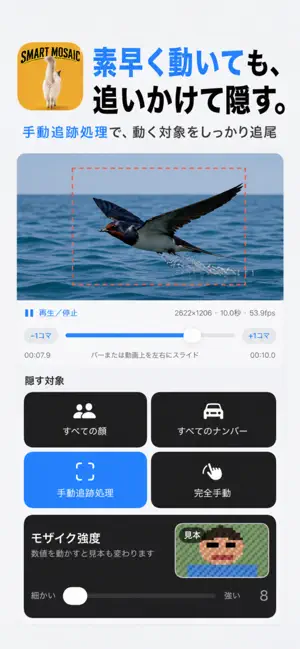
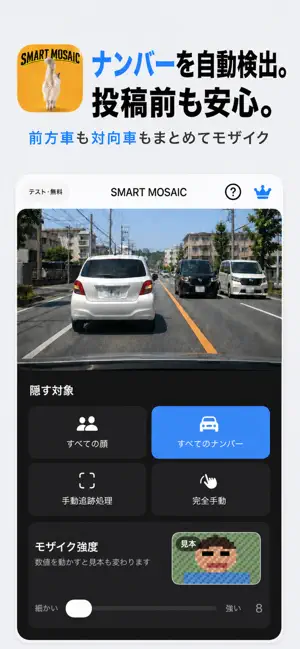
SMART MOSAIC is a privacy-focused editor that applies mosaic blur to faces, license plates, and selected subjects in photos and videos. Your selected media, detection results, and mosaic regions are never uploaded to an external server. Face detection, license plate detection, tracking, mosaic rendering, and export run on your iPhone. Key features • Automatically blur multiple faces in a video • Automatically blur vehicle license plates • Track multiple manually selected subjects • Fully manual, frame-accurate mosaic correction • Exclude a main subject from automatic face mosaic • Blur faces, plates, or custom regions in photos • Preview the processed result and add corrections • Save an in-progress video edit locally • See a live sample of mosaic strength • Portrait and landscape support Free • Export videos up to 1 minute • Face, license plate, and manual tools included • SMART MOSAIC watermark on exports • An ad may appear before export SMART MOSAIC Pro • No video duration limit • No ads • No watermark Automatic detection and tracking can miss or drift because of subject size, low light, motion blur, occlusion, or sudden movement. Review the processed preview before saving and use manual tracking or fully manual correction when needed. Subscriptions renew automatically. You can manage or cancel them in your Apple ID subscription settings. Terms of Use: https://www.apple.com/legal/internet-services/itunes/dev/stdeula/ Privacy Policy: https://smart-mosaic-support.oppi-sakura.chatgpt.site/privacy
What’s new
Version 1.0.5 · Updated September 25, 2026
Improved automatic face mosaics. • Improved tracking of people crossing the scene or entering the frame. • Improved mosaic coverage when multiple faces are close together. • Refined the mosaic area around faces. • Improved video processing efficiency.
App privacy
The developer, Takahiro Aminaga, reported these privacy practices to Apple.
Data Used to Track You
The following data may be used to track you across apps and websites owned by other companies:
- Identifiers: Device ID
Data Linked to You
The following data, which may be collected and linked to your identity, may be used for the following purposes:
- Location: Coarse Location
- Identifiers: Device ID
- Usage Data: Product Interaction, Advertising Data
Used for: Third-Party Advertising, Analytics
Data Not Linked to You
The following data, which may be collected but is not linked to your identity, may be used for the following purposes:
- Diagnostics: Crash Data, Performance Data, Other Diagnostic Data
Used for: Analytics, App Functionality
Alternatives to SMART MOSAIC: Private Blur
Looking for apps like SMART MOSAIC: Private Blur? Here are 6 similar apps on the App Store.
-
 Auto Face Blur: Video Mosaic
-
 MosaicMachine – Video Blur
-
 FineShot - 大人のナチュラル美肌カメラ
-
 Pricon
-
 Blur Video: Face & Plate
-
 KaoKeshi - Face Blur
| App | Rating | Price | Last updated | Compare |
|---|---|---|---|---|
| SMART MOSAIC: Private Blur | – | Free | September 25, 2026 | |
| Auto Face Blur: Video Mosaic | – | Free | Sep 7, 2026 | Compare |
| MosaicMachine – Video Blur | – | Free | Sep 26, 2026 | Compare |
| FineShot - 大人のナチュラル美肌カメラ | – | Free | Oct 2, 2026 | Compare |
| Pricon | – | Free | Jul 7, 2026 | Compare |
| Blur Video: Face & Plate | – | Free | Aug 21, 2026 | Compare |
| KaoKeshi - Face Blur | – | Free | Jul 28, 2026 | Compare |