

Afterward — Daily Planner
nguyen van sang Productivity iPhoneiPadiPod touch
Afterward — Daily Planner is a free Productivity app for iPhone and iPad by nguyen van sang. Requires iOS 15.0. Updated August 19, 2026.
- Price
- Free
- on the App Store
- Size
- 24 MB
- Age 4+
- Updated
- Aug 19
- 2026 · v1.0.0
Screenshots



About Afterward — Daily Planner
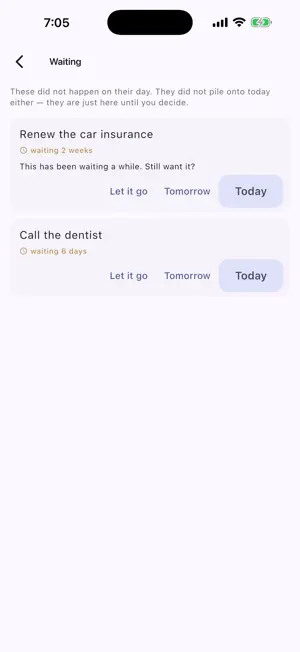
Afterward is a daily planner built around one observation: the hard part usually isn't deciding what to do. It's the gap between deciding and doing. Whether you have ADHD or just a lot on your plate, it is built for the way a day actually goes rather than the way it was planned. IF-THEN TRIGGERS Anchor a task to an event instead of a clock: "when dinner is done, put the laundry on." Move the anchor and everything chained behind it moves too, so a late start doesn't mean rebuilding the rest of the day by hand. A QUEUE, NOT A PILE Whatever you didn't get to does not jump to tomorrow, and it does not quietly disappear. It waits in a queue showing how many days it has been there, and after two weeks Afterward asks what you want to do with it. Today, tomorrow, or let it go — your call. ROUTINES WITH TWO TIERS Every routine has a full version and a minimum version. Do the minimum and the day counts. Six are ready on first launch — Morning, Wind Down, Leaving House, Reset Room, Start Work, Admin Hour — and every step is editable. FOCUS Pick one task, pick a length between 5 and 60 minutes, and the rest of the app gets out of the way. The countdown is optional, because a clock ticking down does not help everyone. REMINDERS THAT TELL YOU THE TRUTH A card on the Today screen shows how many reminders are actually scheduled, when the next one fires, and — when something is wrong — exactly what: notification permission missing, or iOS having reached its cap of 64 pending notifications. No silent failures. NO SCORES, NO STREAKS There is no streak to break, no completion percentage, and no red. Insights shows which days you did something over the past twelve weeks, and stops there. Missing a day costs you nothing. YOUR DATA STAYS ON YOUR PHONE No account, no sign-up, no sync. Afterward contains no networking code at all — not switched off, absent — and an automated test fails the build if anyone adds any. It runs in airplane mode because it has no other mode. PRICE Free for a full year from the day you install it, with everything unlocked. After that, a single payment unlocks it for good. It is not a subscription and nothing renews. LANGUAGES English, Spanish, Portuguese, French, German, Italian, Dutch, Swedish, Norwegian, Danish, Finnish, Polish, Czech, Ukrainian, Russian, Turkish, Japanese, Korean, Chinese (Simplified and Traditional), Arabic, Hebrew, Vietnamese and Indonesian. Afterward is a planner, not a medical device. It does not diagnose, treat or assess any condition, and it is not a substitute for advice from a qualified professional.
App privacy
The developer, nguyen van sang, reported these privacy practices to Apple.
Data Not Collected
The developer does not collect any data from this app.
Alternatives to Afterward — Daily Planner
Looking for apps like Afterward — Daily Planner? Here are 6 similar apps on the App Store. The highest rated is FlexMax: Daily Planner (5.0/5), and all 6 are free to download.
-
 Trellis - Gentle Planner
-
 Savvy Planner
-
 FlexMax: Daily Planner
5.0
FlexMax: Daily Planner
5.0
-
 Passion Planner by Aaesha
-
 Noded: Organize Your Thoughts
-
 Cres: Life Organizer
| App | Rating | Price | Last updated | Compare |
|---|---|---|---|---|
| Afterward — Daily Planner | – | Free | August 19, 2026 | |
| Trellis - Gentle Planner | – | Free | Apr 23, 2026 | Compare |
| Savvy Planner | – | Free | Jan 8, 2026 | Compare |
| FlexMax: Daily Planner | 5.0 / 5 (3) | Free | Oct 24, 2026 | Compare |
| Passion Planner by Aaesha | – | Free | Sep 11, 2026 | Compare |
| Noded: Organize Your Thoughts | – | Free | Sep 14, 2026 | Compare |
| Cres: Life Organizer | – | Free | Oct 28, 2026 | Compare |