

MirrorVO: Screen Mirroring
VEYSEL OZTURK Utilities iPhoneiPadiPod touch
MirrorVO: Screen Mirroring is a free Utilities app for iPhone and iPad by VEYSEL OZTURK. Rated 5.0/5 from 1 ratings. Requires iOS 16.0.
- Rating
- 5.0
- 1 ratings
- Price
- Free
- on the App Store
- Size
- 7 MB
- Age 4+
- Updated
- Oct 21
- 2026 · v1.0.7
Screenshots

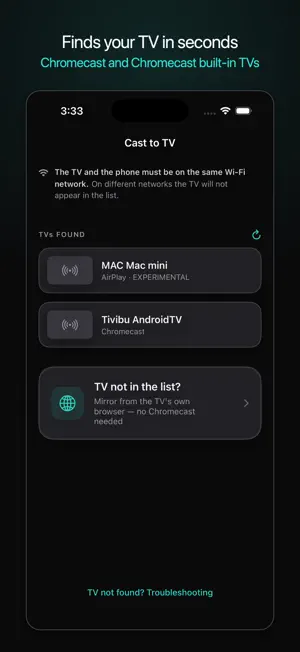
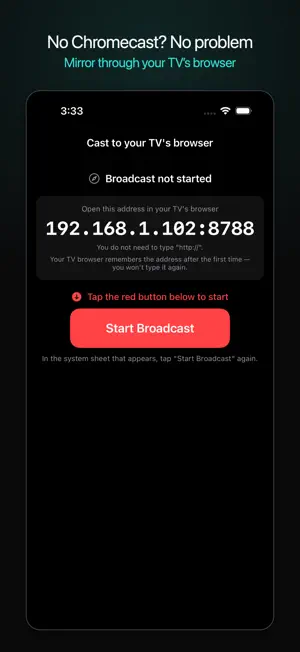

About MirrorVO: Screen Mirroring
Show your iPhone screen on a TV or on another phone. WHAT IT DOES • Mirrors to a TV with Chromecast built in • On TVs WITHOUT Chromecast, mirrors through the TV's own web browser • Mirrors directly between two iPhones — not even a Wi-Fi network is required WHAT YOU NEED • For the TV route: a TV with Chromecast, or a TV with a web browser. The phone and the TV must be on the same Wi-Fi network. • For phone to phone: two iPhones, both running MirrorVO. The same network is not needed; Wi-Fi simply has to be on for both. WHAT DOES NOT WORK — said up front • Protected content such as Netflix or Disney+ appears black. That is the publisher's restriction, not this app's; no app can get around it. • The "Screen Mirroring" option in your TV's menu is Miracast. The iPhone does not support Miracast and no app can use it. • Apple does not let apps start AirPlay mirroring directly. On AirPlay TVs, use Screen Mirroring from Control Center. QUALITY The quality is your choice: four levels up to 1080p60, nothing locked. If the network cannot carry it, quality steps down on its own and comes back up when it can — you do not need to do anything. PRICING • Everything is free and unlocked for 24 hours from your first broadcast: highest quality, lowest latency, no quality lock. • After that, mirroring requires a subscription. Monthly and yearly plans are available. • There are no ads anywhere in the app — not even in free use. PRIVACY The picture goes straight from your phone to the target; it never passes through our servers. The app collects no data and uses no ad network. Terms of Use: https://ozvey07-byte.github.io/mirrorvo/en/terms.html Privacy Policy: https://ozvey07-byte.github.io/mirrorvo/en/privacy.html
What’s new
Version 1.0.7 · Updated October 21, 2026
• Up to 3 phones can watch your screen at once with the same code • Smoother start in the TV browser; several screens can watch at once • New languages: Korean, Traditional Chinese, Indonesian, Vietnamese, Thai • Recommend MirrorVO to a friend from Settings • Stability and security improvements
App privacy
The developer, VEYSEL OZTURK, reported these privacy practices to Apple.
Data Not Collected
The developer does not collect any data from this app.
Alternatives to MirrorVO: Screen Mirroring
Looking for apps like MirrorVO: Screen Mirroring? Here are 6 similar apps on the App Store. The highest rated is Screen Mirroring: View TV (5.0/5), and all 6 are free to download.
-
 Photo Cleaner - SwipeTok
-
 Marine Metrics
-
 TV Cast 4K: Screen Mirroring
-
 Screen Mirroring: View TV
5.0
Screen Mirroring: View TV
5.0
-
 Replico - Cast to TV Remote
-
 Screen Mirroring・Miracast TV
5.0
Screen Mirroring・Miracast TV
5.0
| App | Rating | Price | Last updated | Compare |
|---|---|---|---|---|
| MirrorVO: Screen Mirroring | 5.0 / 5 (1 rating) | Free | October 21, 2026 | |
| Photo Cleaner - SwipeTok | – | Free | Sep 26, 2026 | Compare |
| Marine Metrics | – | Free | Sep 27, 2026 | Compare |
| TV Cast 4K: Screen Mirroring | – | Free | Oct 21, 2026 | Compare |
| Screen Mirroring: View TV | 5.0 / 5 (2) | Free | Oct 6, 2026 | Compare |
| Replico - Cast to TV Remote | – | Free | Sep 18, 2026 | Compare |
| Screen Mirroring・Miracast TV | 5.0 / 5 (3) | Free | Aug 14, 2026 | Compare |