

Phase: Notes by Time of Day
Kenta YAMADA Productivity iPhoneiPadiPod touch
Phase: Notes by Time of Day is a free Productivity app for iPhone and iPad by Kenta YAMADA. Requires iOS 17.0. Updated August 20, 2026.
- Price
- Free
- on the App Store
- Size
- 1 MB
- Age 4+
- Updated
- Aug 20
- 2026 · v1.0.1
Screenshots

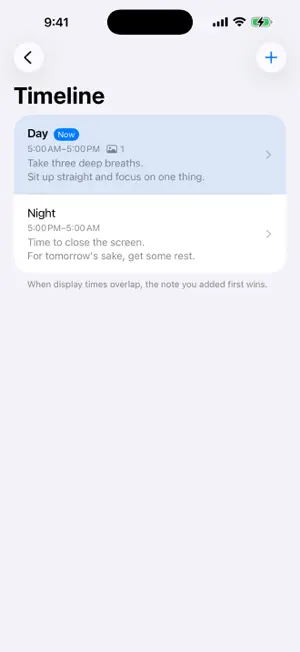


About Phase: Notes by Time of Day
Phase takes the finding out of notes. Open it, and the only note on screen is the one for the stretch of day you are in. No list, no folders, nothing to scroll past to reach what you meant to read, nothing to dismiss when you are done. What is in front of you is what is relevant to you right now. Setting it up takes a few minutes, once. Divide your day into the stretches you actually live in — Morning, Afternoon, Evening, Night, or whatever fits — and write a short note for each one, with a photo if you like. From then on, Phase swaps the contents as the day moves. A notification arrives when a stretch begins, so forgetting to open the app costs you nothing. What you told yourself to do in the morning reaches you in the morning. WAYS PEOPLE USE IT • Morning — what to take with you, the one thing that matters today • Afternoon — the work you want to focus on, a line to reset your posture • Evening — what to do when you get home, tomorrow's prep • Night — what you want to read back before sleep WHAT YOU CAN DO • Add as many notes as your day needs, each shown between the start and end time you choose — including ranges that run past midnight, like 22:00 to 05:00. Phase is free for up to two notes; a one-time purchase lifts the limit. • Attach photos from your library alongside your text. • See the whole day at a glance in Timeline, with the note showing right now marked. • Switch notifications on or off note by note. • Choose whether a notification shows only the note's label or also the beginning of its text — useful if you would rather keep what you write off the lock screen. NO ACCOUNT NEEDED There is nothing to sign up for and nothing to sign in to. Phase has no servers of its own, so your notes and photos are written to this device, and Phase never sends them anywhere. The only thing that ever touches the network is the App Store handling the one purchase. It works in airplane mode, in a tunnel, on a mountain. No analytics. No ads. No tracking. DESIGNED FOR iOS Dynamic Type support, VoiceOver througs shown the way your region writesthem. Available in English and Japanese. Phase is free for up to two notes. A single one-time purchase — not a subscription — lifts the limit for good.
What’s new
Version 1.0.1 · Updated August 20, 2026
This update contains three fixes: • Fixed a blank screen when tapping a note's text to edit it. • Tapping an image in a note now opens a full-screen preview. • Fixed a visual glitch behind the delete confirmation when swiping a note in the Timeline.
App privacy
The developer, Kenta YAMADA, reported these privacy practices to Apple.
Data Not Collected
The developer does not collect any data from this app.
Alternatives to Phase: Notes by Time of Day
Looking for apps like Phase: Notes by Time of Day? Here are 6 similar apps on the App Store. The highest rated is ClientNote: Salon Client Book (5.0/5), and all 6 are free to download.
-
 tiny - すばやく検索
-
 Doc Align - Perspective Fixer
-
 Timeline - Schedule by Hour
4.3
Timeline - Schedule by Hour
4.3
-
 Instant Note for Notion
4.8
Instant Note for Notion
4.8
-
 ClientNote: Salon Client Book
5.0
ClientNote: Salon Client Book
5.0
-
 Superwhisper - AI Dictation
4.4
Superwhisper - AI Dictation
4.4
| App | Rating | Price | Last updated | Compare |
|---|---|---|---|---|
| Phase: Notes by Time of Day | – | Free | August 20, 2026 | |
| tiny - すばやく検索 | – | Free | Oct 21, 2026 | Compare |
| Doc Align - Perspective Fixer | – | Free | Oct 15, 2026 | Compare |
| Timeline - Schedule by Hour | 4.3 / 5 (3) | Free | Oct 22, 2026 | Compare |
| Instant Note for Notion | 4.8 / 5 (90) | Free | Oct 20, 2026 | Compare |
| ClientNote: Salon Client Book | 5.0 / 5 (3) | Free | Oct 2, 2026 | Compare |
| Superwhisper - AI Dictation | 4.4 / 5 (846) | Free | Oct 23, 2026 | Compare |